Revoke Token Approvals Wallet Checklist (Revoke.cash)
Revoke Token Approvals Wallet Security Checklist With Revoke.cash
Last Sunday I sat down with a coffee and opened a list of every permission my main wallet had ever handed out. It was forty entries long. I had approved contracts I could not name, on chains I had forgotten I used.
This post is the revoke token approvals wallet security checklist with revoke.cash that I built from that mess — a quarterly routine you can copy, not a panic. I’ll show you every step I ran, exactly what I found, and the three things that tripped me up along the way.
If you want the why — how a stale permission actually lets a contract drain your funds — I already wrote that. Here we stay operational: connect, read, decide, revoke, verify.
Why I finally did a wallet approval audit
I’ve been clicking “Approve” in DeFi apps for two years without ever looking back. Every swap, every mint, every bridge asked for a permission, and I granted it.
The mechanics of how those permissions turn into a drain are covered in my companion piece on how token approvals drain wallets and how to revoke them. That one is the concept. Read it if you want the danger explained.
The short version: an approval is a standing permission. When you approve an ERC-20 token, you tell a contract “you may move up to X of this token from my wallet.” Many apps request the maximum — an unlimited allowance — because it saves you a second transaction later.
That permission does not expire. If that contract is ever compromised, or was malicious from the start, the allowance is a door left open. This is also the mechanism behind most crypto wallet drainer scams — they don’t guess your seed phrase, they get you to sign a permission.
So the audit isn’t paranoia. It’s cleaning. And revoke.cash is the broom I use to revoke token approvals I’ve outgrown.
Step zero: type the URL by hand
Here’s the step every generic tutorial skips. Before you touch any approval checker, you have to make sure you’re on the real one.
Fake revoke.cash clones exist. Scammers buy ads and post links in Discord DMs that lead to a pixel-perfect copy running a wallet drainer instead of a revoke tool. You connect, you sign what looks like a revoke, and you’ve signed away your funds.
There was also a 2023 incident where users got tricked into signing fake token approvals disguised as gas refunds — a scam ugly enough that revoke.cash shipped a fix and a warning (Cointelegraph covered it). The tool that helps you revoke token approvals is itself impersonated. Sit with that for a second.
So my step zero is a rule, not a click:
- Type
revoke.cashinto the address bar by hand, or use a bookmark you saved yourself. - Never open it from a DM, an ad, a search result, or a “support” link.
- Double-check the domain is exactly
revoke.cashbefore connecting anything.
If you feel silly typing a URL manually, good. That small friction is the point. It’s the same reflex I lean on against signature phishing scams, where the fake page looks perfect and only the URL gives it away.
How to revoke token approvals: the read-only start
Once I confirmed the real site, I did not connect my wallet. Not yet.
Here’s the part that calmed me down. You can paste your public wallet address into revoke.cash and get a full, read-only view of your approvals — no signature, no connection, nothing that can move funds. Pasting an address only reads public blockchain data.
That distinction mattered to me. For months I avoided approval checkers because “connect wallet” felt like handing over my keys. It doesn’t. Connecting only lets the site request transactions you still have to approve. And pasting an address doesn’t even do that.
So the safe way to start a revoke token approvals routine is:
- Type
revoke.cashby hand. - Paste your public address for a read-only look.
- Pick the network you want to inspect.
The official docs spell this out too — the revoke.cash learn guide walks through what an approval is, and both MetaMask’s guide to revoking token approvals and Ledger Academy on Ethereum token approvals confirm the same read-only-first flow. I like reading a primary source before I trust a tool with anything.
revoke.cash covers 100+ networks, so you switch chains from a dropdown and the approval list reloads for that chain. My assets were spread across Ethereum, a couple of L2s, and one sidechain I’d used exactly once.
Only when I was ready to actually remove an approval did I connect the wallet — because revoking is an on-chain transaction, and that needs a signature.
Reading the list: sort newest first
The approval list is a table. Each row is a token, the contract you gave permission to (the “spender”), and how much it’s allowed to move.
When I first saw forty rows, I panicked. I didn’t know which were fine and which were traps. So I used the one trick that turned the mess into something I could reason about: sort by newest first.
Recent approvals are the ones worth the most attention. If a permission appeared that you don’t remember granting — especially right after visiting a new site — that’s your first candidate to revoke. Sorting newest-to-oldest surfaces those instantly.
Then I read each row against one question: do I still use this?
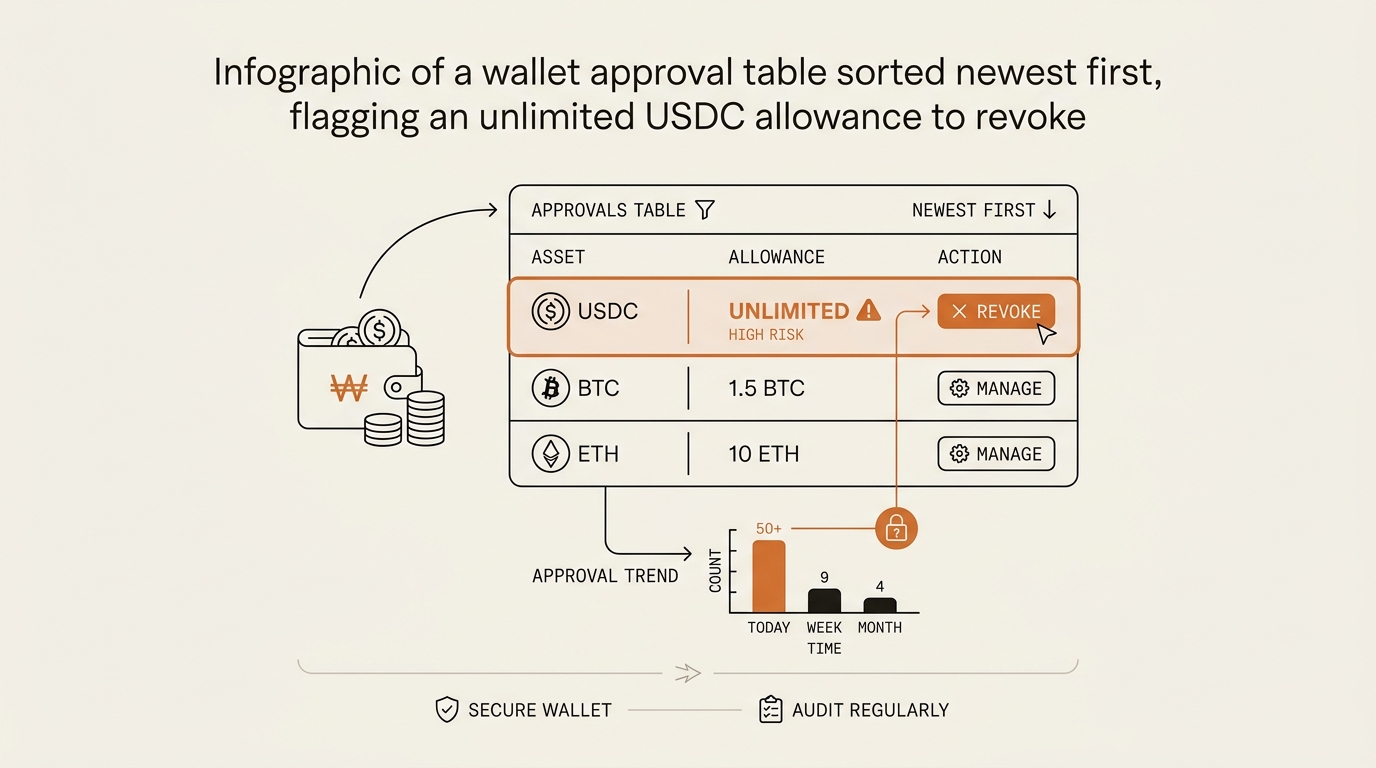
Here’s what I actually found in my own wallet:
- An unlimited USDC approval to a bridge I used one time in 2024 and never again. Standing, wide-open, forgotten.
- Two LP token approvals from a yield farm that no longer exists. The app is dead; the permission wasn’t.
- A setApprovalForAll on an NFT collection from a mint I barely remember. That’s the collection-wide NFT version of an unlimited allowance — one permission over every NFT in that set.
- A dozen approvals to apps I still use weekly, which I chose to keep.
None of these had drained me. But the bridge approval and the dead-farm LP approvals were exactly the kind of stale doors an attacker looks for. I decided to close them.
The keep-or-revoke decision, row by row
I didn’t revoke everything. That’s the reflex the panic pushes you toward, and it’s the wrong one. Revoking an approval you use weekly just means you re-approve it (and pay gas again) next time.
So I ran each row through a simple keep-or-revoke rule. This is the heart of the checklist:
| Situation | My call |
|---|---|
| App is dead / I’ll never use it again | Revoke |
| Unlimited allowance to something I use rarely | Revoke (re-approve a small amount when needed) |
| Approval I don’t recognize at all | Revoke immediately |
| App I use weekly and trust | Keep |
setApprovalForAll on an NFT set I’m done with |
Revoke |
The logic is calm, not fearful. Keep the permissions your routine actually depends on. Cut the standing ones you’ve outgrown. When you revoke token approvals here, re-approving later costs a little gas — but a forgotten door costs everything behind it, so when in doubt, revoke.
One quiet detail I like: revoking does not touch your tokens. It cancels a contract’s future permission to move them. Your balances, your NFTs, your wallet connection — all untouched. You’re closing a door, not moving out of the house.
Confirming the revoke (and what it costs)
Revoking is an on-chain transaction, so it costs gas. This is where my plan met reality.
On Ethereum mainnet, each revoke ran a few dollars in gas — roughly the $2 to $10+ range depending on how busy the network was. On my L2s and the sidechain, the same action cost cents. The tool itself is free; you only ever pay network gas.
So I batched by chain. I cleared the cheap L2 and sidechain approvals first, in one sitting. For the mainnet ones, I waited until a quieter, low-fee window before confirming.
There’s also a newer option worth knowing. Since revoke.cash’s “Summer of Security” push, there’s one free sponsored batch revoke per week via Candide gas sponsorship. It’s genuinely free — someone else covers the gas. The catch: it needs an EIP-4337 smart-account wallet (like Ambire or Coinbase Smart Wallet). My main wallet is a plain EOA, so I couldn’t use it this round, but it’s on my list for the burner setup I run for safe minting.
For each revoke, I confirmed the transaction, waited for it to land, then refreshed the list to verify. An ERC-20 revoke sets the allowance to zero. An NFT revoke sets setApprovalForAll back to false. When the row showed that, the door was shut. I also like previewing what a revoke will do before I sign it, which is where a wallet with transaction simulation earns its keep.
What broke: three things that tripped me up
The routine sounds clean written down. In practice, three things confused or slowed me.
One: I thought “revoke” and “set to zero” were different. I saw both phrases and assumed one was safer or more thorough. They’re the same underlying function. Revoking an ERC-20 approval is setting the allowance to zero. “Revoke” is just the friendly label for that call. I wasted ten minutes looking for a “harder” revoke that didn’t exist.
Two: mainnet gas ambushed me. My first instinct was to clear all forty approvals in one furious session. I revoked two on Ethereum, saw the combined gas, and stopped. That’s when I switched to the batch-by-chain plan — cheap chains now, mainnet later at low fees. If I’d kept going in a busy window, the cleanup would have cost more than it needed to.
Three: I nearly connected before I understood read-only. Old instinct told me connecting a wallet to any site was dangerous, so I froze at the first step. It took me a beat to trust that pasting an address is read-only and that connecting only lets the site request signatures I still control. Once that clicked, the fear drained out of the whole process.
None of these were disasters. But they’re the exact friction points a flat “Step 1, Step 2” tutorial hides — and the reason I write these routines down after I run them, not before.
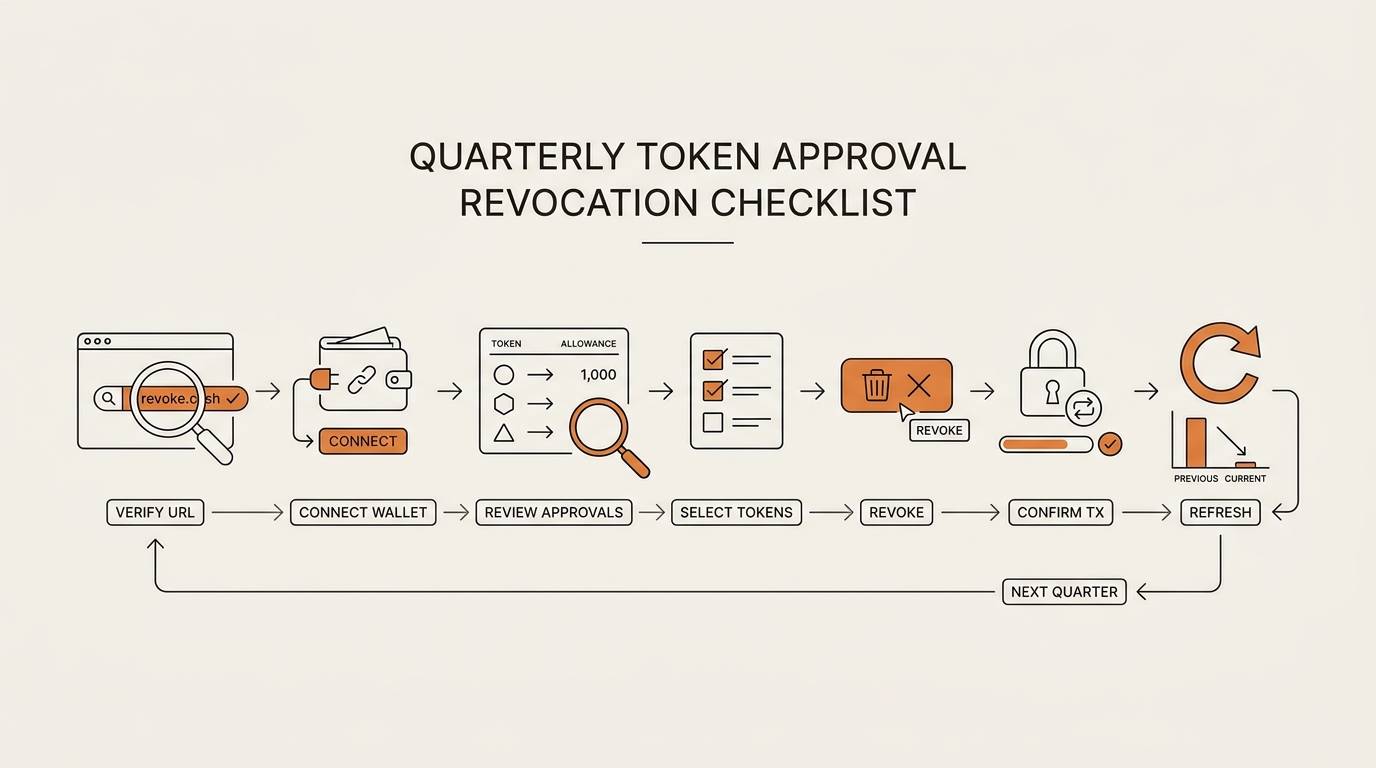
The quarterly wallet hygiene checklist (copy this)
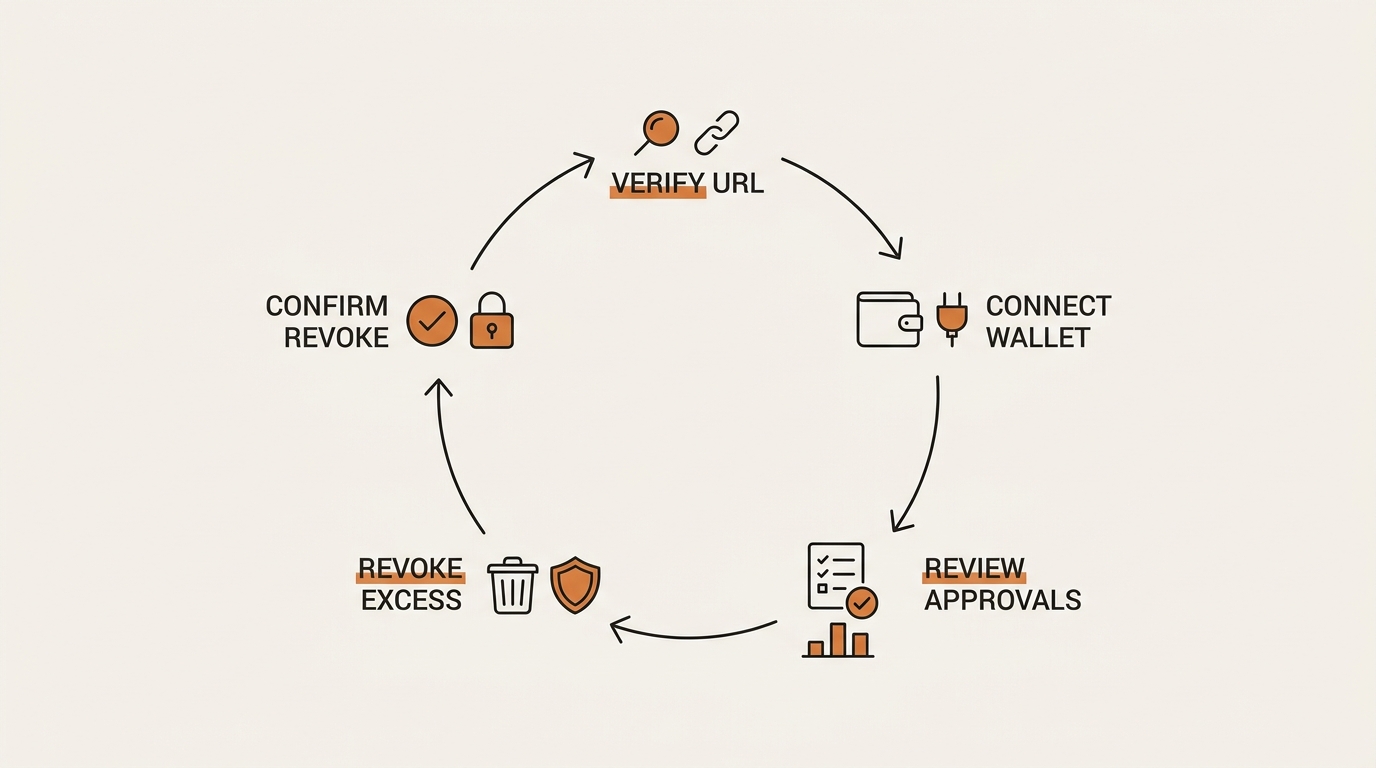
Here’s the repeatable version I now run. Not after a panic — on a calendar. Quarterly, plus once more after any risky mint or a session on a brand-new app.
- Type
revoke.cashby hand. Never from a DM, ad, or search link. Verify the domain. - Paste your address for a read-only view first. No signature needed to look.
- Pick the chain. Repeat for each network you actually use.
- Sort newest first. Recent, unrecognized approvals are your top priority.
- Decide keep or revoke per row. Dead app → revoke. Unrecognized → revoke now. Weekly-use → keep.
- Revoke when gas is low. Batch by chain; do L2s first, mainnet in a quiet window. Use the free weekly sponsored batch if you have a smart-account wallet.
- Refresh and verify. Allowance shows zero (or
setApprovalForAllshows false). Door shut.
That’s it. Seven steps, run four times a year. It won’t make headlines, but boring routines are the ones that survive contact with real life.
One more layer for the curious: revoke.cash also has an Exploit Checker page that flags approvals tied to known exploits. I run it during my quarterly pass as a fast triage before the row-by-row read.
FAQ: revoke token approvals with revoke.cash
Is revoke.cash safe? Yes, with one rule. It’s open-source and non-custodial — it can only show and remove approvals, never move your funds. When you paste an address, it’s read-only. The real risk is fake clone sites, so only ever reach it by typing revoke.cash yourself. Never from a link.
Does revoking token approvals cost gas? Yes. Each revoke is an on-chain transaction. On low-fee L2s and sidechains it’s a few cents; on Ethereum mainnet it’s roughly $2 to $10+ depending on congestion. The site is free — you only pay network gas.
Is revoke.cash free? Yes, the tool is free. You just cover gas. Since the “Summer of Security” update there’s also one free sponsored batch revoke per week via Candide gas sponsorship, which requires an EIP-4337 smart-account wallet like Ambire or Coinbase Smart Wallet.
How often should I revoke approvals? There’s no hard rule. A quarterly audit is a sane cadence for a non-developer, plus an extra pass after any risky mint or a session on a new app. Revoke immediately if you ever spot an approval you don’t recognize.
Does revoking approvals remove my tokens? No. It only cancels a contract’s permission to move your tokens in the future. Your balances, NFTs, and wallet connection stay exactly where they are. You’re closing a door, not moving your assets.
What’s the difference between “revoke” and “set to zero”? They’re the same function. Revoking an ERC-20 approval sets the allowance to zero. Revoking an NFT setApprovalForAll sets it to false. “Revoke” is just the friendly name for that on-chain call.
The reframe I keep
I used to think wallet safety was a wall you build once — a hardware wallet, a written seed phrase, done. This audit changed the picture.
Approvals aren’t a wall. They’re a pile of keys you’ve handed out over time, and most of them you forgot about. Safety isn’t building the wall higher. It’s collecting the spare keys back on a schedule, calmly, before someone else finds one.
So the question isn’t “is my wallet secure.” It’s “when did I last take the spare keys back.” Put the quarterly pass on your calendar and that answer stops being scary.
Next in this Crypto Safety series, I want to open a block explorer and trace a real approve-and-drain transaction end to end — the exact permission, the exact drain, step by step — so you can see what a forgotten approval actually looks like when it fires.
seonjae — Korean office worker documenting his transition into AI systems, agents, and vibe coding — without a CS background. Shipping in public.