
How Token Approvals Drain Wallets and How to Revoke Them
How Token Approvals Drain Wallets and How to Revoke Them
For months I clicked “disconnect” in MetaMask and felt safe. I was wrong. Disconnecting a wallet from a dApp does nothing to the permission you already signed on-chain. This post explains how token approvals drain wallets and how to revoke them, using the exact mistake I made and a simple framework for deciding which approvals to kill first.
Here’s the promise: by the end you’ll know why a live allowance from six months ago is still active, how a drainer abuses it, and how to check and revoke for free.
I’ll walk through the concept, the threat model, a risk matrix, and the actual check-and-revoke steps. Then the part nobody writes about — what it cost me in gas when I finally cleaned up.
The Day I Realized “Disconnect” Never Revoked Anything
I’d been treating “disconnect” like logging out of a website. Click it, the session ends, you’re safe. That mental model is completely wrong on-chain.
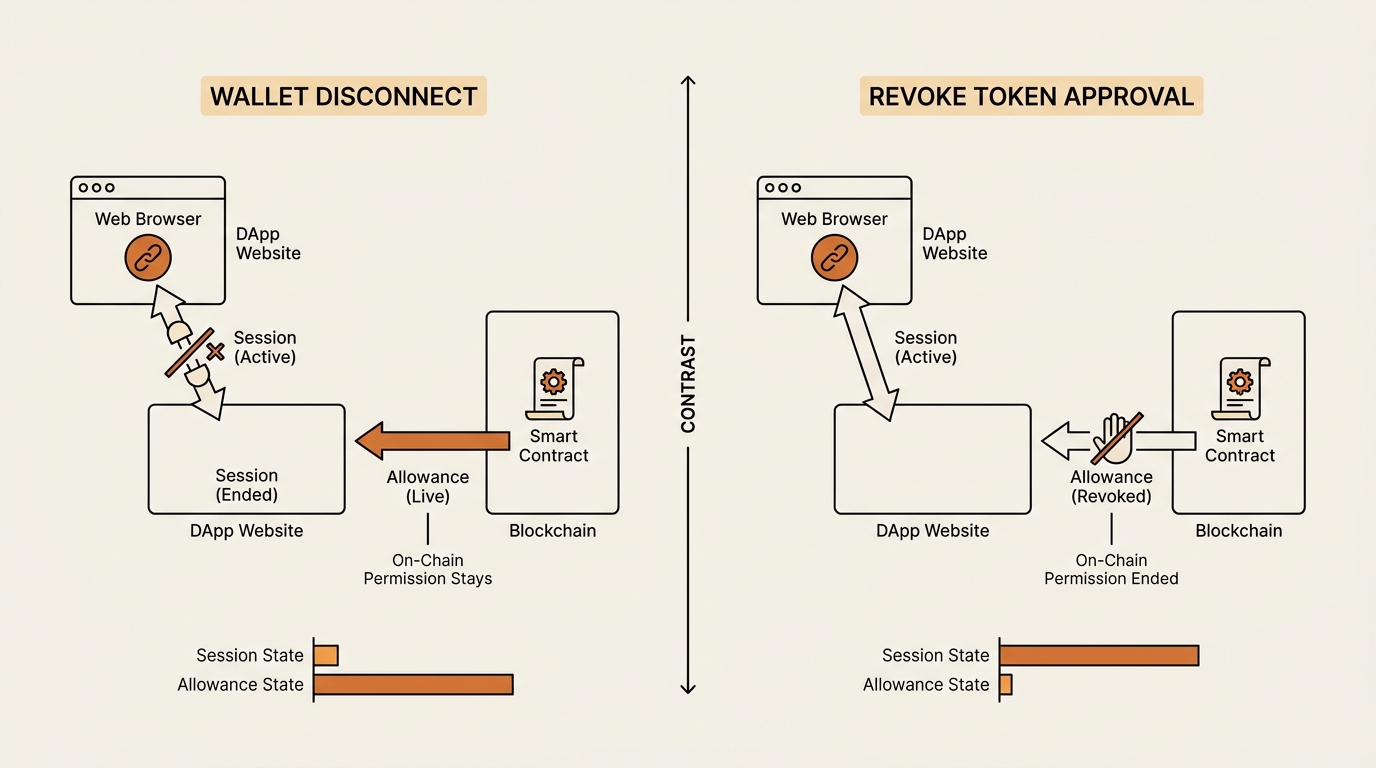
When you connect a wallet to a decentralized exchange, two different things happen. One is a connection — the site can now read your address and ask you to sign things. The other is a token approval — a separate, signed transaction where you grant a smart contract permission to move a specific token out of your wallet.
Disconnecting only kills the first thing. The approval stays live on the blockchain. It doesn’t care whether the browser tab is open or closed.
I found this out the boring way. One evening I opened Etherscan’s approvals page for my own address, mostly out of curiosity. There sat an unlimited USDT allowance I’d granted to a DEX I hadn’t touched in half a year. I had “disconnected” that site dozens of times. The permission never moved.
That’s the whole misconception in one screen. An approval is not a session. It’s a standing permission, and it survives every disconnect you’ll ever click.
What a Token Approval Actually Is
Let me define it plainly, because the word “approval” hides what’s happening.
A token approval is an on-chain permission you sign that lets a specific smart contract (the “spender”) move up to a set amount of one of your tokens, at any time, until you revoke it. On Ethereum this comes from the ERC-20 standard’s
approve()function, which records an “allowance” the spender can spend from your balance.
Why does this permission exist at all? Because ERC-20 tokens can’t be pushed into a contract the way ETH can. To swap USDC on a DEX, you first approve the DEX’s contract to pull USDC from your wallet. Only then can the swap contract move the tokens. The ERC-20 token standard on Ethereum.org{:rel=”noopener”} spells out exactly this approve / allowance mechanic.
Two details do most of the damage.
First, the amount is usually unlimited. To spare you a second approval later, most dApps request “infinite” approval by default. You sign once, and the spender can move all of that token, now and forever, in any amount. MetaMask’s own token-approval guide{:rel=”noopener”} walks through this and lets you set a custom cap instead.
Second, approvals never expire on their own. There’s no 30-day timeout, no auto-cancel. The allowance sits on-chain until you send a transaction to set it back to zero. A permission you forgot about in January is exactly as active in July.
If you want to see who holds these permissions, it’s the same skill as learning to read a spender address on a block explorer — you’re just reading it about your own wallet.
How Token Approvals Drain Wallets
Here’s the threat model, because “your funds could be stolen” is too vague to act on.
An approval-based drainer doesn’t hack your wallet. It doesn’t steal your seed phrase. It uses a permission you granted — either to a contract that was malicious from the start, or by tricking you into signing a new approval to an address the attacker controls.
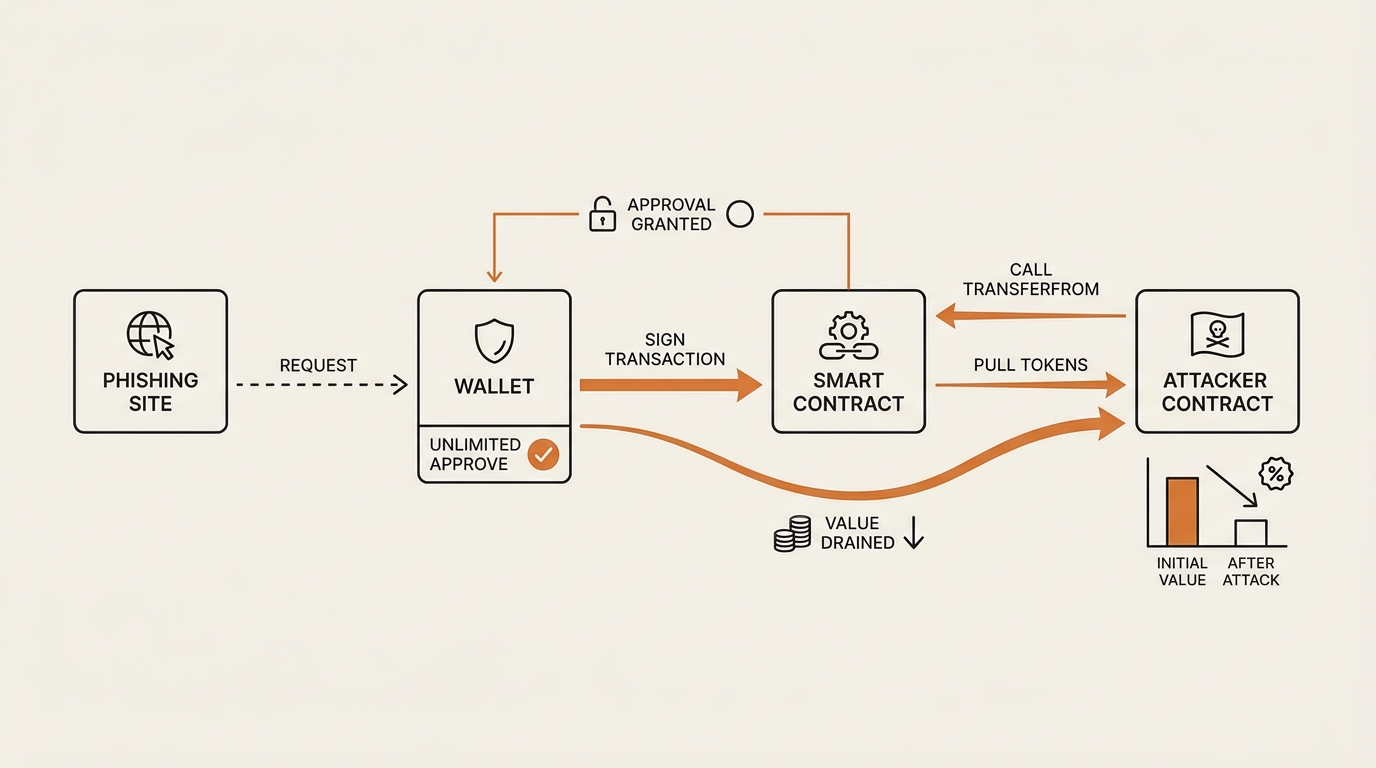
The classic path looks like this. You land on a phishing site — a fake airdrop, a cloned DEX, a “claim your reward” page. The site pops a wallet prompt that looks routine. But the transaction you’re signing isn’t a swap. It’s an approve() granting an unlimited allowance on your USDT (or your NFTs) to the attacker’s contract.
You sign. Nothing visible happens. The site might even show an error. Later — minutes or weeks — the attacker’s contract calls transferFrom and pulls the approved token straight out of your wallet. No further click needed, because the permission is already yours-to-theirs.
The high-value targets are predictable: unlimited allowances on stablecoins and blue-chip tokens, and setApprovalForAll on valuable NFT collections. Those are the standing permissions worth abusing. This is the same family of trickery behind many rug-pull red flags — a malicious frontend asking for permissions it has no honest reason to need.
The uncomfortable part: most people who get drained did sign the approval themselves. The exploit is social, not cryptographic.
Which Approvals to Revoke First: A Risk Matrix
Every generic guide says “revoke your approvals.” That advice quietly fails, because revoking costs gas and re-approving is annoying, so people do nothing. The useful question isn’t whether to revoke — it’s which ones first.
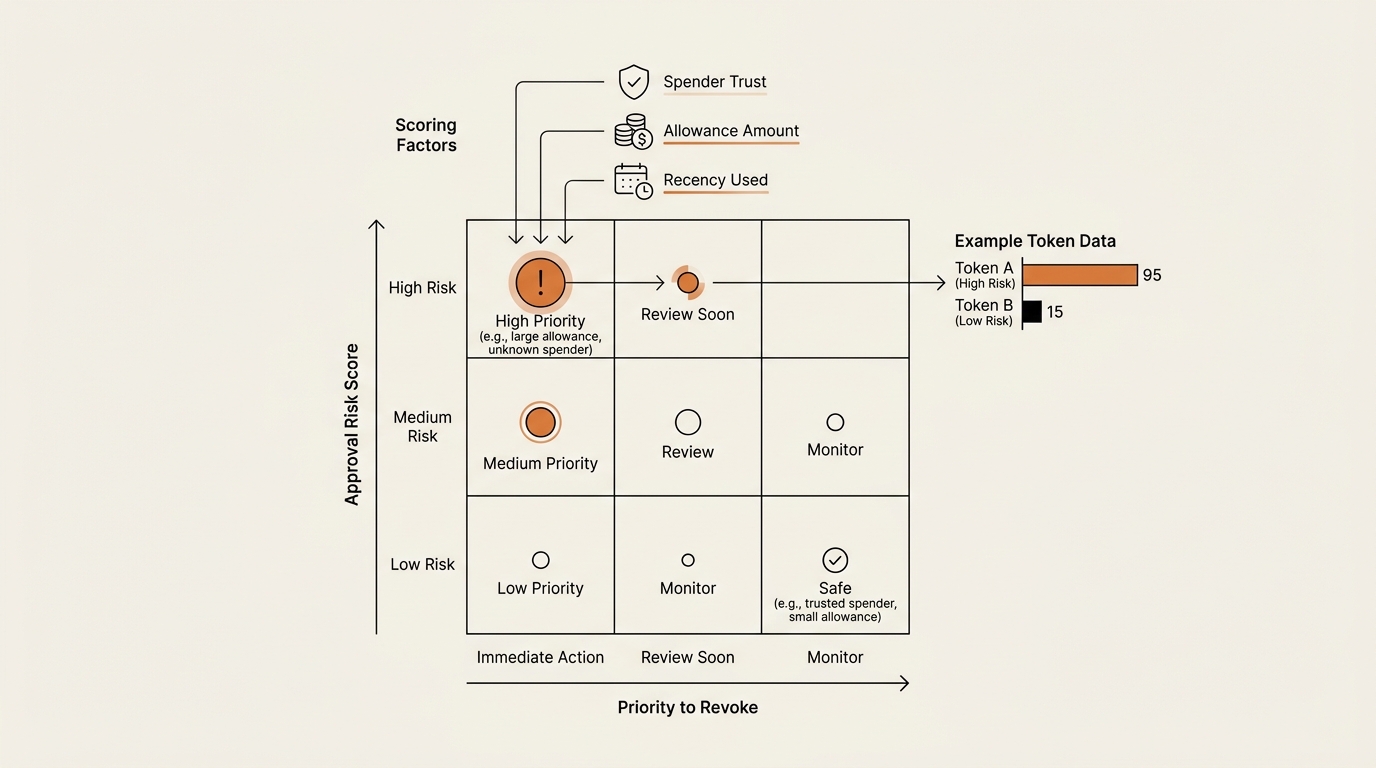
I judge each approval on three axes: how much I trust the spender, how large the allowance is, and how recently I’ve used it. High trust plus small amount plus weekly use is fine. Low trust plus unlimited amount plus dormant is an emergency.
Here’s the matrix I actually use when I open my approvals list.
| Approval type | Spender trust | Amount | Last used | Action |
|---|---|---|---|---|
| Unlimited stablecoin (USDT/USDC) to a DEX you’ve stopped using | Medium | Unlimited | Months ago | Revoke first |
| Approval to an unknown / unverified contract | Low | Any | Ever | Revoke first |
setApprovalForAll on an NFT collection you’re not listing |
Medium | All NFTs | Any | Revoke |
| Unlimited approval to a DEX you use weekly | High | Unlimited | This week | Cap it, or leave |
| Small finite approval to a DEX you trust | High | Finite | Recent | Leave |
The logic behind the top row: a dormant unlimited stablecoin allowance is pure downside. You get zero convenience from it and carry the full risk of that spender contract being exploited later. Kill it first.
The setApprovalForAll row matters for anyone holding NFTs. That single function grants a marketplace permission to transfer every token in a collection, not one. It’s necessary to list on a marketplace — and dangerous when granted to a fake one. Revoke it once you’re done listing. Ledger Academy’s Ethereum token approvals explainer{:rel=”noopener”} covers both the ERC-20 and NFT cases in more depth.
The bottom two rows are the ones I leave alone. A finite approval to a DEX I use every week is low risk and high convenience. Revoking it would just cost gas and force a re-approve next Tuesday. Security that makes normal use painful is security you’ll abandon.
Most of your approvals get signed on exchanges, so it helps to understand the moment you’re granting them — the mechanics of signing approvals on a DEX are where this whole permission trail starts.
How to Check and Revoke Token Approvals for Free
You don’t need to trust a paid tool for this. Two free options cover it.
Option 1 — the block explorer. Go to Etherscan, paste your wallet address, and open the “Token Approvals” page (under the More menu, or search etherscan.io/tokenapprovals). It lists every ERC-20 and NFT approval on your address, the spender contract, and the allowance amount. You can revoke directly from there by connecting your wallet and confirming a transaction.
Option 2 — revoke.cash. It’s a free web app that reads the same on-chain data and presents it more clearly, across many networks at once. Connect your wallet, and it shows each approval with a one-click revoke. I use it as the friendlier front-end over the same underlying transactions.
Here’s my actual routine, step by step.
- Open your approvals list on Etherscan or revoke.cash (read-only first — no signing needed to look).
- Sort by risk using the matrix above. Dormant + unlimited + low-trust goes to the top.
- Check each spender. An unfamiliar contract name is a flag; cross-reference it before deciding.
- Revoke the top-risk approvals. Each revoke is its own transaction that sets the allowance back to zero.
- For a spender you still use, set a finite cap instead of unlimited where the tool allows it.
- Repeat on every chain you’ve touched — approvals are per-network, so an Arbitrum approval won’t show on the Ethereum page.
One caveat worth stating flatly: revoking can’t recover already-stolen funds. If a drainer has already pulled your tokens, setting the allowance to zero only blocks future transfers — it can’t reverse a transaction that already executed. Revoke anyway, immediately, to stop any further draining. But don’t expect it to undo the damage.
What Broke: The Gas Bill I Didn’t Plan For
Here’s the part the tool pages skip. Revoking isn’t free.
Each revoke is a separate on-chain transaction, and on Ethereum mainnet each one costs gas. When I finally cleaned up my address, I had roughly eight approvals worth killing — a couple of dormant unlimited stablecoin allowances, an old setApprovalForAll, and a few unknown contracts.
Eight transactions cost more than I expected. Not catastrophic, but enough that I felt it — tens of dollars in gas across the batch, on a night when the network wasn’t even busy. I’d braced for one small fee and got a stack of them.
That bill changed how I operate going forward, in three ways.
First, I stopped granting unlimited approvals by default. When a dApp asks, I set a finite cap I can live with. A capped allowance can still be abused up to the cap, but it turns “lose everything” into “lose a little.”
Second, I moved more routine activity to Layer 2s. Revoking on an L2 costs a fraction of mainnet, so the cleanup penalty that made me hesitate barely exists there.
Third, I started paying attention to Permit2. This is Uniswap’s approval system that adds two things missing from raw ERC-20: an expiry on the permission, and gasless signature-based approvals. An approval that expires on its own is the opposite of the never-expiring allowances that got me into this. It doesn’t eliminate signature-phishing risk — you can still be tricked into signing a bad permit — but a permission with a clock on it is a real improvement over one that lives forever.
The lesson wasn’t “revoke everything.” It was “don’t create the debt in the first place.” Every unlimited, never-expiring approval is a small future gas bill plus a standing risk. Grant fewer, cap them, and prefer systems that expire.
FAQ
Does disconnecting my wallet remove token approvals? No — this is the core misconception. Disconnecting ends the browser session so the site can’t read your address, but the on-chain approval you signed stays fully active. To remove an allowance you must send a separate transaction that sets it to zero. Disconnect is not revoke.
Do token approvals expire on their own? No. A standard ERC-20 approval has no timeout. Once you sign it, the allowance lives on-chain until you actively revoke it. An approval you granted months ago is exactly as active today. Newer systems like Permit2 add an expiry, but classic approvals never cancel themselves.
Does revoking a token approval cost gas? Yes. Each revoke is an on-chain transaction. On Ethereum mainnet that’s a real fee — a few dollars per revoke, which stacks up over a batch. On Layer 2 networks it costs a fraction of that. Some chains and tools now support gasless or signature-based revokes to reduce the burden.
Can revoking get my stolen crypto back? No. Revoking only blocks future transfers by setting the allowance to zero. It cannot reverse a transaction a drainer has already executed. If you’ve been hit, revoke immediately to stop further draining, then move any remaining assets to a fresh wallet.
What is an unlimited (infinite) approval, and why is it risky? Many dApps request approval for an unlimited amount so you don’t have to re-approve later. The trade-off: that spender contract can move all of that token forever. If the contract is malicious or later exploited, an unlimited allowance means unlimited exposure. Setting a finite cap limits the damage.
What is setApprovalForAll for NFTs? It’s the NFT version of an approval. Instead of one token, it grants a spender permission to transfer every NFT in a collection you own. Marketplaces need it to list items. It becomes dangerous when granted to a fake or malicious marketplace — revoke it once you’re finished listing.
What is Permit2 and does it fix lingering approvals? Permit2 is Uniswap’s approval layer that adds an expiry to permissions and supports gasless, signature-based approvals. The expiry is the key fix: permissions cancel themselves instead of living forever. It reduces the lingering-allowance problem but doesn’t remove signature-phishing risk — you can still be tricked into signing.
An Approval Is a Subscription, Not a Door
I used to picture wallet security as closing doors. Disconnect a site, and the door shuts. That’s why the mistake felt so safe.
The truer picture: every approval is a subscription you signed up for and forgot. It keeps billing — in risk — until you cancel it. Closing the tab does nothing. Canceling the permission does everything.
So the maintenance isn’t “did I log out.” It’s “which permissions am I still paying for that I don’t use.” Open your approvals page once a quarter, kill the dormant unlimited ones, cap the rest, and prefer systems that expire on their own.
Next in this Crypto Safety series: signature phishing — how an attacker can drain a wallet without any approval at all, using a single off-chain signature, and the three prompts I now read before I ever click “Sign.”
seonjae — Korean office worker documenting his transition into AI systems, agents, and vibe coding — without a CS background. Shipping in public.
3 Comments