Fake Crypto Compliance Deadline Phishing Scam Explained
Fake Crypto Compliance Deadline Phishing Scam Explained
A message lands at 11:40 p.m. “Your exchange account is under review. Complete verification within 48 hours or your funds will be frozen.” My thumb was already moving toward the button before I’d read the sender.
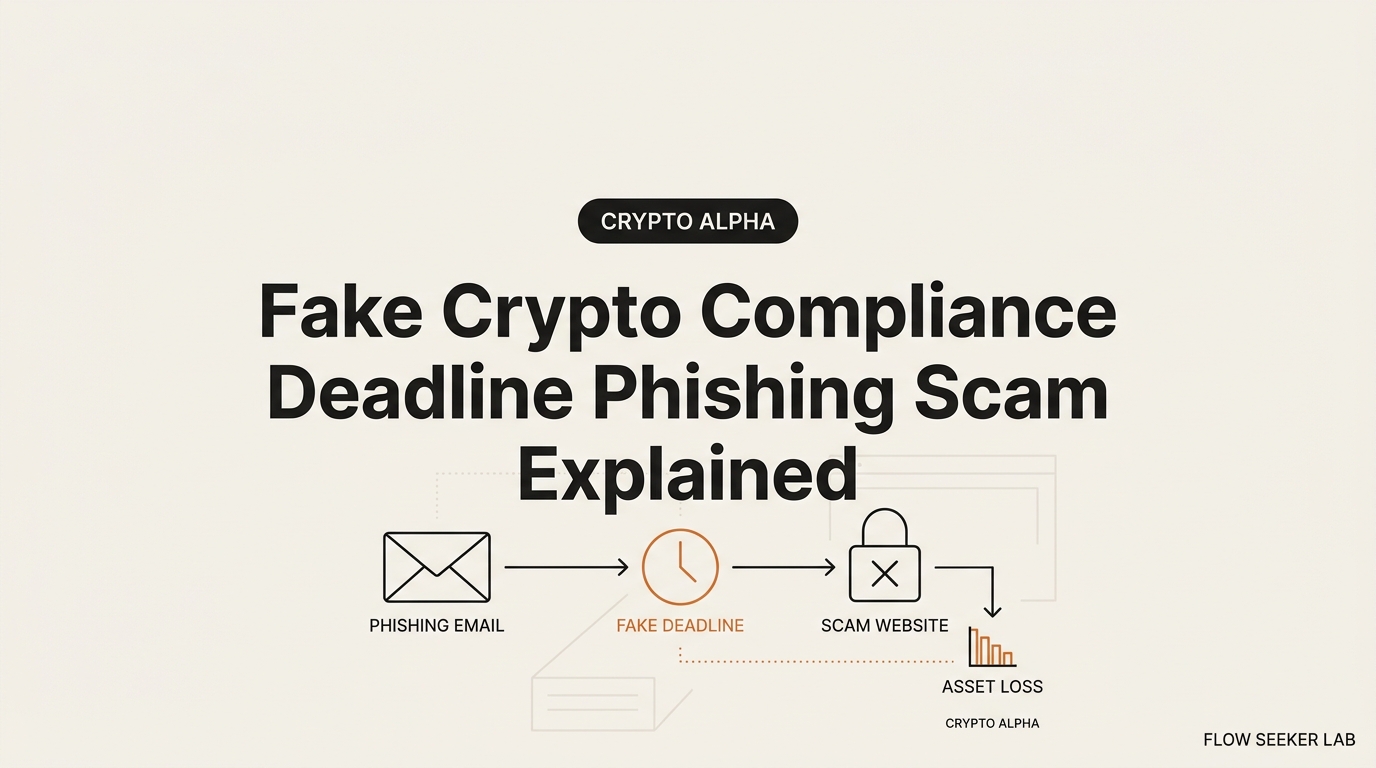
That 60-second reflex is the whole attack. The fake crypto compliance deadline phishing scam doesn’t hack your wallet. It hacks your panic. Here I’ll break down why the deadline is the tell, not the threat, how the same trick arrives through email, SMS, and fake regulator notices, and the one rule that shuts all three down.
I’m seonjae, a Korean office worker with no CS degree. I got this one wrong the first time, so I’ll show you where my brain failed before I show you the framework.
Where I was wrong: the panic did the work
For years in Korea we’ve had the “your account is under investigation, act by this date” phone scam. Older relatives get a call from a fake prosecutor. A case number. A deadline. A demand to move money “to a safe account for the investigation.” Everyone knows about it. And people still fall for it, because the script isn’t aimed at your knowledge. It’s aimed at your nervous system.
So when a crypto version hit my inbox, I assumed I was immune. I wasn’t.
The email looked like it came from an exchange I actually use. It had my (public) wallet address in it. It had a countdown. “Migrate to self-custody before the MiCA deadline or your balance will be locked.” My first thought wasn’t “is this real.” My first thought was “I don’t want to lose my money.” That gap — between fear and the click — is where the money leaves.
What broke was my order of operations. I read the threat first and the source second. That’s backwards. The deadline made me skip the one question that matters: did I go looking for this, or did it come looking for me?
I didn’t click, but not because I was smart. I was tired, and I decided to deal with it in the morning. The delay saved me. That’s a terrible defense. So I built a real one.
The deadline is the tell, not the threat
Here’s the thing nobody says plainly. Real compliance is slow and boring. Scam compliance is a countdown.
When a regulator or an exchange actually changes a rule, you find out through months of notices, in-app banners, and press coverage. There’s no 48-hour clock tied to your personal funds. Real re-KYC asks you to re-upload a document inside an app you already logged into. It never demands a crypto transfer. It never asks for your recovery phrase.
A fake crypto compliance deadline needs the clock because urgency turns off the part of your brain that checks sources. Every element of the message serves that one goal: make you act before you verify. A frozen-funds threat plus a ticking clock plus a familiar logo is a machine for manufacturing a click.
So I stopped reading these messages as “is this claim true” and started reading them as “why is there a clock on this.” A genuine notice doesn’t need to rush you. A scam can’t work unless it does.
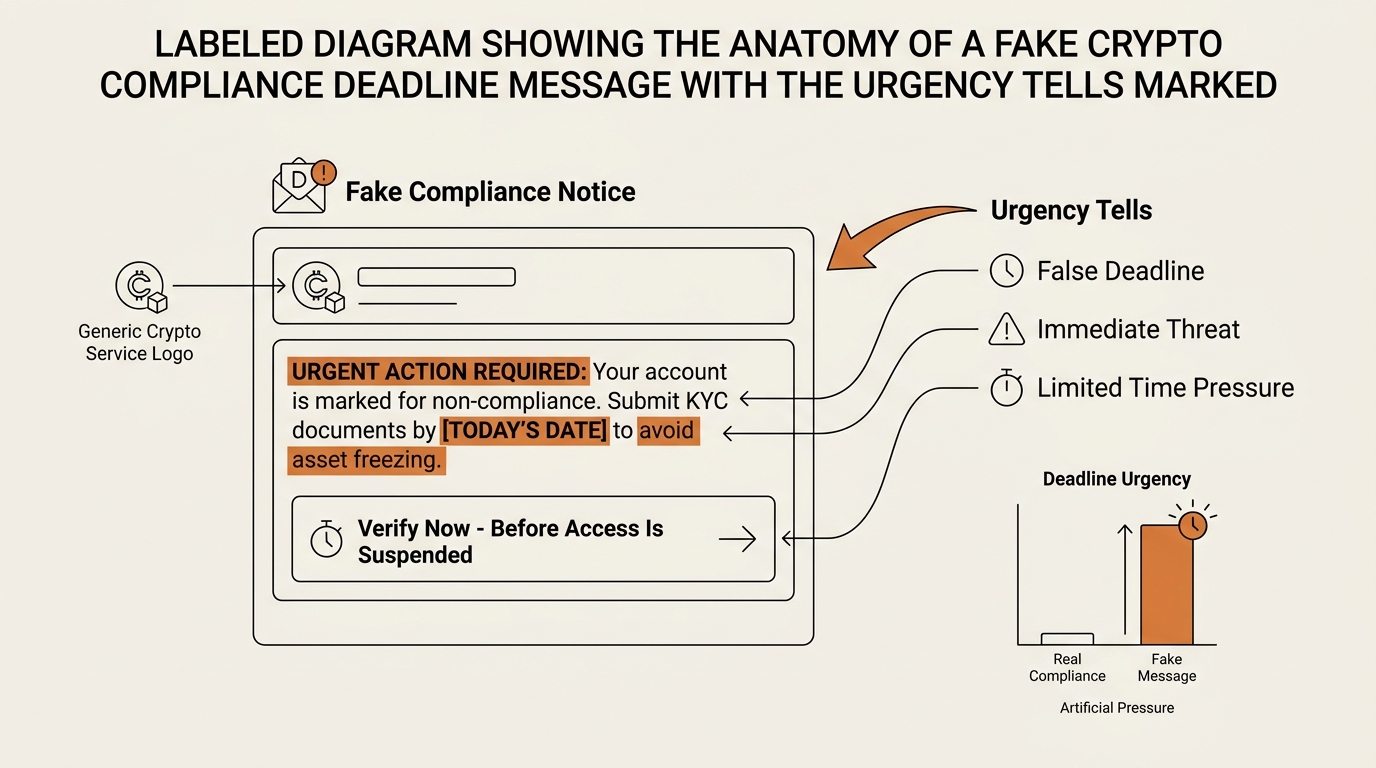
Once you see the countdown as the tell, the specific story stops mattering. MiCA migration, travel-rule verification, a tax portal, a court order to “move to self-custody” — they’re interchangeable costumes on the same skeleton. The skeleton is: authority + deadline + a link that arrived unsolicited.
What real compliance looks like vs the fake deadline
I keep this table in my head now. It’s the fastest sort I have. When a “compliance” message arrives, I run it against these rows before I do anything else.
| Signal | Real re-KYC / compliance | Fake compliance deadline |
|---|---|---|
| Pace | Slow, boring, months of notice | 24–72 hour countdown |
| Where it appears | Inside the app you already use | Unsolicited email, SMS, or DM |
| The clock | Vague or absent | Tied to your personal funds |
| The ask | Re-upload a document in-app | Click a link, connect a wallet, sign |
| Recovery phrase | Never requested | Requested or “confirm your seed” |
| Crypto transfer | Never “for compliance” | “Move funds to a secure address” |
| Sender domain | The exchange’s real domain | Lookalike or spoofed |
| Failure path | Your account keeps working | “Frozen / seized / restricted now” |
Read the right-hand column top to bottom. Any single row can be faked well. But real compliance never combines a personal-funds countdown with a request to sign, transfer, or reveal a seed phrase. That combination doesn’t exist in the legitimate world. It only exists in the scam.
The recovery-phrase row is the hard line. No legitimate exchange or regulator will ever ask for your recovery or seed phrase, and none will ask you to send crypto “for compliance.” If either request appears, you’re done reading. It’s fraud. Full stop.
Put the two timelines side by side and the difference is obvious. Real compliance is a flat, slow line stretched over months. A fake crypto compliance deadline is a steep countdown that ends at your funds.
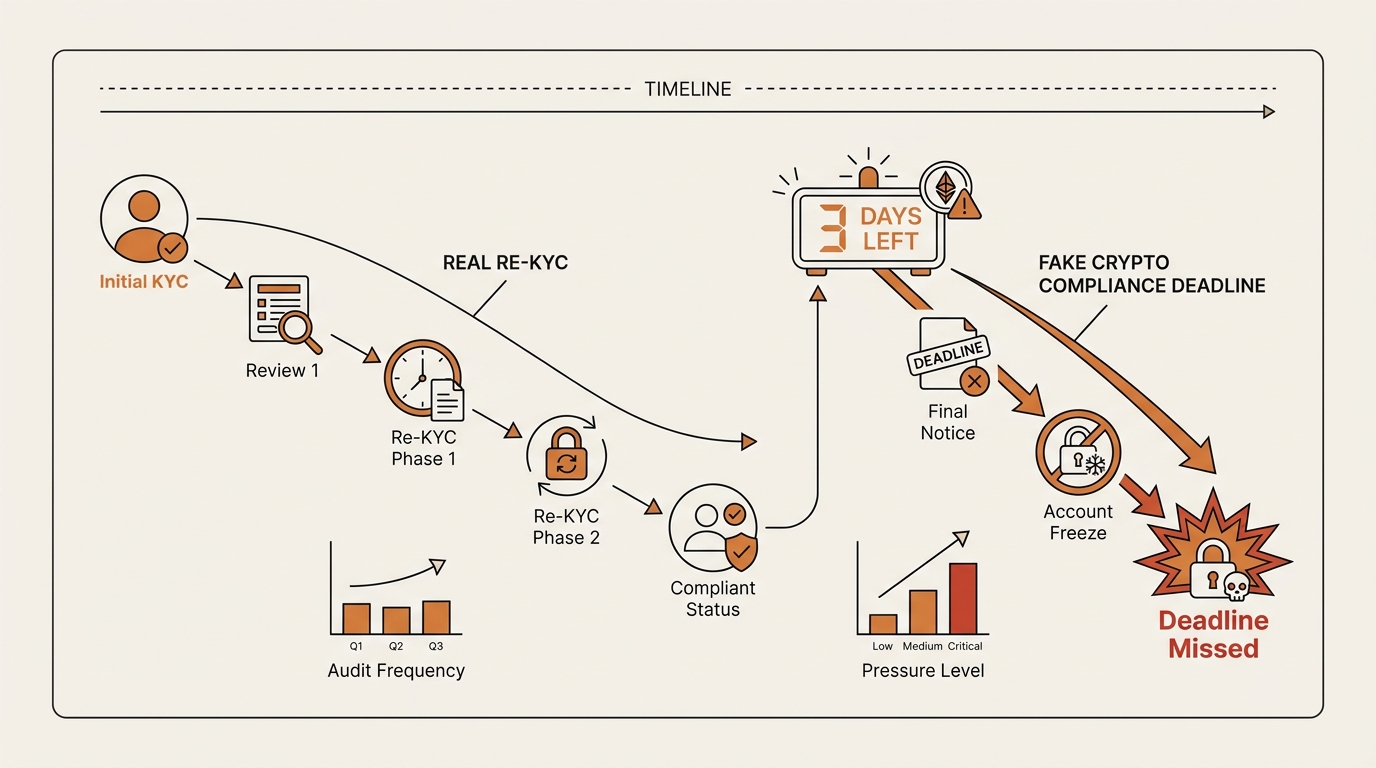
Three channels, one skeleton
A fake crypto compliance deadline shows up in three arrival channels. The costume changes; the skeleton doesn’t.
Channel 1: exchange-impersonation email
This is the most polished version. The email carries a real exchange’s logo, a support-ticket number, and often your public wallet address to feel personal. The 2026 wave leaned hard on migration language: “transition to self-custody before the deadline,” “withdraw your balance to a compliant address.”
The tell is the link. Hover it, and the domain is a lookalike — an extra word, a swapped letter, a different top-level domain. But you shouldn’t be inspecting links at all. You should be closing the email and opening the app yourself. More on that in a second.
Channel 2: “your account will be restricted” SMS
Short, ugly, effective. “ALERT: Your [exchange] account will be restricted in 24h. Verify: [link].” SMS strips away most of the visual cues you’d use on email, so the countdown carries the whole load. There’s no logo to inspect, no sender domain to hover. Just fear and a link.
Treat every SMS link about your money as hostile. Banks learned this years ago and started printing “we will never text you a link” on statements. Crypto exchanges say the same. The channel itself is the red flag.
Channel 3: fake regulator notice
The scariest costume, because it borrows a government’s authority. Two dated examples show the pattern.
In the EU, the MiCA 2026 wave produced a flood of messages impersonating regulators and exchanges, telling users to “complete MiCA compliance” or migrate assets before a cutoff. The EU’s securities regulator, ESMA, publicly warned that impersonators were using its name and stated it never contacts individuals to request transfers or verification of crypto holdings.
In the US, the IRS warned about a fake “Digital Asset Compliance Portal” — a scam that sent a QR code and a deadline, pushing crypto holders to a lookalike site to “confirm” their holdings. The IRS reminds taxpayers it doesn’t demand immediate payment or personal crypto details by surprise message, and doesn’t run a surprise QR-code portal with a countdown.
Use these as examples, not as the definition. Next year the regulator name will change. SEC, FINRA, a tax authority in your country, a “travel-rule verification” body you’ve never heard of. The name is a variable. The skeleton — authority, deadline, unsolicited link — is the constant.
If you want to see how the same fear lever runs through a different vector, I broke down the fake AML-checker scam that dresses a wallet drainer as a “your wallet is flagged” compliance tool, and a phishing letter mailed to look official that moves the whole trick offline into your physical mailbox.
The verify-first framework: use your own front door
Here’s the one rule that survives every wave, and it beats any fake crypto compliance deadline the same way. Never act inside the channel the message arrived in. Re-enter through your own front door.
The message is the attacker’s territory. Its links, its buttons, its phone numbers, its QR codes — all controlled by them. The moment you interact inside their channel, you’re playing on their board. Your front door is any path you control and already trust.
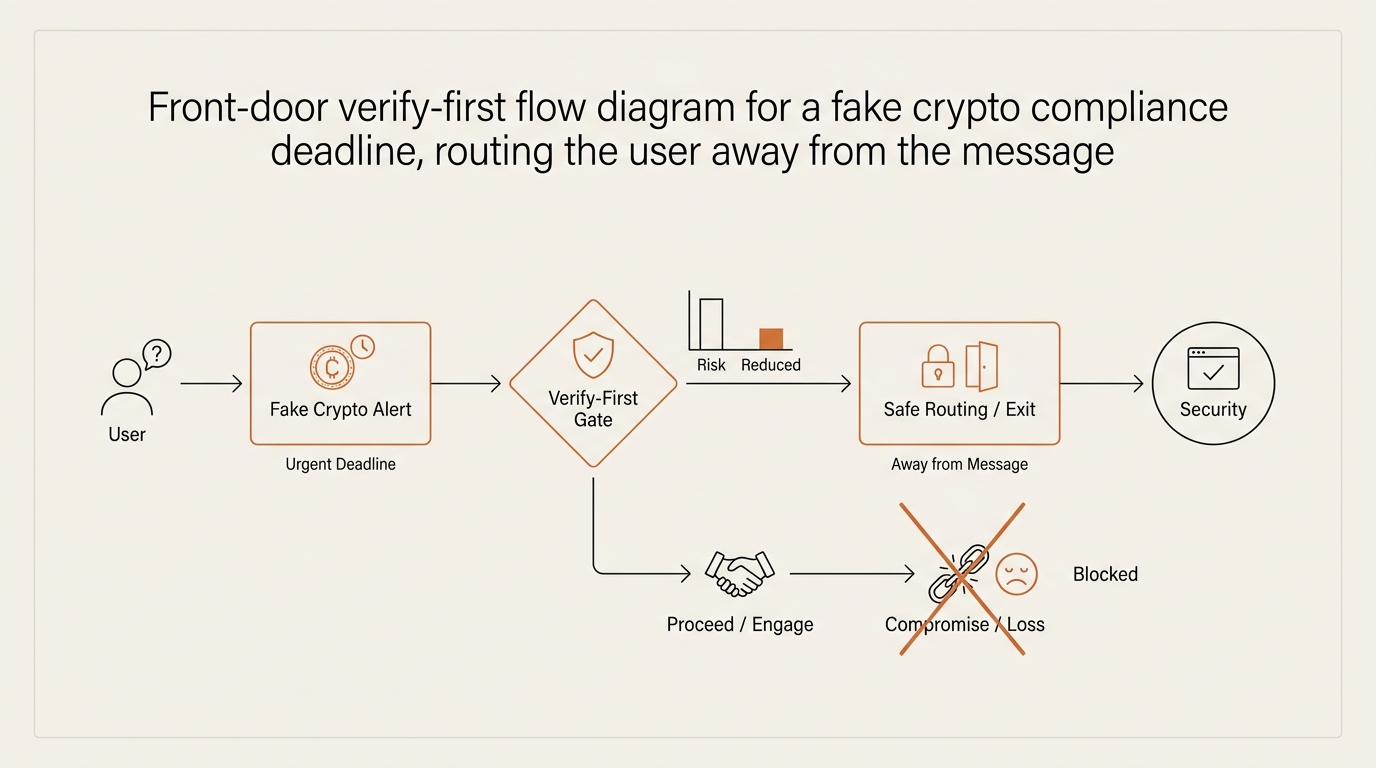
Four front doors, in order:
- Type the exchange URL yourself. Don’t click. Open a new tab, type the address from memory or a saved bookmark, and log in. If there’s a real compliance action, it’ll be waiting inside your account. If your account looks normal, the message was a lie.
- Open the app you already installed. The mobile app you downloaded from the official store is a front door. Real notices show up there. A fear message that has no matching alert inside your app is fake.
- Check the regulator’s own site. For a “regulator” notice, go to the actual agency site by typing it in. ESMA, the IRS, your national regulator — they publish scam warnings and never run surprise personal-funds portals.
- Call the number you already have. Use the support contact from inside your logged-in account or the back of your card, never the number in the message.
Run any one of these and the deadline evaporates. That’s the point. A real obligation still exists when you check it through your own door. A fake one only exists inside the message.
I added a fifth habit for myself: a mandatory pause. Any message with a countdown gets a “deal with it tomorrow” tag. Legitimate deadlines survive a night’s sleep. Scam deadlines are designed to die if you wait, which tells you everything.
If you already clicked
Panic clicks happen. If you entered details or connected a wallet, move through this calmly. This is a practical recovery path, not legal or financial counsel.
- Stop and disconnect. Close the tab. Disconnect your wallet from the site in your wallet’s connections list. Don’t sign anything else it asks for.
- Move your funds to a fresh wallet. If you connected a wallet holding assets, create a new wallet with a new seed phrase and move everything there. Assume the old one is compromised.
- Revoke token approvals. If you signed an approval, revoke it. A drainer often works by approval, not by immediate theft — so revoking can cut it off before it fires. This is exactly how the wallet drainer behind these scams works, and why revoking matters.
- Report it. Report to your exchange through the app, and file with the FBI’s Internet Crime Complaint Center at ic3.gov if you’re in the US, or your national fraud reporting body elsewhere. The FTC also tracks crypto imposter and urgency scams.
- Never hand over your seed phrase. If a “recovery” site or “support agent” asks for your recovery phrase to “restore” or “secure” your funds, that’s the second scam feeding on the first. No legitimate party needs it.
Speed helps here, but calm helps more. The recovery path is a checklist, not a race. Work it in order.
FAQ
Is the “verify your crypto wallet before the deadline or it will be frozen” email a scam? Almost certainly. A fake crypto compliance deadline ties a personal-funds countdown to a link you didn’t request, which legitimate exchanges never do. Don’t click. Type the exchange URL yourself and check your account. If nothing’s wrong there, the email was fake.
Do real regulators or exchanges give you a deadline to re-KYC or lose your funds? No. Real compliance moves slowly, with long notice periods and in-app prompts. A 24–72 hour countdown attached to your specific balance is a manufactured-urgency tactic, not how regulation or KYC actually works.
What does a legitimate crypto compliance or KYC request actually look like? It appears inside an app you already logged into. It asks you to re-upload a document, not to transfer crypto or reveal a seed phrase. It’s boring, unhurried, and it doesn’t threaten to seize your funds by a countdown.
Is the MiCA or travel-rule compliance email I received real? Check the regulator’s own site by typing the address yourself. ESMA has stated it never asks individuals to transfer crypto or verify holdings by message. If the email demands action through its own link before a deadline, treat it as impersonation.
How do I verify a crypto exchange compliance email is genuine before I click? Don’t verify it inside the email. Re-enter through your own front door: type the exchange URL, open the app you already have, or call the number from your logged-in account. A real notice shows up inside your account. A fake one only lives in the message.
Can a crypto exchange or regulator actually freeze or seize my self-custody wallet? No one can freeze a self-custody wallet by sending you a message. Only you hold the keys. That’s exactly why the scam invents a fake “or your funds get frozen” threat — the real system doesn’t work that way, so it manufactures the fear.
What should I do if I already clicked the compliance deadline link or entered my details? Disconnect the wallet, move funds to a fresh wallet, revoke any token approvals you signed, and report it to your exchange and to ic3.gov or your national fraud body. Never give your recovery phrase to a “recovery” service.
The clock is the confession
Strip away the logos, the regulator names, the QR codes. What’s left in every one of these is a clock someone else started on your money. That clock is the confession. Real compliance never needs to rush you, because a genuine obligation is still there when you check it through your own door.
So the reflex to build isn’t “spot the fake logo.” Logos improve every wave. The reflex is narrower and it holds: when a message about your funds carries a deadline, close it and walk through your own front door. If the obligation is real, it’s waiting for you inside. If it vanishes the moment you leave the message, it was never real.
Next in this Crypto Safety series, I want to trace a real compliance-deadline drain on a block explorer — from the panic click to the approval to the sweep — so you can watch the money leave in public and recognize the pattern before it’s yours.
seonjae — Korean office worker documenting his transition into AI systems, agents, and vibe coding — without a CS background. Shipping in public.