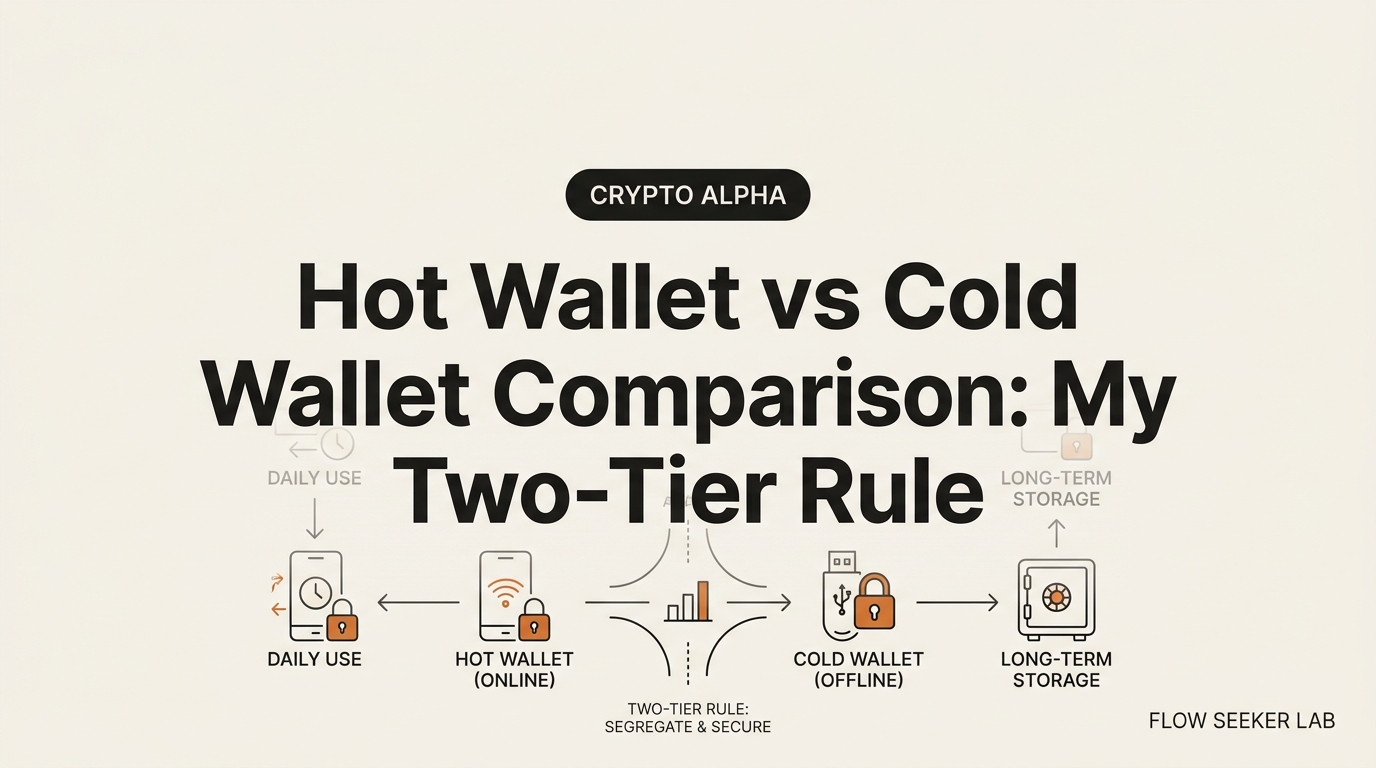
Hot Wallet vs Cold Wallet Comparison: My Two-Tier Rule
Hot Wallet vs Cold Wallet Comparison: The Two-Tier Rule I Use
I used to keep everything in one wallet. One app, one balance, one thing to lose. That felt tidy until I realized my entire crypto life sat on a phone that also runs random links from group chats. This hot wallet vs cold wallet comparison is the fix I wish someone had handed me on day one: stop thinking about which wallet is safest and start thinking about which wallet holds what.
Here’s the promise. By the end, you’ll have a two-tier model — a spending tier and a savings tier — plus a concrete allocation rule I use to keep my online-exposed balance small. Preview: I’ll map the two tiers, clear up a distinction almost every guide blurs, show you where I got the split wrong, and hand off the device details to a deeper post.
I’m a Korean office worker with no CS degree. I think about money in salary-account terms, so that’s the lens I’ll use here.
The Checking vs Savings Split, Applied to Crypto
Every Korean payday, my salary lands in a main account. I move most of it into a savings account I barely touch. A small float stays in checking for cards, transfers, and coffee. Nobody calls this “financial strategy.” It’s just plumbing.
A hot wallet vs cold wallet setup is the same plumbing.
- A hot wallet is your checking account. It’s connected to the internet, it’s fast, and it’s where daily activity happens — swaps, mints, small transfers.
- A cold wallet is your savings account. It’s kept offline, it’s slow to reach on purpose, and it holds the bulk you rarely move.
The connection is the whole point. A hot wallet lives online, so it can sign a transaction the moment you tap. That speed is also its exposure. A cold wallet keeps its private keys offline, so an attacker who compromises your browser or phone still can’t reach into it.
You don’t pick one. You run both, and you decide how much lives where. That decision — not the device — is the framework.
The One Rule I Use: Keep the Spending Tier Small
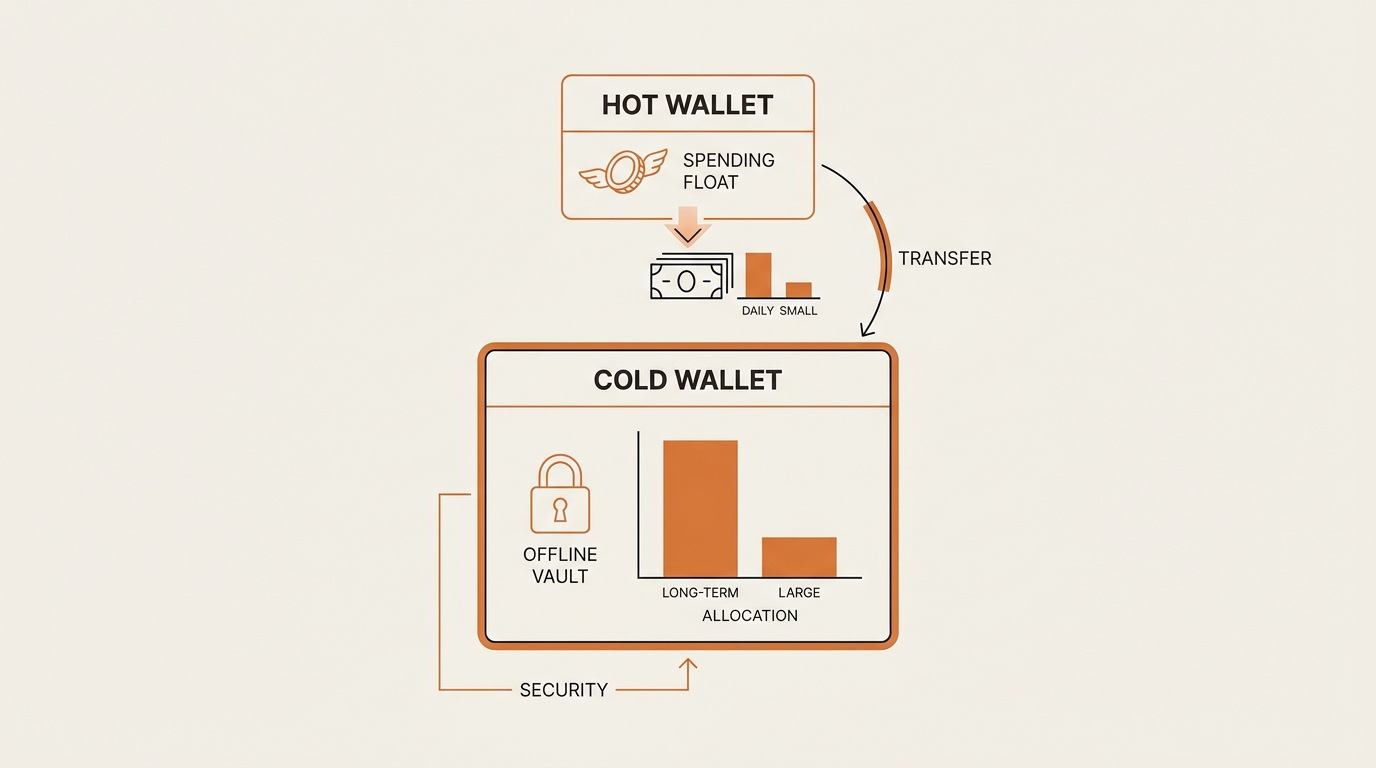
Here’s the boring truth that makes the whole thing work. The hot tier is meant to be small.
I treat my hot wallet like the cash in my physical wallet. If it gets lost or drained, it stings, but it doesn’t end me. So I cap it. My rule of thumb: no more than 5–10% of my total holdings sits in the hot tier at any time. The other 90%+ stays cold.
Read that as a security framework, not a money-management tip. I’m not telling you how much to hold or what to buy. I’m describing how I shrink the balance that’s exposed to the live internet on any given day. The smaller that number, the smaller the worst-case loss when something goes wrong on the hot side.
The trigger for moving between tiers is deliberate friction. When my hot wallet grows past the cap because a swap left a big balance, that overflow is my signal to sweep it back to cold. When I need funds for something active, I move a specific amount out of cold and into hot — never the whole vault.
This is why the checking analogy holds. You don’t carry your savings account around in your pocket. You carry a float.
Hot Wallet vs Cold Wallet: A Side-by-Side Comparison
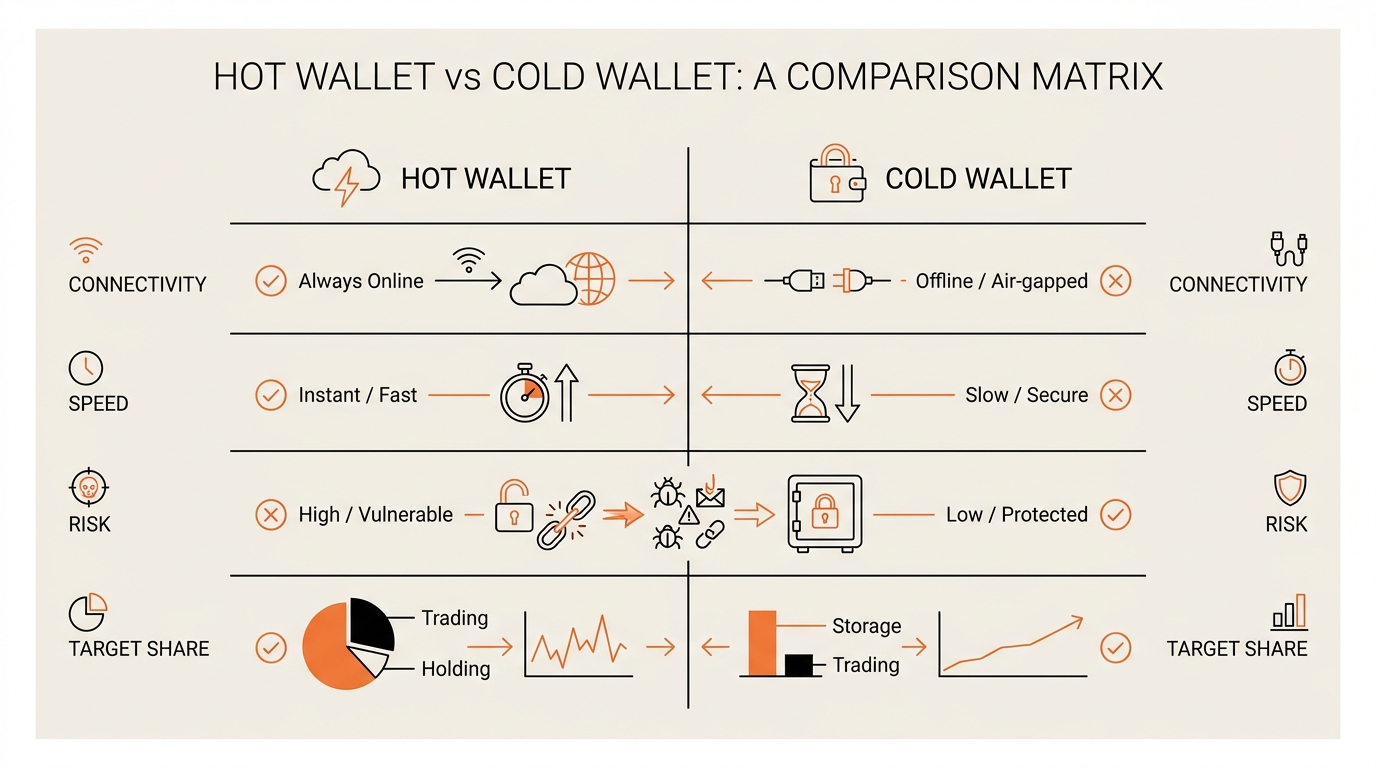
Definitions get abstract fast, so here’s the comparison I keep in my head. Note the last two rows — they’re where I decide what goes where.
| Dimension | Hot wallet (spending tier) | Cold wallet (savings tier) |
|---|---|---|
| Connectivity | Online, always reachable | Offline, keys never touch the internet |
| Speed to use | Instant — tap and sign | Slow by design — extra steps |
| Typical form | Phone/browser app (e.g. MetaMask) | Hardware device kept in a drawer |
| Main risk | Phishing, drainers, malware | Losing or exposing the recovery phrase |
| What I keep there | Daily float, active swaps, small mints | Long-term bulk, rarely touched |
| Target share | ~5–10% max | ~90%+ |
The pattern is simple once you see it. In a hot wallet vs cold wallet setup, speed and exposure travel together. The tier you use most is the tier you keep smallest. The tier you touch least holds the most.
That inversion feels backward at first. Then it feels obvious.
The Second Axis Everyone Blurs: Custody vs Connectivity
This is the part most ranking pages get lazy about, and it cost me real confusion early on.
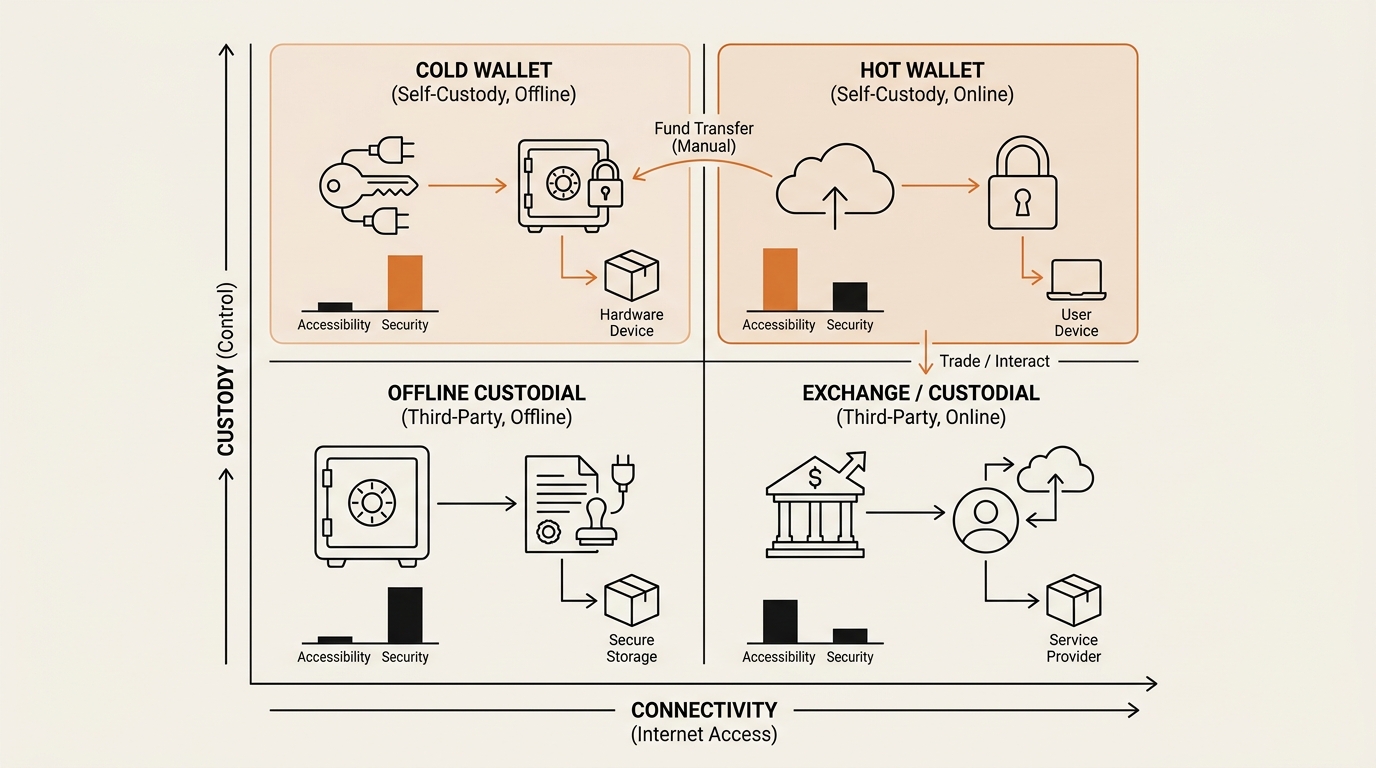
Hot vs cold is one axis: connectivity. Is the wallet online or offline? That’s it.
There’s a second, separate axis: custody. Who actually holds the private keys — you, or a company?
- Custodial means a company holds your keys. An exchange account is the classic case. You have a login, not a key.
- Non-custodial (self-custody) means you hold the keys yourself. No company can freeze or move your funds. The phrase people repeat is “not your keys, not your coins.”
These two axes are independent. A wallet can be any combination. Your exchange balance is custodial and hot. A MetaMask app is non-custodial and hot. A hardware wallet is non-custodial and cold. You can even have custodial cold storage, which is what regulated custody providers offer institutions.
The mistake I made: I assumed “cold” automatically meant “mine.” It doesn’t. Cold describes connectivity. Custody describes control. When you decide where to park your savings tier, you’re really making two decisions — how offline, and how self-held.
Where I Was Wrong: I Let the Spending Tier Bloat
I want to own a real mistake here, because the tiering rule sounds clean and my execution wasn’t.
For a couple of months, my “float” quietly stopped being a float. Moving funds back to cold meant plugging in the hardware wallet, confirming on a tiny screen, and double-checking the address. It felt like a chore. So I kept leaving swap proceeds in the hot wallet. “I’ll sweep it this weekend,” I told myself. I didn’t.
At the worst point, roughly half my holdings were sitting in the online tier. My 5–10% cap was a number I admired, not a number I followed. The whole benefit of the two-tier model — a small blast radius — was gone. I’d rebuilt the single-wallet risk I started with, just with extra steps.
Nothing got stolen. I got lucky, not smart. Luck is not a security layer.
What broke was the friction, not the framework. The cold side was so deliberately annoying that I avoided using it, which pushed balance back into the risky tier. That’s the trap nobody warns you about: over-harden the vault and you’ll route around it.
What I changed: I set a calendar reminder for the first of every month. Sweep day. I also stopped treating the sweep as a big event. Two minutes, one transfer, done. And I made the cold-side process boring-but-fast instead of fortress-but-dreaded. The two-tier model only works if you actually use both tiers.
The Hot Tier: Keep It Small Because It’s the Exposed One
The reason the spending tier stays small is that it’s where attacks land. Not because hot wallets are broken — because they’re online, and online is where the phishing lives.
The dangerous part is rarely a hacked wallet. It’s you approving something you shouldn’t. A malicious signature can hand over your tokens even when your keys were never leaked. That’s the mechanic behind how wallet drainer scams work — you sign, and the funds walk.
A close cousin is stale permissions. Every “approve” you grant a dApp can linger indefinitely, and one of them going bad can empty a token balance. It’s worth learning to revoke risky token approvals on a schedule. There’s also the copy-paste trap, where attackers seed your history with a look-alike address — the address poisoning scam — so you send to the wrong place from memory.
I don’t recite these to scare you off hot wallets. I use one every week. I recite them to justify the cap. The hot tier stays small because this is the exposed surface. You can’t remove the risk. You can shrink the amount standing in front of it.
The U.S. FTC keeps a plain-language page on crypto scams and how they reach you. Read it once. It maps neatly onto why the online tier is the one you keep lean.
The Cold Tier: Where the Bulk Lives, and When You Graduate to a Device
The cold tier is the vault. Its whole job is to be hard to reach — for an attacker, and honestly for you too.
At small balances, “cold” can just mean discipline: a separate self-custody wallet you never connect to sketchy sites, funded and then left alone. But once the savings tier holds a meaningful chunk, the real cold move is a hardware wallet that keeps your keys offline and signs transactions on its own screen.
I’m deliberately not turning this into a device shootout. Which model to buy, how to back up your recovery phrase, how to run an air-gapped setup — that’s a full topic on its own, and I’ve written it up as the cold-side deep dive: the hardware wallet setup checklist. Treat this post as the decision above the device — how to split — and that post as the graduation step once you’ve decided your cold tier needs real hardware.
One thing I’ll flag, because it’s the actual loss vector. A cold wallet’s device almost never gets “hacked.” What gets people is the recovery phrase — those words that restore the wallet. If that phrase leaks, the offline device stops mattering. Anyone can rebuild the wallet elsewhere. The cold side isn’t about a magic gadget. It’s about keeping that phrase off every screen and out of every cloud. The official ethereum.org security guidance is a solid neutral reference on handling keys and phrases.
FAQ: Hot Wallet vs Cold Wallet Questions
Is a hot wallet safe? A hot wallet is safe enough for what it’s for — a small spending float. It’s internet-connected, so it carries more risk than cold storage. Use biometrics or a strong password, watch what you sign, and keep the balance small. Safety here comes from the cap, not the app.
Do I need both a hot wallet and a cold wallet? If your holdings are meaningful, yes. The two-tier model splits daily activity from long-term savings. The hot wallet handles swaps and transfers; the cold wallet holds the bulk offline. If you only hold a tiny amount, one careful self-custody hot wallet can be enough for now.
Is Coinbase a hot or cold wallet? Both terms apply, depending on which product. Your Coinbase.com exchange balance is custodial hot storage — the company holds the keys, and it’s online. The separate Coinbase Wallet app is a non-custodial hot wallet you control, and it can pair with a hardware device for the cold side.
Can a cold wallet be hacked? The device itself is rarely the failure. The real loss vector is your recovery phrase leaking — through a photo, a cloud note, or a phishing page that asks you to “verify” it. Keep the phrase offline and no one restores your wallet elsewhere. The hardware is the easy part; the phrase is the target.
How much crypto should I keep in a hot wallet? The framework I use caps the hot tier at roughly 5–10% of total holdings — a spending float, not a vault. This is a security rule to shrink my online-exposed balance, not advice on how much to hold. Sweep the overflow back to cold on a schedule so the float stays a float.
What’s the difference between custodial and non-custodial wallets? Custody is about who holds the private keys. Custodial means a company holds them for you, like an exchange login. Non-custodial means you hold them yourself. This is a different axis from hot versus cold, which is only about whether the wallet is online or offline.
The Real Question Isn’t Which Wallet Is Safest
Stop hunting for the safest wallet. There isn’t one. The whole hot wallet vs cold wallet question dissolves into three parts: a spending tier that’s fast and exposed, a savings tier that’s slow and protected, and a percentage that decides how much you’re willing to lose on a bad day.
A hot wallet vs cold wallet setup isn’t a purchase. It’s a ratio you maintain — small float online, bulk offline, and a boring monthly sweep that keeps the line honest. Set your cap, then actually follow it. That last part is where I failed first.
Next in the Crypto Safety series: how to read a signature request before you approve it — the exact fields I check on the hot side so a small float never becomes a small disaster.
For the neutral definitions behind all of this, the Wikipedia cryptocurrency wallet entry is a clean reference on hot, cold, custodial, and non-custodial storage.
seonjae — Korean office worker documenting his transition into AI systems, agents, and vibe coding — without a CS background. Shipping in public.