How to Set Up a Burner Wallet for Safe Minting
How to Set Up a Burner Wallet for Safe Minting
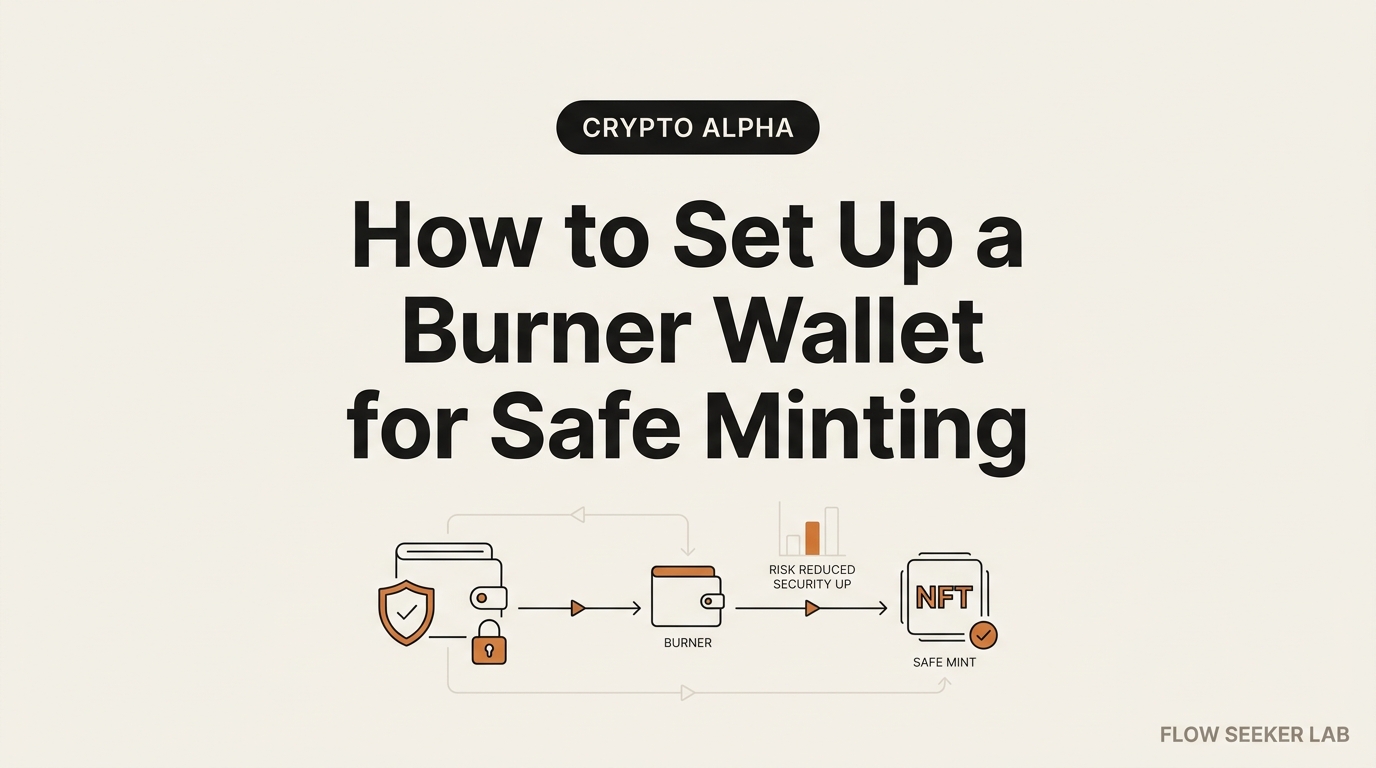
The first mint I ever tried asked me to sign something before I saw a single JPEG. I clicked away and my hands were sweating. That night I built the routine I still run, and this post is exactly how to set up a burner wallet for safe minting — a throwaway account that holds almost nothing, so a bad mint page can only reach almost nothing.
I’ll walk it in order: create and label the account, fund it with only mint price and gas, do the mint, then the part most guides skip — sweep the NFT out, revoke approvals, and retire the wallet. No code, about ten minutes, on a lunch break.
One rule up front. This is a damage-limiting habit, not a shield. A burner shrinks the blast radius when something goes wrong. It does not make a scam site safe to touch.
Why I stopped minting from my main wallet
My main wallet is where the bulk of my crypto lives. Minting is the single riskiest thing a normal person does on-chain, because you connect to a brand-new contract you can’t read and sign whatever it puts in front of you.
Connect the wrong account to the wrong page and one signature can hand over everything that account can touch. That’s not paranoia. It’s how most drains actually happen — through a signature you approved, not a password you leaked. I broke down that mechanic in how crypto wallet drainer scams work, and minting is where beginners meet it first.
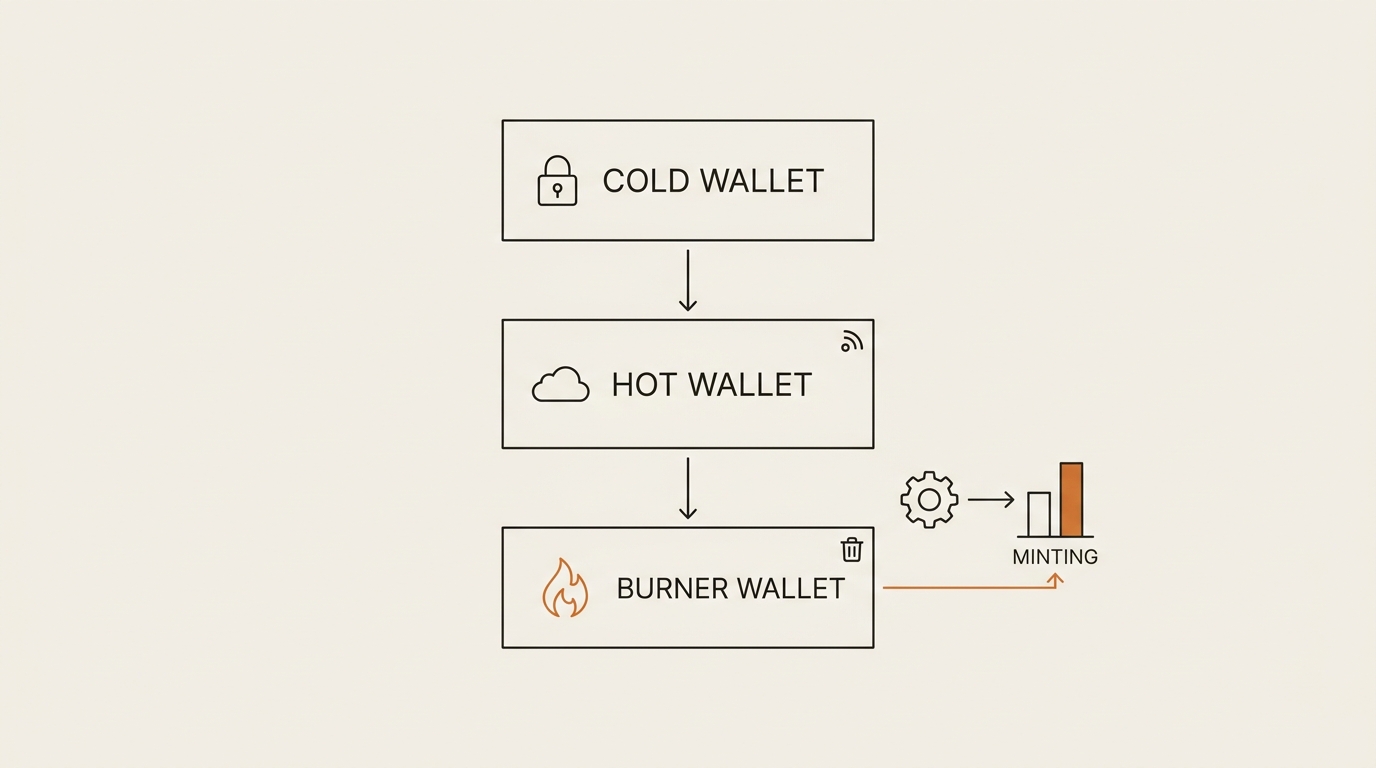
So I moved minting one tier down. A burner sits below my hot and cold wallets: expendable, near-empty, connected to the sketchy stuff so the important accounts never are. If you haven’t sorted your tiers yet, start with hot wallet vs cold wallet — the burner is the layer beneath both.
Here’s the plain definition I give friends. A burner is a disposable crypto account you fund with only what one risky action needs, use once, empty, and abandon. Small on purpose. Boring on purpose.
Step 1: Create and label a burner wallet in MetaMask
You don’t need a new app or a new seed phrase. In MetaMask you can add a fresh account under your existing wallet in seconds. Click the account name at the top, hit the account list, then “Add account or hardware wallet,” and pick “Add a new account.” A new address appears — same seed underneath, a separate public address on top. MetaMask’s own support docs walk the exact clicks if the menu has moved since I wrote this.
The one thing beginners skip: rename it. Tap the three dots next to the new account, choose “Account details,” and change the name to something you can’t misread half-asleep. Mine reads “BURNER — mint only.” Not “Account 4.” Not “test.” A name that tells you what the account is for the second you glance at the connect dialog.
Why so blunt? I once had four unnamed accounts and connected the wrong one to a mint at 11pm. Nothing bad happened, but my stomach dropped, and that fear is the whole reason for the label. The connect screen shows the account name in tiny grey text; if it says “BURNER,” you get one last chance to catch a wrong-account slip before you sign.
If you mint on Solana, the same idea works in Phantom with a second account. The chain changes; the discipline doesn’t. I’ll keep the walkthrough on MetaMask and Ethereum because that’s where most mint pages still live.
One label, one job. This account exists to touch mint contracts and nothing else. Don’t let it become a second daily wallet. The moment a burner starts collecting random tokens, it stops being disposable.
Step 2: Fund a burner wallet with only mint price and gas
This is the step that does most of the work. Move in exactly the mint price plus a little gas — nothing more. If the mint is 0.02 ETH, I send maybe 0.03 to cover gas and a failed transaction or two. That’s it.
How do I land on that exact number? I take the stated mint price, then add a small buffer for gas plus one retry, because minting often fails the first time when a drop is busy and the gas estimate spikes. I don’t round up to a “nice” number, and I never top it off “so I don’t have to refund it later.” The awkward, slightly-too-small amount is the safety. A throwaway account funded to the exact job can’t leak more than the job. If I’m minting two in a series, I fund for two — not for ten I might mint someday.
The math is simple and it’s the entire point. If the mint page turns out to be a drainer, it can only take what’s in the wallet. An empty-ish burner is a wallet with almost nothing to steal. You’re not preventing the attack; you’re capping the loss at pocket change.
Do the transfer from your hot wallet, not your cold storage. And check the destination address carefully — attackers seed your history with lookalike addresses so you copy the wrong one, a trick I unpack in the address poisoning scam. Read the first four and last four characters out loud before you hit send.
Here’s the funding rule as a checklist you can run in under a minute:
- Send only mint price + a small gas buffer to the burner
- Never send your whole hot-wallet balance “to be safe” — that inverts the safety
- Verify the burner address char-by-char (poisoning risk)
- Leave your cold wallet completely out of this
- If a mint suddenly wants more than the stated price, stop
That last line has saved me twice. A mint that quietly asks for a second, larger transaction is telling you something.
Step 3: Do the mint (and watch what you sign)
Now connect the burner to the mint page and mint. This part is fast. The care is in the signature, not the click.
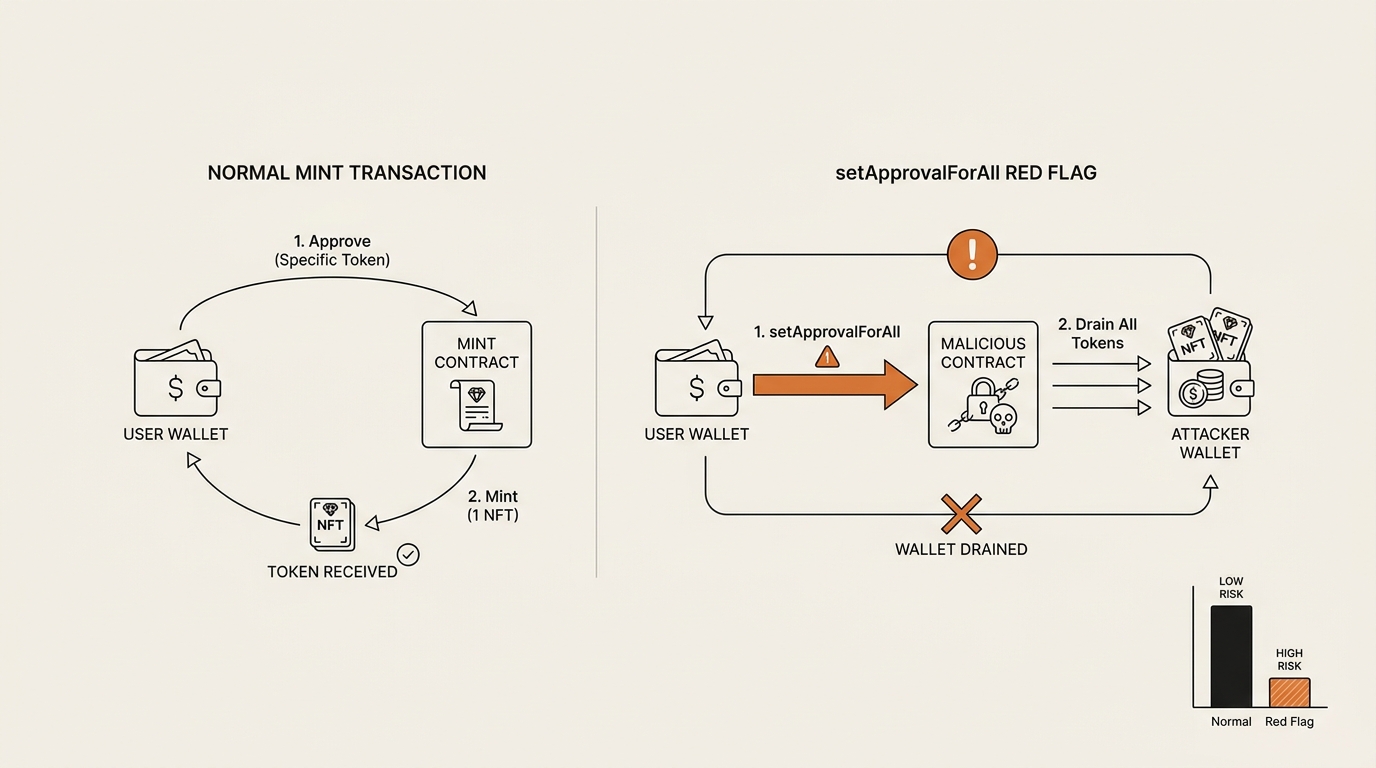
A legitimate mint asks you to send a transaction that calls something like mint — you pay, you receive an NFT. That’s a normal spend. What a legitimate mint does not need is permission over tokens you already hold.
If a mint page pops up a request to approve or, worse, setApprovalForAll, stop cold. That signature doesn’t buy you a JPEG. It hands a contract standing permission to move your assets later, on its schedule, without asking again. Legit mints don’t need it. I treat that prompt as a fire alarm, and you should too. The mechanics of how that permission becomes a drain are in how token approvals drain wallets and how to revoke them.
The other trap is off-chain signatures — a gasless-looking “sign this message” that’s actually a token permit. It costs no gas, which makes it feel harmless, and that’s the bait. I wrote a full breakdown in the Permit2 signature phishing scam. Read the fields, not the vibe: what am I approving, for how much, and for whom?
Step 4: Sweep the NFT out, then retire the burner wallet
This is the step every “fund it small” guide forgets, and it’s where I lost the plot early on. Minting is not the finish line. The finish line is an empty burner and your NFT somewhere safer.
The order matters. Right after a successful mint, I do four things and then walk away:
- Move the NFT out. Open the NFT in the wallet, hit send, and transfer it to my main or cold wallet. The first time I did this my hands were on the keyboard the same way they were during that first mint — a transfer of something I’d just paid for feels heavier than it should. Same address check applies: read the first four and last four characters out loud. The mint is over; the asset shouldn’t sit in a disposable account.
- Revoke approvals. Open a checker like revoke.cash/learn, connect the throwaway account, and switch it to the network you minted on. The tool lists every token and collection that account has granted permission to, with a “Revoke” button next to each. I look for anything dated to today’s mint, click revoke, and sign the small transaction it asks for — revoking is itself an on-chain action, so it costs a little gas, which is why I left that buffer in step 2. If the list is empty, good — that’s what a clean mint looks like.
- Empty the dust. Send any leftover ETH back to the hot wallet so the throwaway account reads near-zero.
- Retire it. For a high-value or unfamiliar mint, I don’t reuse the account. I make a fresh one next time.
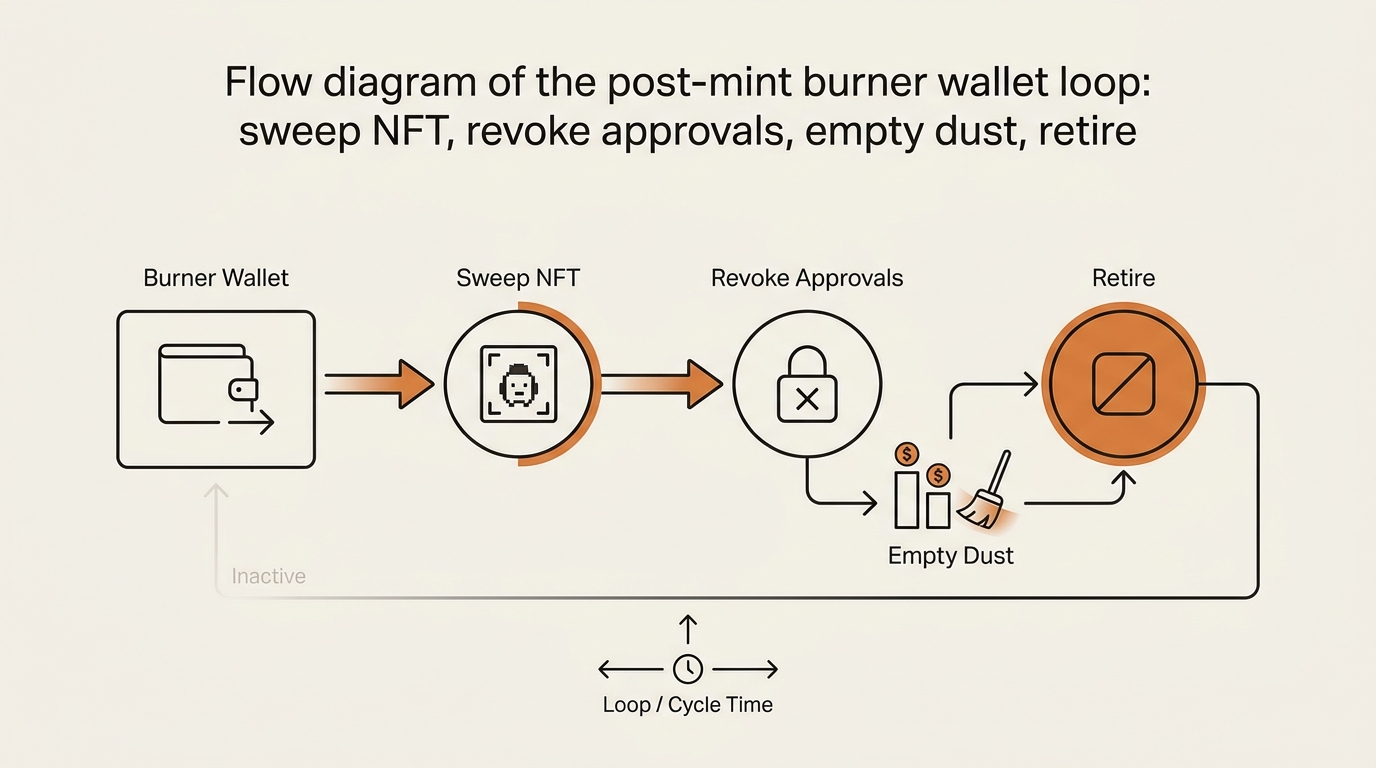
Why retire instead of reuse? Because approvals accumulate. Reuse one burner across ten mints and a single bad approval from mint #3 can quietly reach the NFT you swept in from mint #8 before you moved it. One burner, one high-risk interaction, then gone. Ethereum’s own security page is a solid primer on why standing permissions are the thing to watch.
The sweep discipline is the difference between “I use a burner” and “I’m actually protected.” Anyone can make a throwaway account. Emptying it and revoking after every use is the part that works.
What broke: the “small wallet = safe forever” trap
Here’s where I was wrong, and it’s the mistake I see beginners repeat.
I thought a small balance made a burner permanently safe. So after a mint I liked, I left the NFT sitting in that burner for weeks — it felt low-stakes. What I forgot: that account still had a live setApprovalForAll I’d signed during a related interaction. The balance was tiny, but the approval was standing, and the NFT that drifted in later was suddenly reachable. “Small wallet” says nothing about what a live approval can reach after you add value to it.
I got lucky. I revoked before anything used it, after reading about a drain that worked exactly this way. But the lesson stuck: a burner is only “empty” if it has no assets and no live approvals. Balance and permissions are two separate risks.
The second thing I broke: I reused one burner across a run of mints to save the funding hassle. Efficient, and exactly backwards. One sketchy approval from an early mint sat there while I kept minting into the same account. If it had fired, it wouldn’t have hit one mint’s pocket change — it would’ve hit everything I’d cycled through that wallet. Convenience widened the blast radius I’d built the burner to shrink.
So my rule now is boring and firm. New burner for anything high-risk. Sweep and revoke every single time. A burner that lingers with value and an old approval isn’t a safety tool anymore — it’s a slower version of minting from your main.
Where this framework falls short
A burner limits damage. It doesn’t cover every angle, and pretending otherwise is its own risk.
It won’t help if you paste your seed phrase into a fake site — that compromises every account under it, burner and main alike. It won’t stop you from later approving something malicious with your main wallet on a different site. And it adds friction: funding, sweeping, and revoking every time is annoying, which is exactly why people quit and go back to minting from their main. The habit only works if it’s boring enough to keep.
It’s damage control, not immunity. The wallet caps the loss; your reading of each signature request is still the thing standing between you and a bad day.
When a throwaway wallet is overkill — and when it isn’t
I don’t spin up a fresh account for everything. That’s how the habit dies — too much friction and you quietly go back to minting from your main. So I sort risk before I sort wallets.
For a mint from a team I’ve followed for a year, on a link from their own verified account, I’ll sometimes just mint from my hot wallet after checking the contract. The overhead of funding and sweeping isn’t worth it for a known, low-value drop. Judgment, not ritual.
The disposable account earns its keep when the risk is real: a brand-new project, a link from a Discord DM or a reply-guy, a “surprise” mint I found through an ad, or any drop where the FOMO is loud enough that I can feel my judgment slipping. Those are exactly the moments a signature gets clicked without reading. The extra ten minutes buys me a hard ceiling on how wrong that click can go.
Here’s the line I use: the higher the hype and the newer the source, the more I want a wall between the mint and everything I own. Low hype, known source, small value — a hot wallet is fine. High hype, unknown source, or real value — throwaway account, every time. The chart below is roughly how I triage it in my head before I even open the mint page.
| Situation | Where I mint | Why |
|---|---|---|
| Known team, verified link, low value | Hot wallet | Friction not worth it |
| New project, unverified link | Fresh disposable account | Unknown contract, isolate it |
| High-FOMO drop, ad or DM link | Fresh disposable account | Hype is when I skip reading |
| Anything I’d hate to lose in the wallet | Fresh disposable account | Blast radius must stay small |
Notice the tie-breaker is never “how much do I trust the JPEG.” It’s “how much can this contract reach if I’m wrong.” That question survives every new scam format, which is why I lead with it.
Frequently asked questions
How do I set up a burner wallet for safe minting? Add a new account inside MetaMask (or Phantom on Solana), label it “burner — mint only,” fund it with just the mint price plus a little gas, connect it to the mint page, and after minting sweep the NFT to your main wallet, revoke approvals, and empty it. That full loop is what makes a burner wallet actually safe.
Is a burner wallet safe for minting NFTs? Safer, not safe. A burner wallet limits how much a bad mint page can take, because it holds almost nothing. But it only protects you if you fund it small, sweep the NFT out afterward, and revoke approvals. Leave value and a live approval sitting in it and the protection is gone.
How much crypto should I put in a burner wallet before a mint? Only the mint price plus a small gas buffer — enough for one mint and a retry, nothing more. The whole point of a burner wallet is that a drainer can only reach what’s inside it, so the smaller the balance, the smaller the worst case.
Should I use a new burner wallet for every mint? For high-value or unfamiliar mints, yes. Reusing one burner across many mints lets a single bad approval from one interaction reach assets from another. One burner, one risky action, then retire it — that keeps each mint’s risk isolated.
Do I need to approve or setApprovalForAll when minting? No. A legitimate mint just needs you to send the mint transaction and pay. If a mint page asks you to approve or setApprovalForAll, treat it as a red flag and stop — that grants standing permission over your tokens, not a JPEG. You can verify any granted approvals on a checker like revoke.cash.
What do I do with the account after minting? Run the loop, in order: move the NFT to your main or cold wallet, revoke any approvals the account granted during the mint, send the leftover ETH back to your hot wallet, and retire it. The mint isn’t finished when the JPEG lands — it’s finished when the disposable account reads near-zero and holds no live approvals.
Can I set up a throwaway wallet for minting on Solana? Yes. In Phantom you add a second account the same way, fund it with only the mint price plus a small SOL buffer, mint, then move the NFT out and empty it. The chain and the token standard change, but the discipline — fund small, sweep, retire — is identical. Solana approvals work differently, so use a Solana-aware checker rather than an Ethereum one.
The habit, not the wallet
The wallet was never the hard part. Anyone can click “add account.” The thing that actually protects you is the loop after the mint — sweep, revoke, empty, retire — run every time, even when the mint went fine and you’re tired.
Fund it small. Sweep it clean. Never let it linger with value and a live approval. Do that and a burner turns minting from the riskiest thing you do on-chain into the most contained.
Next in the Crypto Safety series, I’ll trace a real mint drain on a block explorer — the exact transaction where an approval fired — so you can see the failure step by step instead of taking my word for it. If you want the bigger map first, start with how to track a crypto wallet.
seonjae — Korean office worker documenting his transition into AI systems, agents, and vibe coding — without a CS background. Shipping in public.
One Comment