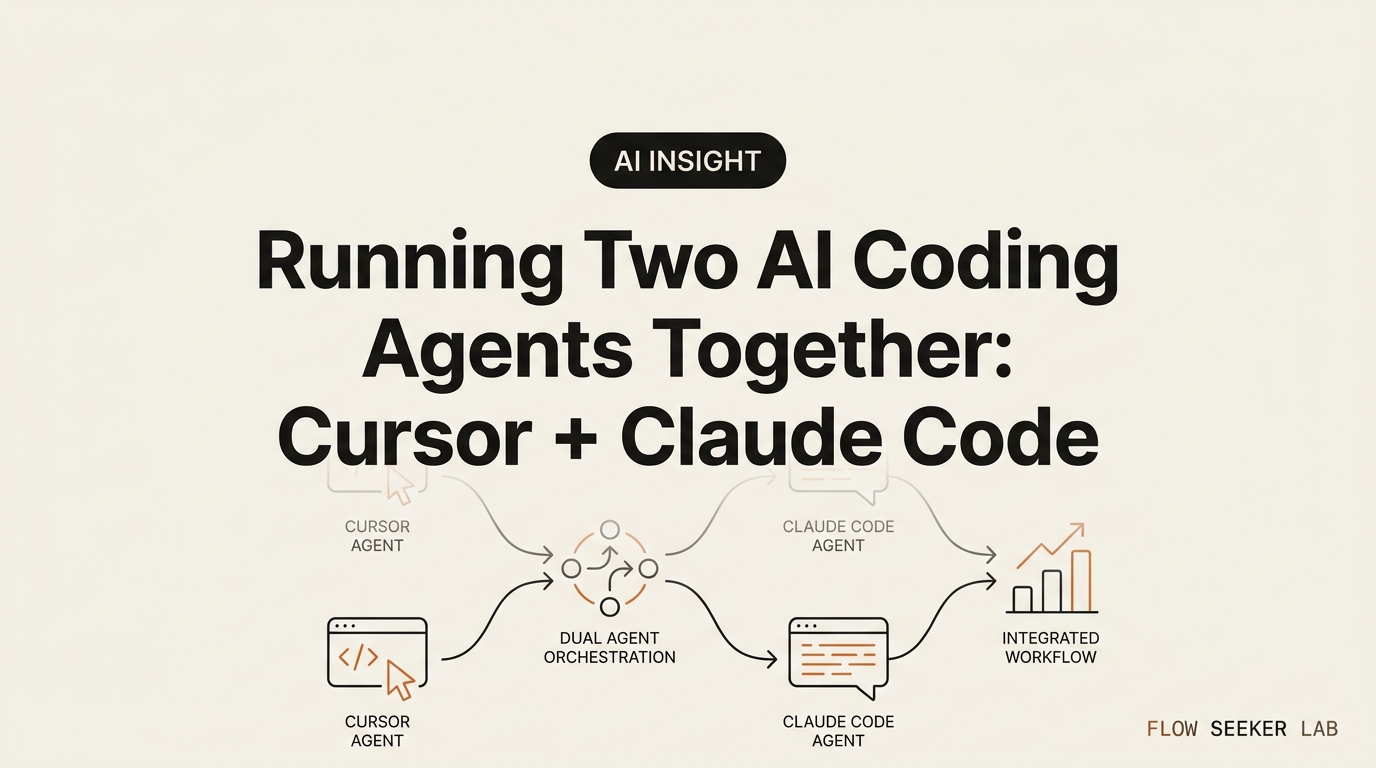
Running Two AI Coding Agents Together: Cursor + Claude Code
Running Two AI Coding Agents Together: My Cursor + Claude Code Split
I opened two windows on a Tuesday night and let both of them touch the same file. Ten minutes later, my little side project would not run, and I had no idea which agent had done what.
That night taught me the one thing nobody writes about running two AI coding agents together: the hard part isn’t setup, it’s traffic control. I’m not a developer. I don’t have a CS degree, and I still read a diff slowly, with my finger on the screen. So this is a diary, not a benchmark. I’ll walk through exactly how I ended up splitting Cursor and Claude Code by role, the evening it broke, and the boring git habit that turned two agents from a mess into a workflow.
Here’s the map: why one agent stopped being enough, the role split I landed on, what broke when I ignored it, and the optional advanced move I still barely use. If you’re still deciding which single tool to adopt, that’s a different question — I’ll point you to it below.
Night one: why one coding agent stopped being enough
I started with just Cursor. It sits inside an editor, so I could see the code, click a line, and ask it to change that one spot. For small edits that felt safe. I could watch the change land.
The wall came on a weekend. I wanted to rename a setting across a dozen files and add a small feature that touched three of them at once. In Cursor’s editor, I kept scrolling, approving, scrolling again. It worked, but I was babysitting every step. A single coding agent tied to one open file is patient but slow when the job is wide.
So I opened Claude Code in a terminal beside it. This is where the difference clicked. Claude Code doesn’t wait for me to have a file open. I describe the whole job in plain English — “rename this setting everywhere and update the three screens that read it” — and it goes off, reads the repo, and comes back with a batch of edits. One agent lives in the room I sit in. The other is a worker I send off with an errand.
That’s the moment “one agent” became “two agents with different jobs.” Not because two is trendy. Because the two surfaces answer two different questions: where exactly? versus everywhere at once?
Night three: the role split I actually use
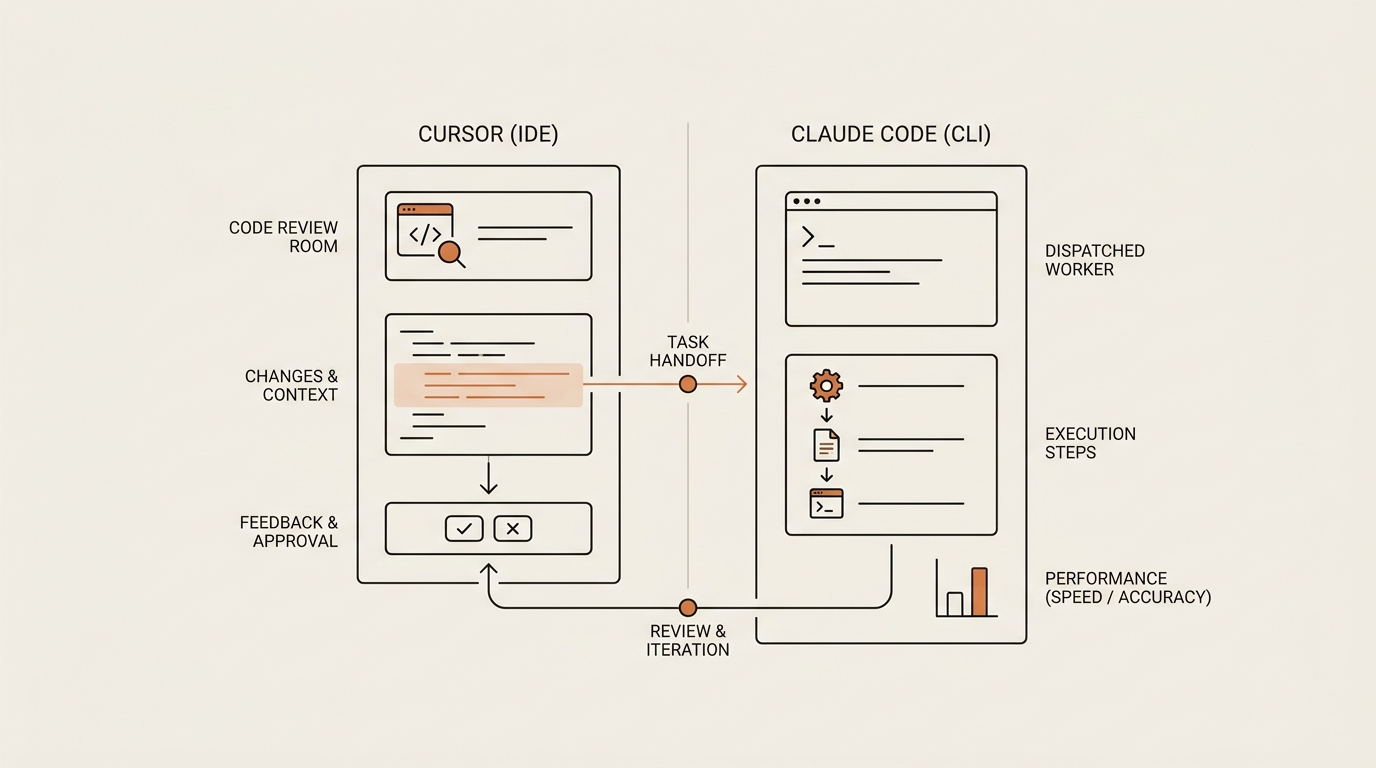
By the third session I stopped improvising and wrote the split down. The rule is one sentence: Cursor is the room I sit in and review; Claude Code is the worker I send off to do multi-file jobs. Everything else follows from that.
When a task is small and local — fix this function, rename this variable, explain this block — I stay in Cursor. I can see the change next to the code and accept it line by line. The feedback loop is short, and short loops are where a non-developer stays in control.
When a task is wide or repetitive — the same change across many files, a first draft of a new feature, a cleanup pass, writing tests — I hand it to Claude Code. It reads more of the codebase at once and returns a full set of edits I can inspect together. I’m not watching each keystroke. I’m reviewing a finished batch.
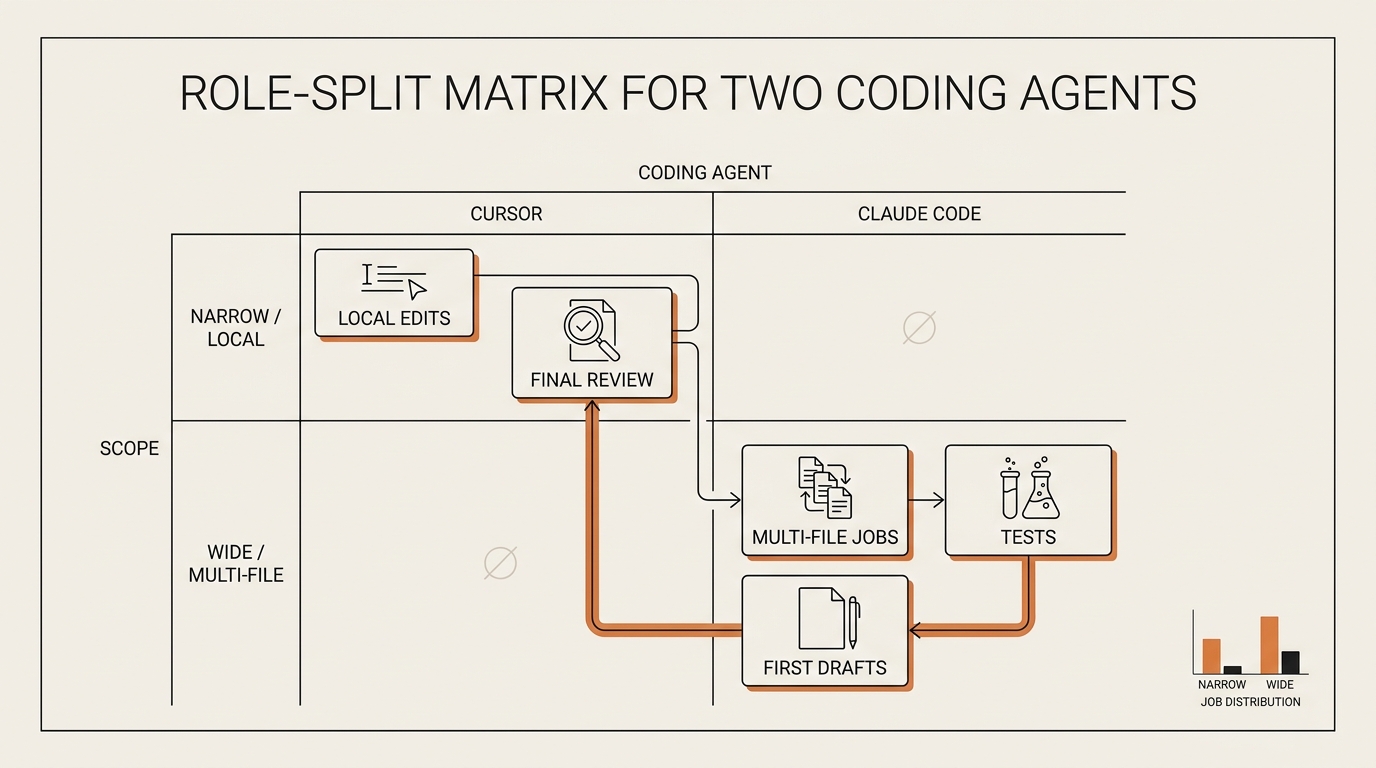
Here’s the table I keep pinned. It’s not about which coding agent is “better.” It’s about which one owns which job.
| Job in front of me | Who I hand it to | Why |
|---|---|---|
| Rename one variable, fix one function | Cursor | I want to see the edit next to the code |
| Explain what a file does, in plain English | Cursor | Inline, fast, low stakes |
| Same change across 8+ files | Claude Code | It reads the whole repo, not one open tab |
| First draft of a new feature | Claude Code | Wide job, I review the batch after |
| Write tests for existing code | Claude Code | Repetitive, boring, well-scoped |
| Final read of a diff before I commit | Cursor (my eyes) | The last check is always mine |
The last row matters most. Whatever the worker brings back, I open it in the room and read the diff before it becomes real. The room is where I stay a human with a veto.
There’s a second piece that makes the handoff calm instead of chaotic: shared instructions. Claude Code reads a CLAUDE.md file in the project root — plain-English house rules like “don’t touch the config folder” or “keep functions short.” Cursor reads its own rules file. I keep the two roughly in sync, so both agents follow the same fences. When both agents obey the same rules, the handoff stops feeling like handing your car keys to a stranger.
What broke: the night both agents edited the same file
Now the night I promised you. Early on, before the rule existed, I got greedy. I had Cursor mid-edit on a file and, impatient, told Claude Code to “clean up the whole project” — which included that same file. Two coding agents, one file, at the same time.
The result was a quiet mess. Cursor saved its version. Claude Code saved its version on top. Half of one edit survived, half of the other did, and the file ended up in a state neither agent intended. Nothing crashed loudly. It just stopped working, and the code looked plausible, which is worse. A plausible-looking broken file is the trap for someone who reads slowly.
I sat there for twenty minutes trying to reverse-engineer which line came from which agent. I couldn’t. That’s the real lesson: when two agents write to the same place, you don’t just get a conflict — you lose the ability to tell whose change was whose.
The fix was almost embarrassingly simple, and it’s the rule I’d give anyone before they touch a second agent: only one agent edits at a time, and git is the undo button. Before I hand a job to the worker, I make sure the room is idle and everything is committed. Then I send Claude Code off. When it comes back, I read the diff, and git lets me throw the whole batch away with one command if I don’t like it. No agent overwrites another, because they’re never writing at the same moment.
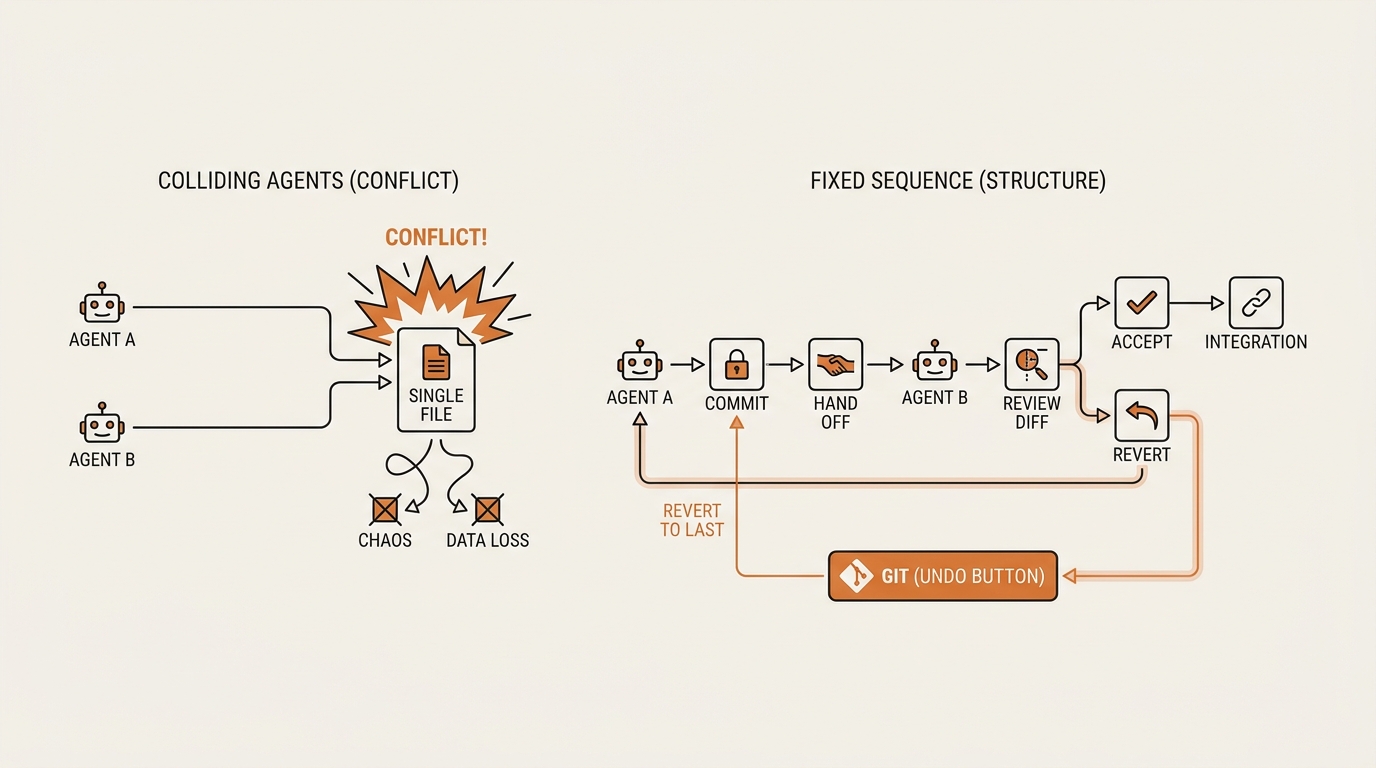
I keep it concrete now. My handoff checklist is four lines:
- Finish and accept whatever the room is doing.
- Commit, so I have a clean point to return to.
- Send the wide job to the worker.
- Read the diff before I accept — and revert with git if it’s wrong.
That’s the whole safety system. Not fancy. It just makes sure the two agents take turns instead of fighting.
Night seven: the handoff and the optional advanced move
By the end of the first week the workflow had a rhythm. Session starts in the room. Wide job goes to the worker. I review, commit, and often the next move belongs back in the room — a small tweak on top of what the worker built. The task moves to whichever surface fits the next step, not to whichever tool I happen to like.
Claude Code can pick a session back up where it left off, so I don’t lose the thread when I switch back and forth. I finish a batch, jump into Cursor to review and adjust, then resume the worker for the next wide pass. The handoff is just me deciding, each step, where does this belong — the room or the errand.
Now the advanced move I promised, and I want to be honest about it: I barely use it. If you want two agents literally running at the same time on truly separate jobs, git has a feature called a worktree. A git worktree gives each agent its own isolated copy of the project in a separate folder, so they can work in parallel without ever touching the same files. Anthropic’s own docs walk through running parallel sessions with worktrees, the broader Claude Code CLI overview covers how the worker runs, and the official git worktree documentation explains the underlying command.
Here’s my honest take as a non-developer: worktrees are real and useful, but they are not the entry price. Every dev blog treats them as step one. For me they’re step ten. You only need true parallelism when two jobs are genuinely independent — different features, different corners of the app — and you’re comfortable merging two branches back together afterward. Until then, taking turns with one commit between handoffs does the same job with a fraction of the confusion. Reach for a worktree when “one at a time” actually starts costing you time, not before.
If you want to see how each tool behaves on its own before you split them, I compared them head to head in my Claude Code and Cursor coding agent comparison — start there if you’re still deciding which one. This post assumes you’ve decided to run both.
Where this workflow falls short
I won’t pretend two agents is always the answer. Some sessions, opening the second one is pure overhead. If my whole task is small and local, Claude Code adds nothing but another window to manage. One coding agent, one open file, done.
Two agents also cost two subscriptions, and that’s a real number for a side project that earns nothing. I run both because the wide jobs genuinely save me the babysitting, but I wouldn’t tell a beginner to pay for the pair on day one. Get fluent with one. Feel the wall I hit in Cursor. Then the second agent solves a problem you can actually name.
And the deepest limit is me. Two agents don’t make me read diffs faster. They generate more code for me to review, and review is my bottleneck, not typing. On a bad night, two agents just mean twice as much to check. The workflow only helps because I forced it into turns — one writer at a time, git between them — so I’m never reviewing a mystery. Remove that discipline and two agents make things worse, not better. If you’re new to letting AI touch real work at all, my three-question filter for using AI agents at work is the gate I run every task through first.
FAQ
Can you use Cursor and Claude Code together at the same time? Yes, and it’s a common setup. The safe way is to have them take turns on the same files — one edits, you commit, then the other goes. Only run them literally at once when they’re working on separate, independent parts of the project, ideally in isolated git worktrees so they never touch the same file.
How do I run two AI coding agents at once without them clashing? Keep one rule: only one agent edits at a time, and commit to git between handoffs. Finish and accept the current agent’s work, commit, then send the next job to the other. That way no agent overwrites another, and git lets you revert any batch you don’t like.
Which one should do what — Cursor or Claude Code? Use Cursor for small, local edits you want to watch land next to the code. Send Claude Code the wide, multi-file, repetitive jobs — renames across many files, first drafts, tests. One is the room you review in; the other is the worker you dispatch. The last read of any diff is always yours.
Do I need to pay for both to run them together? To run both regularly, yes — each has its own plan. But you don’t need both on day one. Start with one coding agent, hit the wall where a single open file feels slow, and add the second only when wide jobs are the thing eating your time.
What is a git worktree, and do I need it for two agents? A git worktree is a second, isolated copy of your project in a separate folder, so two agents can work in parallel without touching the same files. You do not need it to start. Taking turns with one agent at a time works fine. Treat worktrees as an optional advanced step for truly independent parallel jobs.
Is running two coding agents worth it if I can’t read code well? It can be, but only with discipline. Two agents generate more code to review, and reviewing is the slow part for a non-developer. The turn-taking rule and git-as-undo keep you from reviewing a mystery. If you skip that discipline, two agents add confusion instead of removing it.
What I’d tell myself before night one
The mistake wasn’t running two agents. It was thinking the challenge was picking tools, when the real challenge was deciding who touches the file next. A second coding agent didn’t make me a better coder. It made me a dispatcher — and the whole job of a dispatcher is making sure two workers never grab the same box at once.
So don’t start with the fancy parallel setup. Start with one sentence: room for review, worker for wide jobs, one editor at a time, git as the undo button. If you want the mindset for letting AI write real code at all, my honest first week of vibe coding as a non-developer covers the fear I had to get over first.
Next in this series, I’m going to actually turn on a git worktree and run two agents in genuine parallel on one project — and log every place it saves time and every place it just doubles the mess. If turn-taking is the safe version, that’s the experiment that tests whether the advanced version earns its keep.
seonjae — Korean office worker documenting his transition into AI systems, agents, and vibe coding — without a CS background. Shipping in public.