My First No-Code AI Agent: Morning Briefing Build Log #1
My First No-Code AI Agent: Building a Morning Briefing in One Sitting (Build Log #1)
Last post I gave you the ten-step framework. This post is me running it on myself. I built my first no-code AI agent — a morning briefing that lands in my inbox at seven a.m. with today’s meetings and three headlines — in a single Saturday sitting, and I’m writing down every step the same day so I cannot retouch the parts that broke.
This is Build Log #1. The plan is one new agent a month, each one shipped against the framework from the pillar post, with the breakage on display.
Why a Morning Briefing Is the Right First No-Code AI Agent
I needed an agent small enough to embarrass me. That was the rule I gave readers in the pillar post, and I had to honor it here.
A morning briefing fits. It runs once a day, it has a clear output, and if it fails I notice within minutes. No customers, no real money, no Slack channel watching for it to misfire. The cost of a broken first no-code AI agent is that I pour my own coffee and read my own calendar — the same thing I did before the agent existed.
I picked Lindy as the builder. The pillar post lists it as the right starting point for personal-assistant style agents, and a morning briefing is exactly that. The underlying mechanic — a scheduled program that reads inputs, makes a decision, and acts — is the same shape the Wikipedia entry on intelligent agents describes, just dressed up in a no-code UI. I’ll cover n8n in a later build log when the agent has to do something Lindy can’t.
Step 1 — Goal (One Sentence That Actually Holds)
The goal sentence I wrote on a sticky note before I opened the browser:
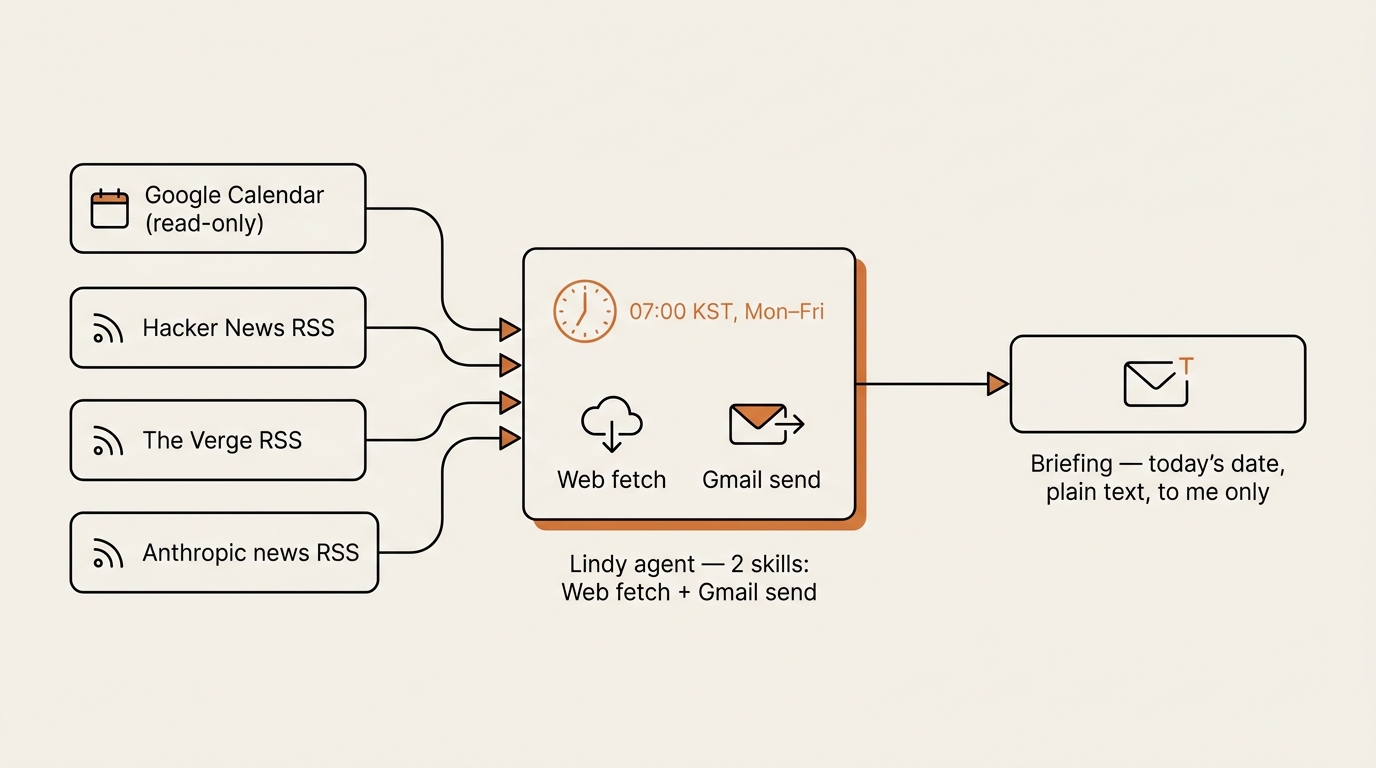
“Every weekday at seven a.m., send me one email with today’s calendar events and three headlines from each of my three RSS feeds.”
It took me four tries. The first version was “send me a morning briefing,” which is not a goal — it’s a wish. The second added “from my feeds and calendar,” which still left “what counts as a briefing” undefined. By the fourth try I had the trigger, the inputs, the output channel, and the size constraint all in one line.
What broke. I caught myself drifting into version five — “and also weather, and also a market summary, and also my Notion tasks for today.” That is exactly how a first agent dies. I crossed everything out and went back to version four.
Step 2 — Inputs (Three RSS Feeds and One Calendar)
The pillar framework calls this Inputs: where the data comes from. For me that meant three sources, no more.
- My Google Calendar (today’s events only)
- Hacker News front page RSS
- The Verge front page RSS
- Anthropic’s news RSS
The temptation was to add five more feeds. I read more than three. But the goal sentence said three feeds, and the goal sentence had already survived four rewrites. I kept the inputs honest.
What broke. Anthropic’s news RSS URL had moved at some point and the old URL I had bookmarked returned an HTML page instead of an XML feed. Lindy quietly ingested the HTML and produced a “headline” that was the page’s <title> tag. I caught it in the first test run because the headline read like a marketing page and not a news article. I replaced the URL with the current one and added a note to my goal sticky: every feed URL gets one test fetch in the browser before I wire it in.
Step 3 — Tools (What the Agent Is Allowed to Call)
In Lindy this is the Skills panel. I gave the agent exactly two:
- Gmail (send email) — to deliver the briefing.
- Web fetch — to read the RSS URLs.
I did not give it Gmail read access. I did not give it calendar write access. I did not give it Slack. Every additional skill is another way the agent can misbehave, and a morning briefing does not need any of them.
The calendar feed I handled differently — Lindy has a native Calendar skill that I scoped to read-only on my primary calendar. Read-only is the kind of guardrail that should feel obvious in writing and somehow never does until you have an agent in front of you with too many checkboxes ticked. Google’s own Calendar API guide for read-only scopes describes the same idea from the platform side — the narrowest scope is calendar.readonly, and it is the only one a briefing agent ever needs.
What broke. My first version of the agent had “Calendar (full access)” because that was the default scope Lindy offered. I noticed when I read the permission summary out loud to myself. Reading the agent’s tool list out loud is now part of my checklist. It catches things that skimming does not.
Step 4 — Decision Rules (Plain English Is Fine Here)
The pillar framework says you can write the decision rules in plain English, and that turned out to be true. The Lindy prompt I gave the agent was three short rules:
- Pull today’s calendar events. List them in chronological order with start time and title only. Omit declined events.
- For each of the three RSS feeds, take the top three headlines. Include the headline and the source name. No summaries, no body text.
- Format the email as plain text. Calendar first, then feeds. Subject line is “Briefing — ” followed by today’s date.
I did not let the model “summarize creatively” or “highlight what’s important.” Both phrases tested badly in the first two runs — the agent kept inventing context that wasn’t in the source.
What broke. Rule one originally said “list today’s events.” The agent listed everything, including a recurring event from a former employer I forgot to remove from my calendar a year ago. I added “Omit declined events” and the noise dropped to zero. The lesson: write the decision rules against what you actually want to see, not against the cleanest version of your input data.
Step 5 — Output (Where the Result Lands)
One email. Plain text. To my own address. Subject line that sorts well in Gmail search.
That was it. I considered HTML formatting. I considered a Notion entry. I considered a Slack DM to myself. I rejected all three because none of them passed the “would this make me ten percent less likely to read the briefing” test. Plain text in my inbox is what I read.
What broke. Nothing here. The simplest output is the one that does not break.
Step 6 — Trigger (Scheduled, Weekdays Only)
Lindy’s scheduler lets you pick a cron-style expression or a friendly recurrence. I used the friendly one: every weekday at 7:00 a.m. Korea Standard Time.
Setting the timezone correctly took me longer than the rest of the trigger combined. Lindy’s default was UTC. The first scheduled run fired at 4:00 p.m. local. I fixed the timezone and re-ran a test against a fake “today” to make sure the next run would land where I wanted it.
What broke. Timezone. Always timezone. I have now lost roughly four hours of my life to scheduled jobs that fired in UTC when I expected KST. I have started writing the timezone in the goal sentence so it never gets left implicit again.
Step 7 — Guardrails (The List of “Never”)
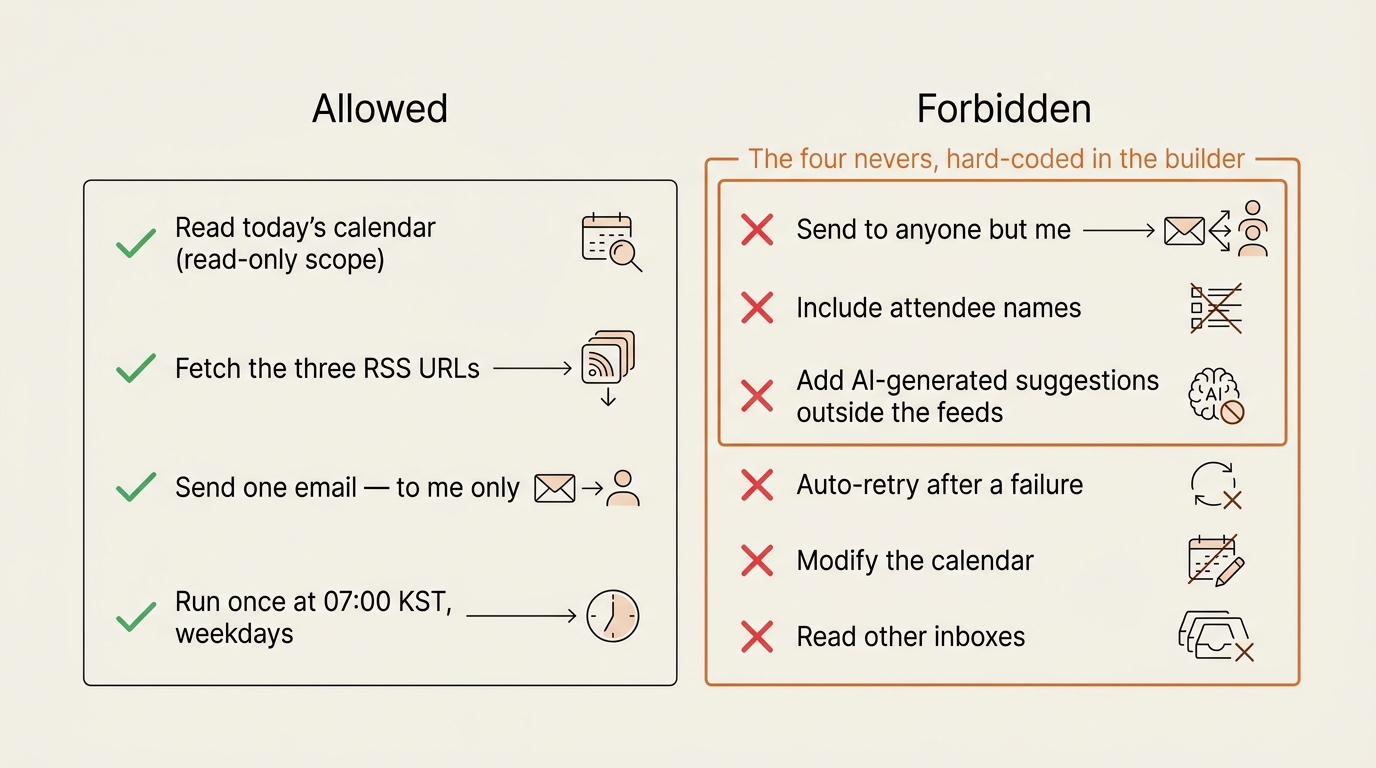
I wrote four nevers on the same sticky note as the goal:
- Never send to anyone except me. The
to:field is hardcoded to my own address. - Never include event attendee names. Privacy on shared calendars.
- Never link to anything not in the source feed. No AI-generated suggestions.
- Never run more than once per scheduled trigger. Lindy has retry logic that can fire duplicates if a step times out.
Lindy enforced the first two natively. The third was a prompt rule. The fourth required me to disable automatic retries and accept that a failed run is just a failed run — I’d rather skip a day than send two briefings.
What broke. The first test send went to my actual address, which sounds correct, but I had wanted it to go to a test address first. I had not made a test address. I made one before the second test send.
Step 8 — Test Loop (Read the Last Ten Outputs Once a Week)
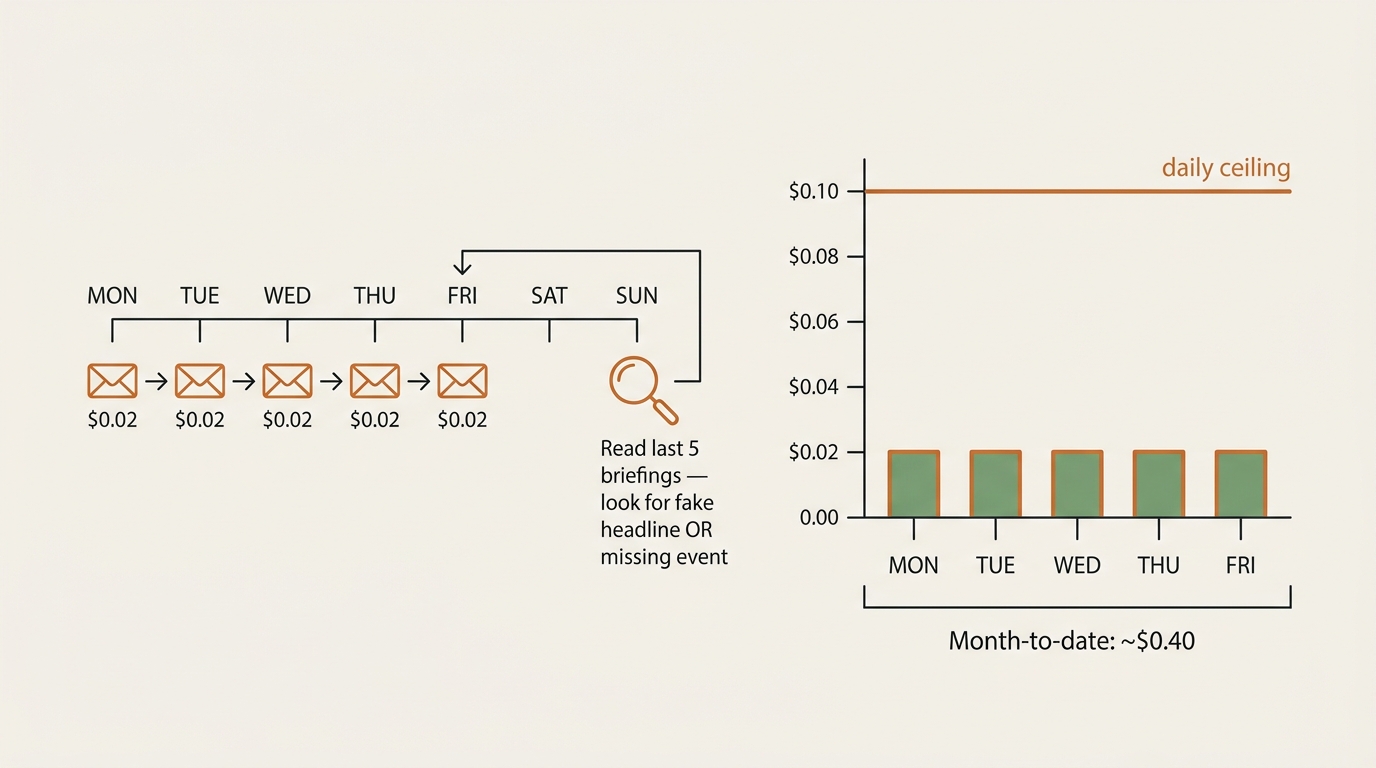
I built the test loop into the Lindy run history page. Every Sunday evening I open it, read the last five briefings end to end, and look for two specific failures:
- A headline that does not appear in the source feed when I open the source.
- A calendar event that I know happened but is not in the briefing, or vice versa.
If I find one of either, the agent gets paused on Monday morning until I can fix the source. The point of the test loop is not to be impressed by the agent. It is to find the small drift before it becomes a habit.
What broke. I almost skipped this step entirely. The agent worked on day one and I felt finished. I had to physically write “Sunday — review briefings” on the same sticky note as the goal to make myself open the run history. A test loop you do not actually run is the same as no test loop.
Step 9 — Cost Ceiling (Tokens Add Up Faster Than You Expect)
Lindy’s pricing model is task-based at my tier, but the underlying LLM calls still count, and the platform shows me a daily spend estimate. I set a cap of ten cents per day for this agent — generous for a single morning run, tight enough that a runaway loop would trip the limit before lunch.
The actual spend has settled around two cents per weekday run, which lines up with what I’d guess from the size of the prompt and the response. Over a month that is about forty cents. I can live with that.
What broke. Not yet. But the cost ceiling is the guardrail I have hit on a different project, and it is the one that I have learned to set first instead of last. The pillar post’s link to the Anthropic prompt engineering docs is the same advice in a different package: short prompts cost less and break less. The same depth-over-breadth instinct is why I stopped chasing new AI tools earlier this year and forced myself to live with the ones I already pay for.
Step 10 — Kill Switch (A Single Toggle, Not a Phone Call)
Lindy has a per-agent enable toggle. I bookmarked the page on my phone’s home screen. If the briefing ever sends something embarrassing or duplicates or hallucinates a meeting that does not exist, I can disable it from a coffee shop in two taps.
What broke. Nothing yet. I have not had to use the kill switch. But the second I had to think about where the kill switch was, I would have already missed the window when it mattered. Put the toggle one tap away before you need it.
What I Got Wrong Overall
Three honest mistakes from the build, in order of stupidity:
- I spent twenty minutes choosing a model. Lindy lets you pick the underlying LLM, and I went back and forth between two options for no good reason. The right move was to use the default, ship, and only switch if a specific failure pointed at the model. The pillar post calls this “trying to build the perfect agent on day one.” I did it anyway.
- I almost added a fourth RSS feed at the last minute. The goal sentence said three. I caught myself reaching for a fourth at the very end of the build because the agent felt “too small.” Too small is correct. Too small is the win.
- I did not set up a test address first. The first send went to my real inbox. It worked, but it would have been a bad day if it had not. The next build log will start with a test address before anything else gets connected.
The whole sitting took about ninety minutes including the breakage. I called the post title “in one sitting” because that is honest. “Thirty minutes” is the version where I write the post before I build the agent, and that is not the version I want to write.
How This Connects to the Framework
Every step of this no-code AI agent build maps one-to-one to the pillar framework. That mapping is the whole point of writing the build log alongside the build: the framework is portable, even when the no-code AI agent platform underneath it is not. That is on purpose. The framework is not a checklist for show — it is the part that survives the platform. Lindy could raise its prices or pivot tomorrow and the ten-step structure still tells me how to rebuild the same agent on n8n or Make.com in an afternoon.
The agent is replaceable. The framework is the durable asset.
Frequently Asked Questions
How long does a first no-code AI agent actually take to build? About ninety minutes for me including the parts that broke. Roughly thirty minutes of wiring, thirty of fixing the timezone and the bad RSS URL, and thirty of staring at the model picker for no reason. Plan a half-day if you have never opened a builder before.
Do I need a paid Lindy plan to ship a morning briefing agent? Not for one daily run. The free tier covers a single agent at low frequency. I moved to a paid tier later for a different project, not for this one.
Why not just use Google’s existing morning summary features? I tried. The native Google summary doesn’t combine my RSS feeds with my calendar in one place, and it does not let me write the decision rules. The point of building the agent was to learn the loop, not to save the ninety minutes.
What model does the agent run on under the hood? A general-purpose chat model in Lindy’s default tier. I deliberately stopped caring which one after the first build. Model swaps are a later optimization once the agent does something the default cannot handle.
Can I copy this no-code AI agent build exactly? You can copy the structure. The feed URLs and the calendar will obviously be yours. The one thing worth copying verbatim is the goal sentence rule — write it down before you open the builder, and rewrite it until it survives four attempts.
What is the cheapest mistake I should avoid? Skipping the test loop. The agent that works on day one and never gets reviewed becomes the agent that drifts into nonsense on day forty and you only notice on day sixty.
Closing — What Ships Next
The email triage agent was supposed to be Build Log #2. When I sat down to build it, I stopped — the cost of a mistake in a real inbox was too high to ship on a Saturday the way this briefing was. So it became a Framework Deep Dive instead: the email triage AI agent I refused to build, and the read/label/draft permission boundary it has to pass before I’ll let it touch anything.
If you want the framework reference open in a second tab while you build your own, the pillar post lives here, and every new build log lands in the AI Agent Lab under the same series number.
Frameworks, not forecasts. Ship the no-code AI agent that embarrasses you first.
seonjae — Korean office worker documenting his transition into AI systems, agents, and vibe coding — without a CS background. Shipping in public.
Published 2026-05-14 · Updated 2026-05-28 · AI Agent Lab · Build Log #1 · flowseekerlab.io