How Crypto Clipboard Clipper Malware Swaps Wallet Addresses
How Crypto Clipboard Clipper Malware Swaps Wallet Addresses
It was 11pm. I copied a receiving address, glanced at the first four and last four characters, and my thumb hovered over Send.
That three-second glance is the whole game. This post explains how crypto clipboard clipper malware swaps wallet addresses in that exact window, and hands you the paste-check habit I use now.
Here’s the shape of it: how the swap works in plain terms, why my “first-4/last-4” shortcut was the trap, how this differs from the on-chain tricks I’ve already covered, and a verify-before-send routine you can run tonight.
The three seconds between Ctrl-C and Send
I hold crypto in a hot wallet like a lot of people reading this. No CS degree, no security-engineer instincts. I copy an address, I paste it, I send. That reflex is the attack surface.
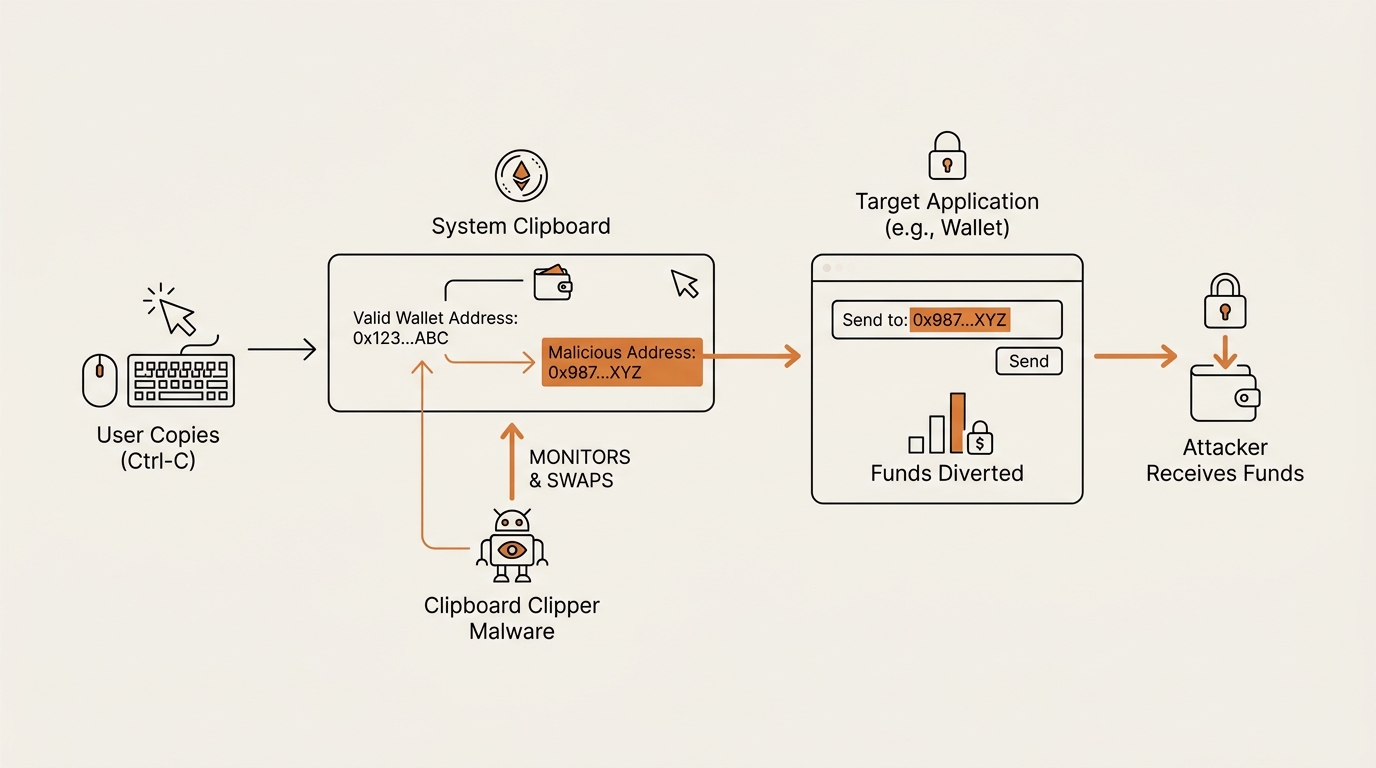
Clipboard clipper malware lives on your machine. It watches your clipboard, and when it spots text shaped like a wallet address, it quietly replaces what you copied with the attacker’s address. You paste. You send. The money goes to them.
The part that stings: nothing on your screen looks wrong. The wallet UI shows a valid address. It’s just not the one you copied. I never saw the swap happen, because the swap happens between copy and paste, where I stop looking.
That gap — Ctrl-C on one side, Send on the other — is three seconds where I trust my own eyes and my own habit. The malware is built to survive exactly that trust.
How clipboard clipper malware actually works
Let me break down the mechanism without the analyst jargon, because most write-ups aim at security teams, not someone with MetaMask open at midnight.
A clipboard clipper is a small background program. It does one boring thing on a loop: it reads your clipboard, checks it, and — if it matches — rewrites it. It doesn’t need your password. It doesn’t need to open your wallet. It only needs the clipboard.
Think of it like a mail sorter who quietly rewrites the address on every envelope you hand over that looks like it’s carrying money. You sealed the envelope. You addressed it. The sorter changes the destination in the two feet between your desk and the outbox, and hands it on. Nothing about the envelope in your memory looks wrong, because the change happened after you looked.
Here’s the loop in four steps:
- Poll the clipboard. The malware checks your clipboard contents on a tight interval — often a few times a second. Whatever you copy, it sees.
- Match the shape. It runs a pattern check (a regular expression, per chain) that recognizes text shaped like a Bitcoin, Ethereum, or other wallet address. Addresses have predictable formats, so this is easy.
- Swap in a lookalike. It replaces your copied address with one the attacker controls. Good clippers keep a bank of addresses per chain and pick one whose first and last characters resemble the real one.
- Wait. It puts the swapped address back on your clipboard and does nothing else. You paste. You send. It never touches your keys or your screen.
That’s it. It’s not a genius hack. It’s a patient one. The families researchers name — ClipBanker, Laplas Clipper, CryptoClippy — differ in delivery and polish, not in that core idea. Microsoft’s security team documented a 2026 Windows crypto clipper that added Tor and worm-like spreading for persistence, but the address-swap heart is the same simple loop. Palo Alto’s Unit 42 wrote up CryptoClippy targeting Portuguese speakers with the same regex-per-chain approach.
The subscription angle is what makes these common. Laplas Clipper was sold as a service with a control panel, so an attacker doesn’t need to write anything — they rent the swap. That’s the same rental logic behind the drainer kits I’ve covered, and it’s why “clipper” isn’t a rare, targeted threat. It’s a commodity, shipped to whoever pays.
How does it get on your machine in the first place? The usual doors: a trojanized installer for cracked or “free” software, a fake browser extension, a malicious ad, or a loader that drops it quietly. You don’t get a warning. You get a program that watches your clipboard forever. The delivery is the boring part attackers automate; the payoff is that one quiet loop, running until the day you send.
One clarification, because people conflate the two: this is not cryptojacking. Cryptojacking hijacks your device to mine crypto — it steals your CPU. A clipper steals your transaction. Different goal, different defense. If your fan is loud, that’s mining. If your address changed at paste, that’s a clipper.
Where my instinct was wrong: the first-4/last-4 trap
Here’s the “What broke” part, and it’s the emotional core of this post.
For years, my address check was: read the first four characters, read the last four, if they match what I expect, send. Fast. Felt safe. It’s the habit half the people I know use.
It’s exactly the habit a lookalike clipper is built to defeat.
Attackers can’t produce an address that matches the whole real string — that’s cryptographically out of reach. But they don’t need the whole string. They generate throwaway addresses until they find ones whose first few and last few characters resemble a target. Then they swap those in. My four-and-four glance was checking precisely the characters they optimized to fool.
Back to my 11pm near-miss. The ends matched. My thumb was on Send. What stopped me wasn’t cleverness — it was that I’d started forcing myself to read a longer chunk, and the middle didn’t sit right. I re-copied from the source, pasted again, and the middle was different the second time. That’s the tell of a clipper: paste twice, and the address changes or the middle drifts. I got lucky because a slower habit caught what a fast one waves through.
I want to be honest about why the shortcut existed. Reading forty-odd characters at midnight is genuinely annoying, and the ends are the part your brain can hold. So the four-and-four glance felt like a reasonable trade — fast, and it caught the obviously-wrong pastes. It just happened to be blind to the exact thing a lookalike clipper produces. The trade I made was real; I’d just priced the risk at zero when it wasn’t.
The lesson wasn’t “check harder.” It was “the shortcut I trusted is the shortcut they target.” Speed at the paste step is not efficiency. It’s the vulnerability. That’s the same pattern I ran into with token approval exploits — the convenience step is the one attackers build around, because convenience is where you stop looking.
Host-side malware vs on-chain tricks: not the same threat
This is the distinction the vendor posts skip, and it’s the one that actually changes what you do.
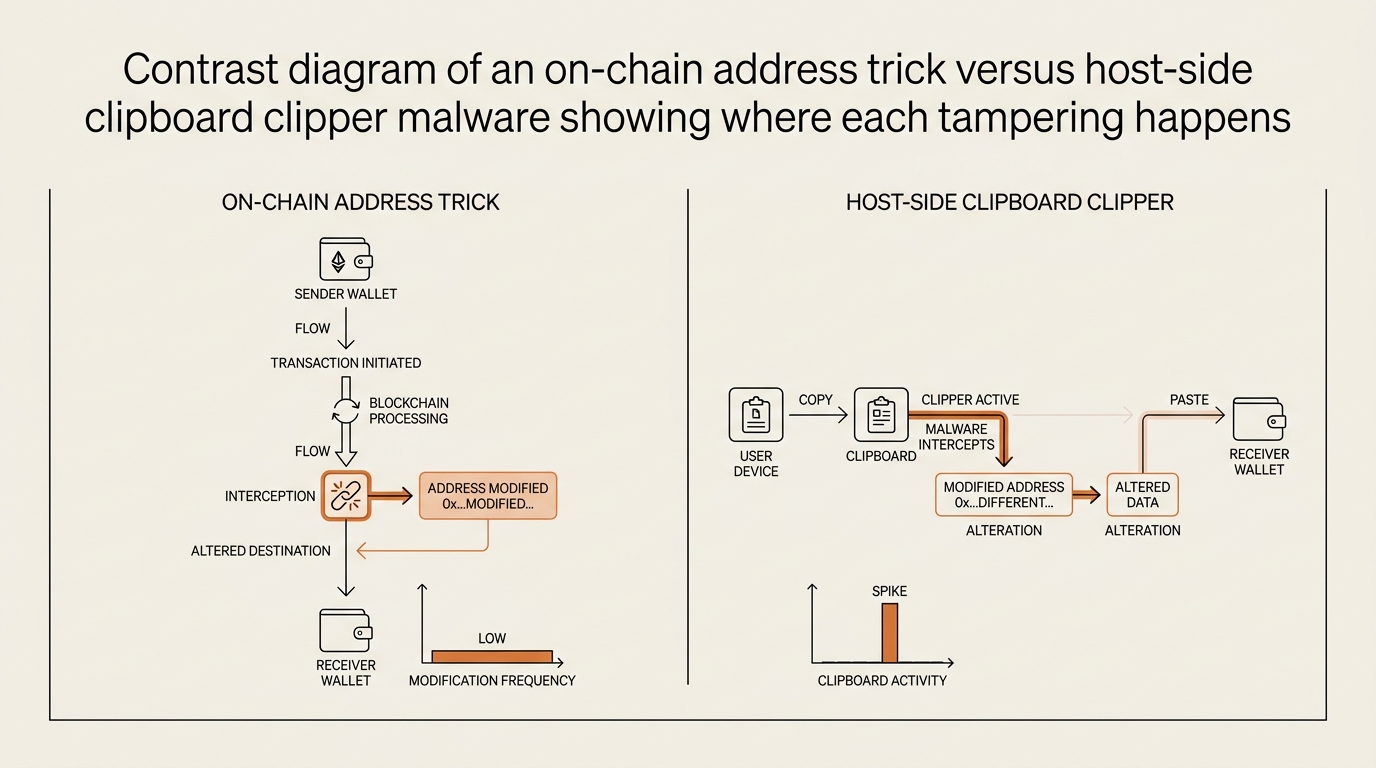
I’ve written about on-chain tricks before. An address poisoning scam drops a lookalike address into your transaction history so you copy the wrong one later. A zero-value transfer scam fakes a transfer entry for the same reason. Those are tricks played on the blockchain’s public record. Your defense there is: never copy an address from your own history.
Clipboard clipper malware is a different animal. It doesn’t touch the chain. It lives on your device and edits your clipboard. You could copy the address from a perfectly clean, trusted source — a friend’s message, an exchange page — and the malware still swaps it in transit. No amount of on-chain vigilance helps, because the tampering happens locally, after the copy and before the paste.
| Dimension | On-chain trick (poisoning / zero-value) | Host-side clipper malware |
|---|---|---|
| Where it lives | The public blockchain record | Your own device |
| What it tampers with | Your transaction history | Your clipboard, at paste |
| How you get exposed | Copying an address from history | Copying any address while infected |
| Primary defense | Never copy from history; use an address book | Verify the full address; keep the device clean |
| Does a clean source save you? | Yes — a trusted source is safe | No — the swap happens after you copy |
Why does this matter? Because if you only defend against poisoning, you’ll feel safe and still lose funds to a clipper. They’re a family — the wallet drainer scams I covered earlier are a third branch — but each one enters through a different door. Guard one, not all three, and you’ve locked the front while the side window is open.
The verify-before-send habit I use now
Frameworks, not forecasts. I can’t tell you your device is clean or infected. I can give you a repeatable routine that makes the swap fail even when it isn’t.
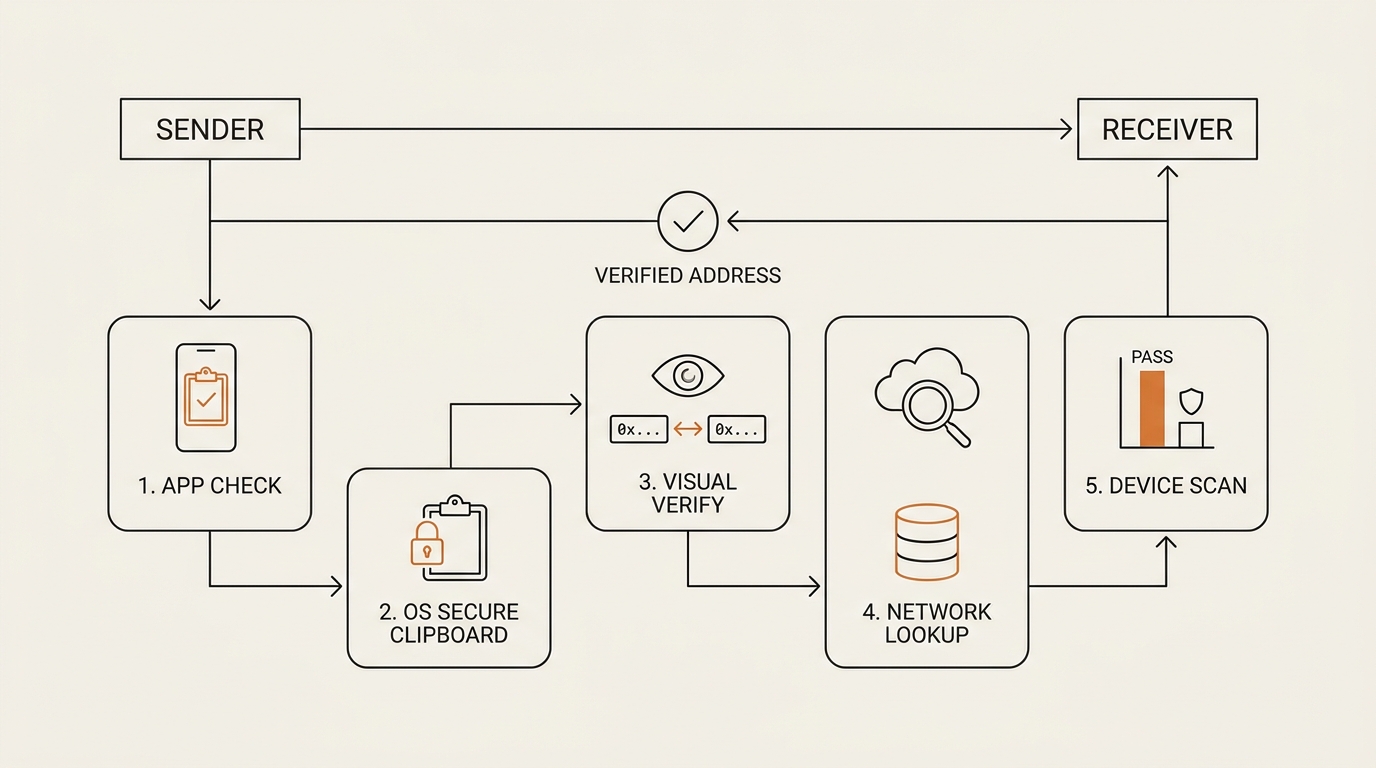
The whole idea is to move the check away from “trust my eyes” and toward “make the swap unsurvivable.” Five layers, in the order I run them:
- Verify a longer chunk, not the ends. For any real send, read the first six and last six characters — better, spot-check the middle too. For a large transfer, compare the entire string, character by character, against the source. The ends are what attackers optimize; the middle is where they lose.
- Send a tiny test transaction first. Move a trivial amount, confirm it landed at the intended address on the receiver’s side, then send the rest. A few cents of fees is cheap insurance against an irreversible mistake. This is the single habit that would have saved most clipper victims I’ve read about.
- Use an address book / whitelist. Save known addresses once, verified, and reuse the saved entry instead of copy-pasting each time. Some exchanges let you whitelist withdrawal addresses so funds can only go to pre-approved destinations. A clipper can’t swap what you never paste.
- Confirm on the hardware wallet screen. If you sign on a hardware wallet, read the address on the device’s own screen, not the computer’s. The device shows the actual destination it’s signing. Malware on your PC can’t rewrite the hardware screen. This is why I keep pushing the hardware wallet checklist as the backbone of self-custody.
- Keep the device clean. A clipper has to run to work. Install software only from official sources, skip cracked apps and sketchy extensions, and let reputable security tools do their job. I’m not ranking a product here — categories, not picks. The habit is: reduce what runs in the background.
Notice what layers 2 through 4 have in common. They don’t ask you to out-see the malware. They route around your eyes entirely — a test send, a saved entry, a device screen the PC can’t touch. That’s the point. Human verification is the layer clippers are designed to beat, so I lean on the layers that don’t depend on it.
If you want a paste-check you’ll actually repeat: copy the address, paste it, then paste it a second time into a notes app. If the two pastes differ, stop — that’s a clipper. If they match, verify a longer chunk, send $1, confirm, send the rest.
Where this habit falls short
I won’t pretend the routine is airtight, because that’s the kind of promise that gets people burned.
A test transaction confirms the address, but it costs a little in fees and adds a step you’ll be tempted to skip when you’re rushing. The 11pm version of me is exactly the one who skips it. The habit only works if it survives being in a hurry, so I made mine non-negotiable for anything above pocket change and let small sends slide with a longer-chunk check.
An address book protects reused destinations, but the first time you save an address, you’re back to verifying by eye. And a hardware wallet screen is strong, yet plenty of us still send from a hot wallet where there’s no separate screen to trust. No single layer covers everything — that’s why it’s five, not one.
FAQ
What is clipboard clipper malware in crypto? It’s malware on your own device that watches your clipboard and swaps a copied wallet address for the attacker’s. When you paste and send, funds go to them. It’s also called a clipboard hijacker or clipper, and it targets the copy-paste habit rather than your keys.
How does crypto clipboard clipper malware swap my wallet address? It polls your clipboard several times a second, pattern-matches text shaped like a wallet address, and replaces it with a lookalike the attacker controls — often one with matching first and last characters. The swap happens silently between your copy and your paste.
How do I know if I have clipper malware on my device? The classic tell: copy an address, paste it twice, and compare. If the address changes or the middle drifts between pastes, something is rewriting your clipboard. Unexplained slowdowns after installing cracked software or unknown extensions are another warning sign worth investigating.
Can a hardware wallet protect me from clipboard hijacking? Largely, if you use it right. A hardware wallet shows the real destination address on its own screen, which malware on your computer can’t rewrite. Read and confirm the address on the device screen, not the PC, and the swap fails at the moment of signing.
Does clipper malware steal my seed phrase or private key too? Not by itself — a pure clipper only swaps addresses at paste. But it often arrives bundled with other malware, and some strains also try to exfiltrate seed phrases and keys. Treat an infected device as fully compromised and move funds from a clean machine.
How is clipboard clipper malware different from address poisoning? Address poisoning is an on-chain trick that plants a lookalike address in your transaction history so you copy the wrong one. A clipper is host-side malware that edits your clipboard directly. One tampers with the blockchain record; the other tampers with your device. Different door, different defense.
The reflex is the real target
The uncomfortable takeaway: the chain isn’t broken, my wallet wasn’t broken, and even my eyes weren’t broken. My reflex was — the fast four-and-four glance I’d trusted for years. Clipboard clipper malware doesn’t beat cryptography. It beats a habit. So the fix isn’t a smarter check; it’s building a slower one that survives being in a hurry, and leaning on the layers that route around my eyes entirely.
Next in this Crypto Safety series, I’ll trace a real address swap on a block explorer — following where a swapped transaction actually landed, so the abstract “funds go to them” becomes something you can read line by line.
seonjae — Korean office worker documenting his transition into AI systems, agents, and vibe coding — without a CS background. Shipping in public.