Claude Code vs Cursor Coding Agent Comparison 2026
Claude Code vs Cursor Coding Agent Comparison 2026: The Axis I Got Wrong
I picked my first AI coding tool the way I pick a lunch spot near my Seoul office — on price and a friend’s hype. That was the mistake. This Claude Code vs Cursor coding agent comparison 2026 is the correction, written for someone like me: I pay for Claude Pro and ChatGPT Plus, and I still cannot read the code either tool writes. Here’s the axis I chose on first, why it told me nothing, and the axis that actually decides it.
Both tools start at $20 a month. When I saw that, I thought the pricing page had settled the question for me. It hadn’t. The number that matters for a non-developer isn’t the headline price at all.
The wrong axis: $20 and a hype thread
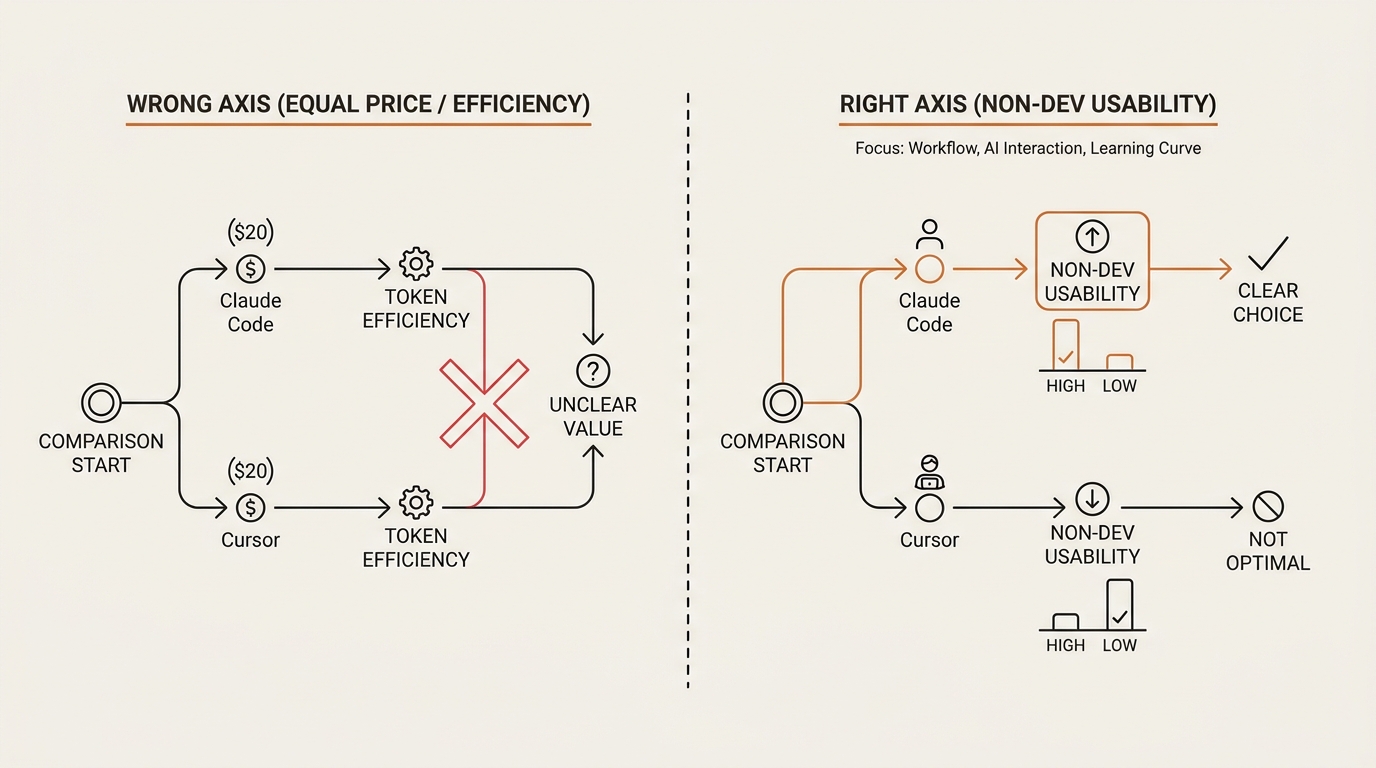
My first filter was embarrassingly simple. In my head, the whole Claude Code vs Cursor question was a price fight. Claude Code costs $20. Cursor costs $20. A thread I trusted said Claude Code “uses fewer tokens,” so cheaper-to-run must mean better-for-me. I signed up on that logic and moved on.
Here’s the thing that took me a month to see: identical entry prices told me nothing. Two tools priced the same are not the same product. The $20 is the door fee, not the experience inside.
And “fewer tokens” is a developer’s worry, not mine. I don’t run these tools at industrial scale. I run one small project at a time, in the evening, after work. Token efficiency is a real axis — for someone shipping a real codebase. For me it was a proxy I borrowed because I didn’t know what else to measure.
The token claim itself is softer than the thread made it sound. One independent test found Claude Code used roughly 5.5x fewer tokens on identical tasks. That’s a single third-party benchmark, not a law. I had built my whole choice on a number I couldn’t verify and a price that was the same on both sides.
What the $20 actually buys on each side
So I went back and read both pricing pages slowly, the way I should have the first time. In a Claude Code vs Cursor read, the entry tier is the same number. Everything above it and around it is different.
Claude Code is a terminal tool. You type instructions in a command line, and it edits files, runs commands, and delegates the work. It also plugs into VS Code and JetBrains. It runs Claude models only — Opus 4.8 when I want the strongest reasoning, Sonnet 5 as the balanced default, Haiku 4.5 when I want speed. Its usage shares a budget with my Claude Pro account, with session and weekly caps rather than a topped-up wallet.
Cursor is a different shape. Built by Anysphere, it’s a fork of VS Code — a full visual editor with a file tree, an agent panel, and inline diffs you can eyeball. Its Agent mode plus its own Composer 2.5 model do the heavy lifting, and it routes to Claude, OpenAI, or Gemini depending on the job. The $20 Pro tier comes with a monthly credit pool of roughly the same value, plus unlimited use of its “Auto” mode.
Read that back. One is a command line that runs one company’s models. The other is a visual editor that routes many. The $20 was hiding two completely different bets.
Here’s the tier map I wish I’d read on day one, framed around what a non-developer actually feels, not what a team lead budgets.
| Axis (non-dev lens) | Claude Code | Cursor |
|---|---|---|
| Maker | Anthropic | Anysphere |
| Entry price | Pro $20/mo | Pro $20/mo (~$20 credit pool + Auto) |
| Higher tiers | Max 5x $100, Max 20x $200, plus API | Pro+ $60, Ultra $200, Business ~$40/seat |
| Free tier | No standalone free tier | Hobby (free, limited requests) |
| Interface | Terminal + VS Code / JetBrains | VS Code fork (full GUI) |
| Models | Claude only (Opus 4.8 / Sonnet 5 / Haiku 4.5) | Routes Claude / OpenAI / Gemini + Composer 2.5 |
| Cost shape | Session / weekly caps | Credit-pool burn, then overage |
| When it breaks | Terminal error text | File tree + inline diff you can see |
I’m keeping the exact caps and credit mechanics deliberately loose here, because both shift often. As of mid-2026 these are the shapes; for the current numbers, read Anthropic’s pricing page and Cursor’s pricing docs directly. Verify at the source, not off a comparison post — including this one.
The axis that actually decides it: what you see when it breaks
Here’s the reframe that fixed my thinking. In a Claude Code vs Cursor decision for a non-developer, the deciding question is not “which is cheaper to run.” It’s “when this breaks and shows me an error I can’t read, which tool lets me recover?”
That’s recoverability. And it splits these two tools cleanly.
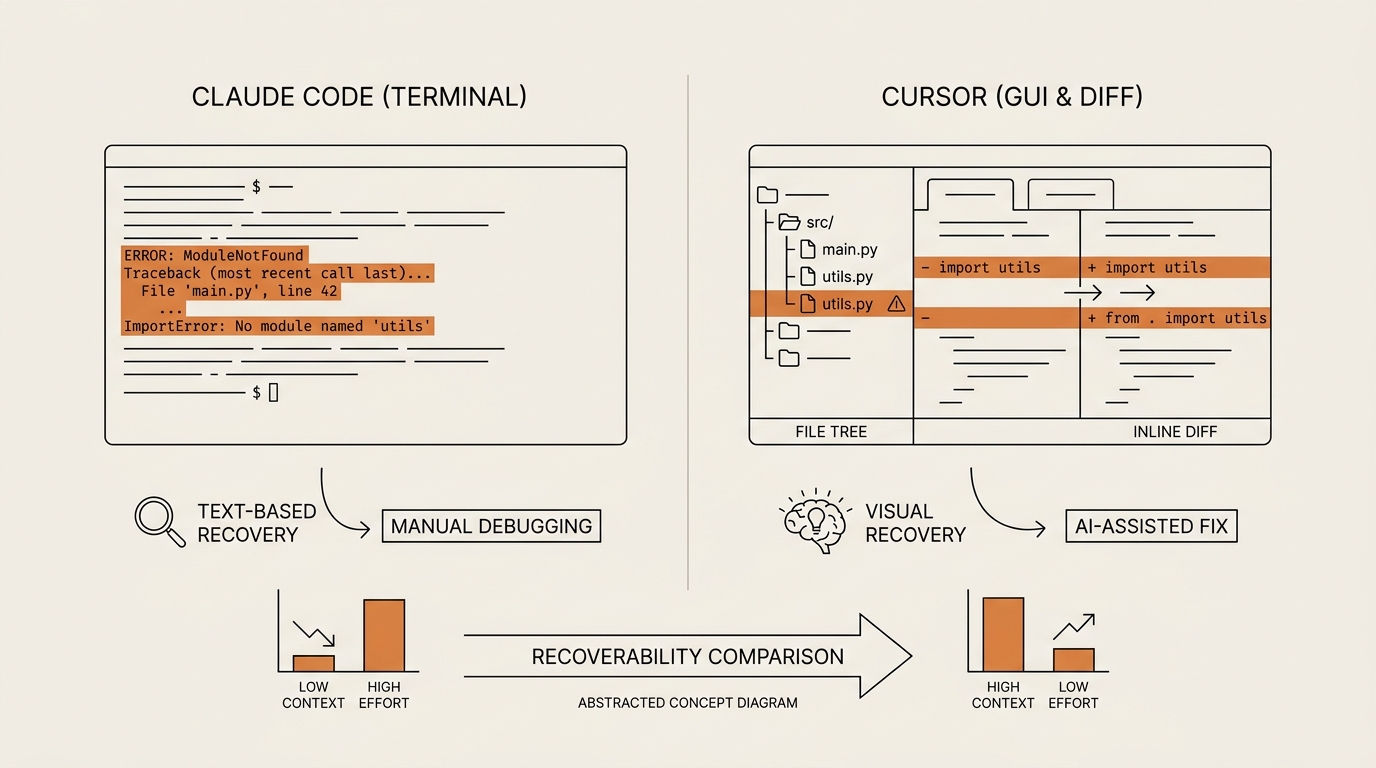
Cursor gives me a visual anchor. When a build fails, I see the file tree light up, a diff highlighted in red and green, a preview that stopped rendering. I can’t read the code, but I can point. I can tell the agent “the change you made to this file broke the page” because I can see which file changed. The GUI is a safety net for exactly the thing I lack: the ability to read what happened.
Claude Code hands me a terminal. When it breaks, I get error text scrolling in a black window. No file tree lighting up. No diff to point at. For someone who reads code, that stream is information. For me, it was a wall.
But — and this is the part the beginner-facing posts miss — the terminal’s delegation model can be more intuitive for how I actually think. I think in outcomes: “make the login page work,” not “edit line 42.” Claude Code takes an outcome and goes. Cursor sometimes wants me to steer at the file level, which assumes I know which file to open. When I don’t know, delegation wins. When it breaks, visibility wins.
So recoverability isn’t a single winner. It’s a fork based on how you fail: do you want to see the failure (Cursor) or re-describe the outcome and let the tool retry (Claude Code)?
This is the same lesson I hit in my honest first week of vibe coding — you’re not learning to code, you’re learning to direct code, and the tool that lets you recover from a mistake matters more than the one with the prettier benchmark.
The second axis I ignored: cost predictability, not token count
The other thing I mispriced was, well, price — the shape of it. The Claude Code vs Cursor cost story is not a single number; it’s two different meters.
I fixated on tokens. The axis I should have watched is predictability. Can I tell, before the month ends, roughly what this will cost and when it will stop?
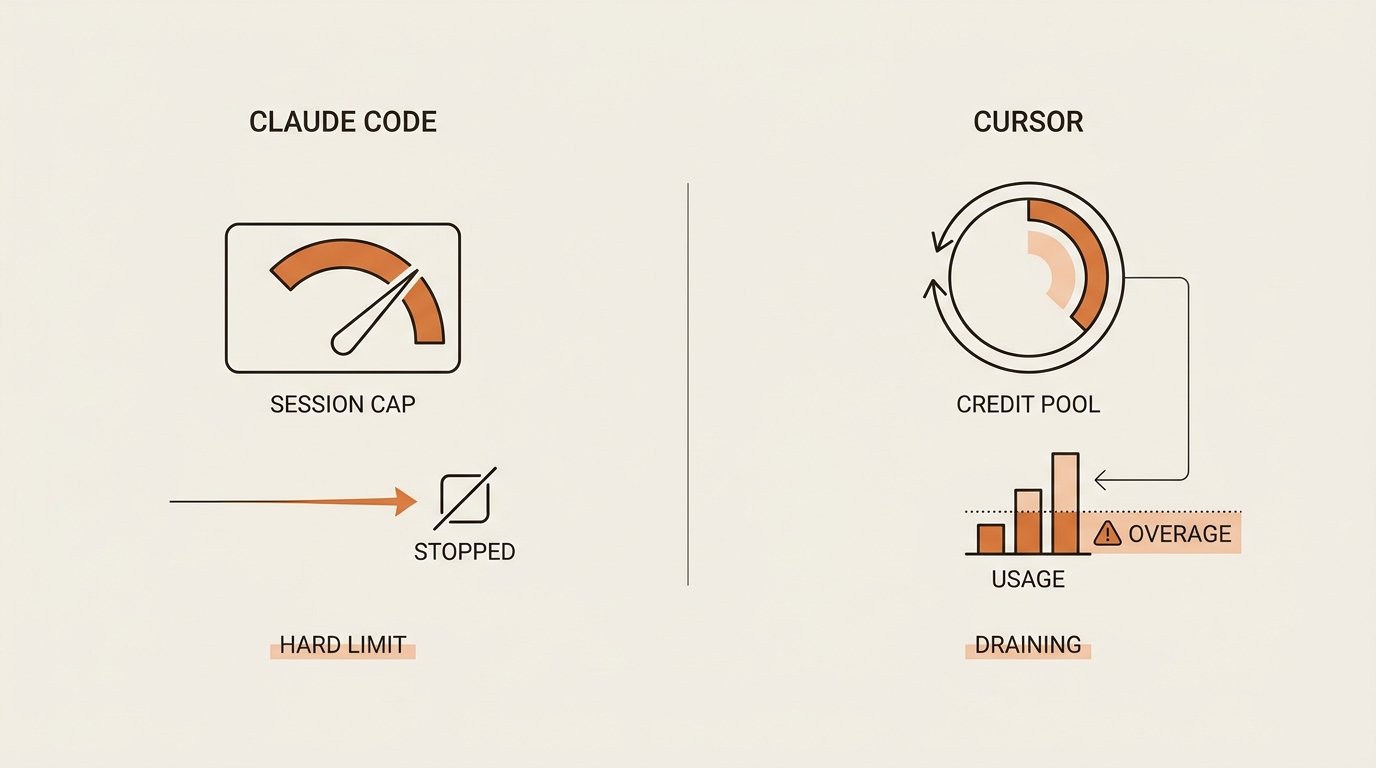
Cursor’s $20 Pro tier runs on a credit pool. You spend down a wallet as the agent works. Heavy sessions burn it faster, and when it’s gone you’re into overage or you stop. That’s flexible, but for a nervous non-developer it means the meter is always running and I have to watch it.
Claude Code, on its Pro tier, shares my Claude budget with session and weekly caps. When I hit a cap, it stops. That felt annoying the first time. Then I realized a hard stop is a guardrail. A cap is a cost ceiling I didn’t have to build. It won’t quietly drain a wallet while I’m distracted in a meeting.
Neither model is better in the abstract. But “predictable ceiling” and “flexible pool you must watch” are different anxieties, and for someone learning, I’d rather the tool cap me than trust myself to watch a meter. This is the same “pick the failure mode you can survive” logic I used when comparing open-source LLM tools for indie builders — the cost you can predict beats the cost that’s technically lower.
One neutral write-up worth reading before you commit is DataCamp’s comparison, which walks the feature set without a vendor’s thumb on the scale.
What broke: the terminal error I couldn’t read
Here’s the evening that taught me all of this the hard way.
I’d chosen the terminal tool on my price-and-hype logic. I asked it to add a small feature to a toy web page. It worked for a while, printed a lot of text, then stopped on a red line I still can’t fully parse — something about a module and a path. I sat there staring at a black window.
I couldn’t tell it what went wrong, because I couldn’t read what went wrong. I couldn’t point at a file, because the terminal showed me no files. I retyped my request three times, hoping the outcome-based framing would carry me past a problem I couldn’t name. It didn’t. I closed the laptop and went to bed annoyed.
The next weekend I ran the same idea in the GUI tool. It broke too — but this time the file tree flagged the changed file, and the diff showed me two lines highlighted. I still couldn’t read them. But I could copy them back and say “this specific change broke it.” That one sentence — the one the terminal never let me write — got me unstuck in a minute.
That’s when the axis flipped in my head. My problem was never token count. My problem was that I’d bought a tool whose failure mode I couldn’t survive. What a GUI would have shown me on night one was: which file, which change, where to point. The terminal gave me nothing to point at.
I want to be honest about the limits of this story. This is my experience as a non-developer, not a benchmark. A developer would read that terminal error in seconds and prefer the delegation. My “wall” is their “signal.” Your mileage depends entirely on whether you can read the thing that broke.
The decision rule I use now
So I stopped asking “which is better” and wrote myself a rule. Here’s the 8-point filter I run before settling a Claude Code vs Cursor choice, or deciding to run both.
- Can I read code? If yes, ignore most of this — pick on workflow, not recoverability.
- When it breaks, do I want to see the failure or re-describe the outcome?
- Do I think in files, or in results?
- Do I want a hard cost cap, or a flexible pool I’ll watch myself?
- Do I need many models (Claude, GPT, Gemini), or is Claude alone fine?
- Am I comfortable in a terminal, or do I need a visual editor?
- Is this my daily driver, or an occasional heavy-lift?
- Can I afford to run both at roughly $40 a month?
That last point is the honest answer for a lot of us. Many people run both: the terminal tool for heavy delegation, the GUI tool for daily editing and — crucially — for seeing what broke. At roughly $40 a month combined, that’s a real option nobody framed for me from a non-developer’s budget lens.
My personal rule, today: if you can’t read code, start with the GUI tool, because recoverability beats delegation while you’re still learning to point. Add the terminal tool later, when you can survive its silence. That’s not a verdict on which is “the one.” It’s a sequence based on what I can actually recover from.
For where a tool like this fits into your actual job, I mapped a separate filter in how to use AI agents at work — same instinct, different decision.
FAQ
Is Claude Code or Cursor better for beginners and non-developers? Cursor’s GUI is gentler for beginners. Its file tree and inline diffs give you something to see and point at when a build breaks. Claude Code’s terminal is a steeper start, though its “describe the outcome” delegation suits people who think in results rather than in files or lines of code.
Can you use Cursor without knowing how to code? Mostly, yes, for simple builds in plain English. You direct the agent and eyeball the visible changes. You’ll hit walls where real code knowledge is needed — reading an error, judging a fix, knowing which file matters. As people say, you’re not learning to code, you’re learning to direct code.
Do I need to know the terminal to use Claude Code? Yes, largely. Claude Code assumes basic comfort with a command line, so the learning curve is medium to high for a non-developer. It also runs inside VS Code and JetBrains, which softens things, but the core experience is text in, text out, with no visual file tree to anchor you when something fails.
How much does Claude Code cost versus Cursor in 2026? Both start at $20 a month. Above that they diverge: Claude Code offers Max 5x at $100 and Max 20x at $200 plus API usage, while Cursor offers Pro+ at $60, Ultra at $200, and Business seats near $40. Check the official pages, since caps and credits shift often.
Can I use Claude Code and Cursor together? Yes, and many people do at roughly $40 a month combined. A common split is the terminal tool for heavy delegation and the visual editor for daily edits and for seeing what broke. For a non-developer, running both buys you delegation and recoverability at once, instead of forcing a single trade-off.
Which uses fewer tokens or is cheaper to run, Claude Code or Cursor? One independent test found Claude Code used roughly 5.5x fewer tokens on identical tasks. Treat that as a single third-party claim, not a rule. For a non-developer running small projects, cost predictability — a hard cap versus a credit pool you watch — matters more than raw token efficiency.
Does Cursor use Claude models? Yes. Cursor routes to Claude, OpenAI, and Gemini, and also has its own Composer 2.5 model. Claude Code runs Claude only — Opus 4.8, Sonnet 5, and Haiku 4.5. Both tools also support the Model Context Protocol; you can read how the Model Context Protocol works if that routing layer matters to you.
The number was never the point
I opened this comparison on a $20 price tag and a token claim, thinking both had answered the question. Neither did. A price told me the door fee. A benchmark measured a worry I don’t have.
The axis was always this: when it breaks and I can’t read the error, what can I see? That single question sorts these two tools faster than any pricing table. Pick the one whose failure you can survive, and let the other one wait until you can.
Next in this Framework Deep Dive series, I’m running one small build end to end in both tools on the same evening — same task, same breakage, side by side — and writing down exactly what each one showed me the moment it fell over.
seonjae — Korean office worker documenting his transition into AI systems, agents, and vibe coding — without a CS background. Shipping in public.