Vibe Coding for Non Developers: My Honest First Week
I Tried Vibe Coding for Non Developers for One Week (Claude Code Build Log)
I cannot read code. I pay for Claude Pro, I have never opened a terminal in my life, and last week I spent seven evenings trying vibe coding for non developers anyway. This is the honest log of what that felt like — where I got stuck, what broke, and whether someone who genuinely can’t read the output should bother. No “build an app in 30 minutes” promise. Just the real seven days, in order, with the embarrassing parts left in.
This is Build Log #2. Build Log #1 was a no-code agent I clicked together in a browser. This time I went the harder route — Claude Code, which lives in a terminal — to find out what actually happens when a non-developer tries to make a computer do a new thing with plain English.
What Vibe Coding Actually Means (And Why a Non-Developer Tried It)
The term came from Andrej Karpathy. In February 2025 he posted the original “vibe coding” tweet, describing a way of building where you “fully give in to the vibes” and stop reading the code line by line — you describe what you want, the AI writes it, you run it, and you nudge it when it’s wrong. The Wikipedia entry on vibe coding tracks how fast the phrase spread after that.
That definition is exactly why this question is even worth asking for someone like me. The whole pitch is that you don’t have to understand the code — you describe the outcome in English. For someone like me, that sounds either liberating or like a trap. I wanted to know which one it was in practice, not in a sales page.
Here is the part the vendor blogs skip. Vibe coding does not delete the need for judgment. It moves it. You stop judging syntax and start judging behavior — does the thing do what I asked, and can I tell when it doesn’t? That shift is the real skill, and it is the one nobody warns a beginner about.
Why I Picked Claude Code for Beginners Over the Easy Tools
Most guides aimed at vibe coding for non developers point you at friendly web apps — you type in a box, an app appears in a preview window. That is the gentle on-ramp, and it is a reasonable choice. I deliberately did not take it.
I picked Claude Code instead, which is closer to “Claude Code for beginners on hard mode.” It runs in the terminal, not a pretty web preview. Anthropic’s own Claude Code quickstart walks through install and the first commands, and I’ll be honest: the quickstart assumes a comfort with the terminal that I did not have on day one.
So why choose the hardest door? Two reasons. First, I already pay for Claude Pro, and as of mid-2026 that plan includes Claude Code access, so there was no new subscription to test. (Plans change — check current terms before you assume.) Second, the thing Claude Code produces is real code that lives in real files on my own machine. It is not locked inside someone else’s app. If I am going to learn this muscle as a non-coder, I’d rather learn it where I own the output, even if the first week hurts more.
My Setup — What a Non-Developer Needs Before Day One
I did not have a “dev environment.” I had a laptop, a Claude Pro subscription, and zero idea what a command line was for. Here is the honest list of what I needed before the first real session.
- A terminal. It comes built into the laptop. I had just never opened it. It is the black window where you type commands instead of clicking.
- Claude Code installed. One install command from the quickstart, pasted in, fingers crossed.
- A folder for the project. One empty folder so the AI had somewhere to put files.
- A
CLAUDE.mdfile. A plain-English notes file Claude Code reads for context — basically a sticky note for the AI. I’ll explain how that one saved me later.
That’s it. No Python, no Node knowledge, no understanding of what any of it meant. The setup itself took an evening, mostly because I kept the quickstart open in one window and re-read each line twice before typing it. If you’ve ever done the no-code path from the pillar framework, this is the other path on the same map — same goal, more raw.
The 7-Day Log — Evening by Evening
I do this after work. Korean office hours do not leave a lot of room, so every session here started around 11 p.m. at my kitchen table, after the dishes, with one coffee I shouldn’t have had. That detail matters because it sets the pace: short sessions, tired brain, no pretending I had a clean four-hour block.
My goal for the week was small on purpose: a script that renames and sorts the mess of PDF receipts I download every month into folders by date. Boring. Personal. Low stakes. Exactly the size the framework from Build Log #1 told me to start with.
| Day | What I tried | What happened |
|---|---|---|
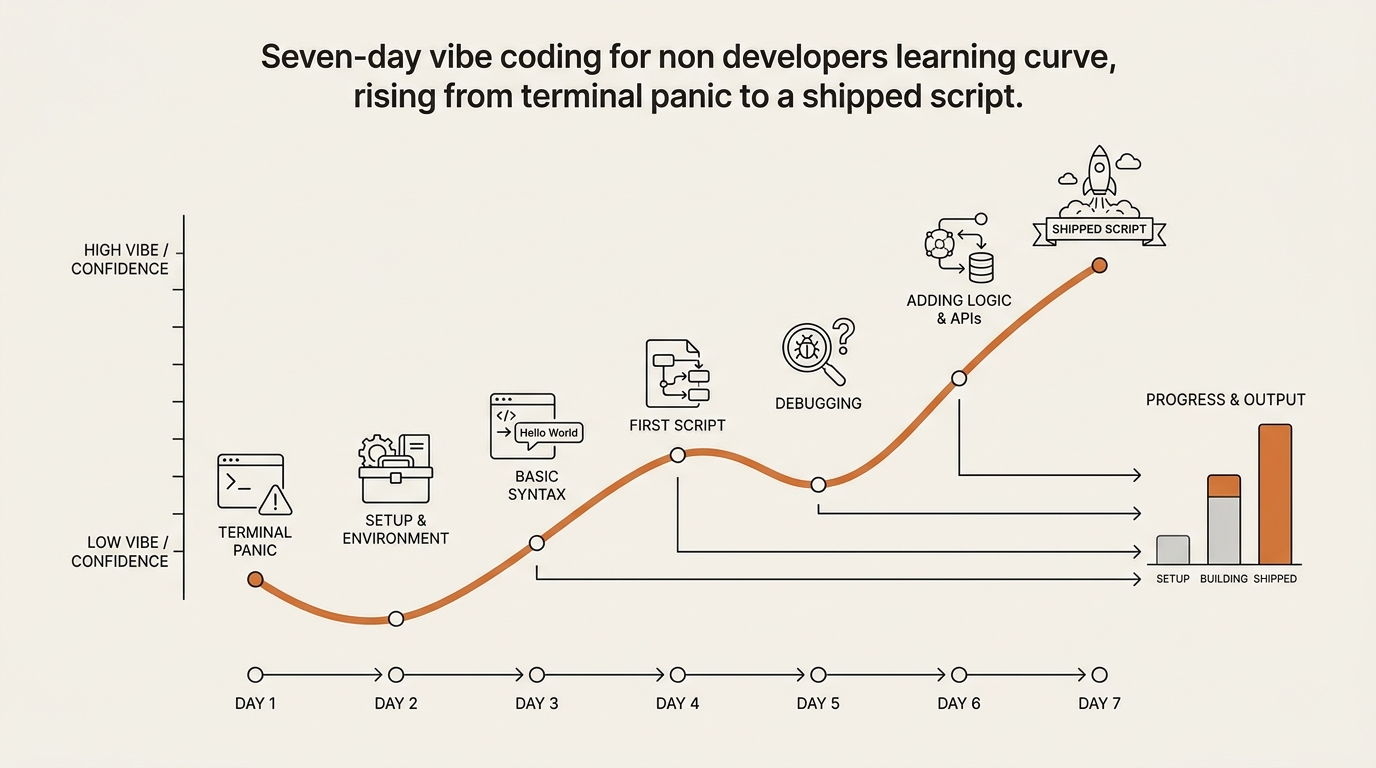
| 1 | Install Claude Code, open the terminal | Got stuck on the install path for an hour; the window felt hostile |
| 2 | First prompt: “write a script to rename my receipts” | It produced code. It did not run. I had no idea why. |
| 3 | Learned to paste the error back into Claude Code | The AI read its own error and fixed it. First small win. |
| 4 | Wrote a CLAUDE.md with my folder rules |
Output stopped drifting; context held between sessions |
| 5 | Asked it to sort by date, not just rename | It worked on three files, broke on a fourth with a weird name |
| 6 | Used Plan Mode before letting it change files | Fewer surprises; I could read the plan in English first |
| 7 | Ran it on the real folder of 40 receipts | Sorted 38 of 40. Two needed a manual fix. I shipped it anyway. |
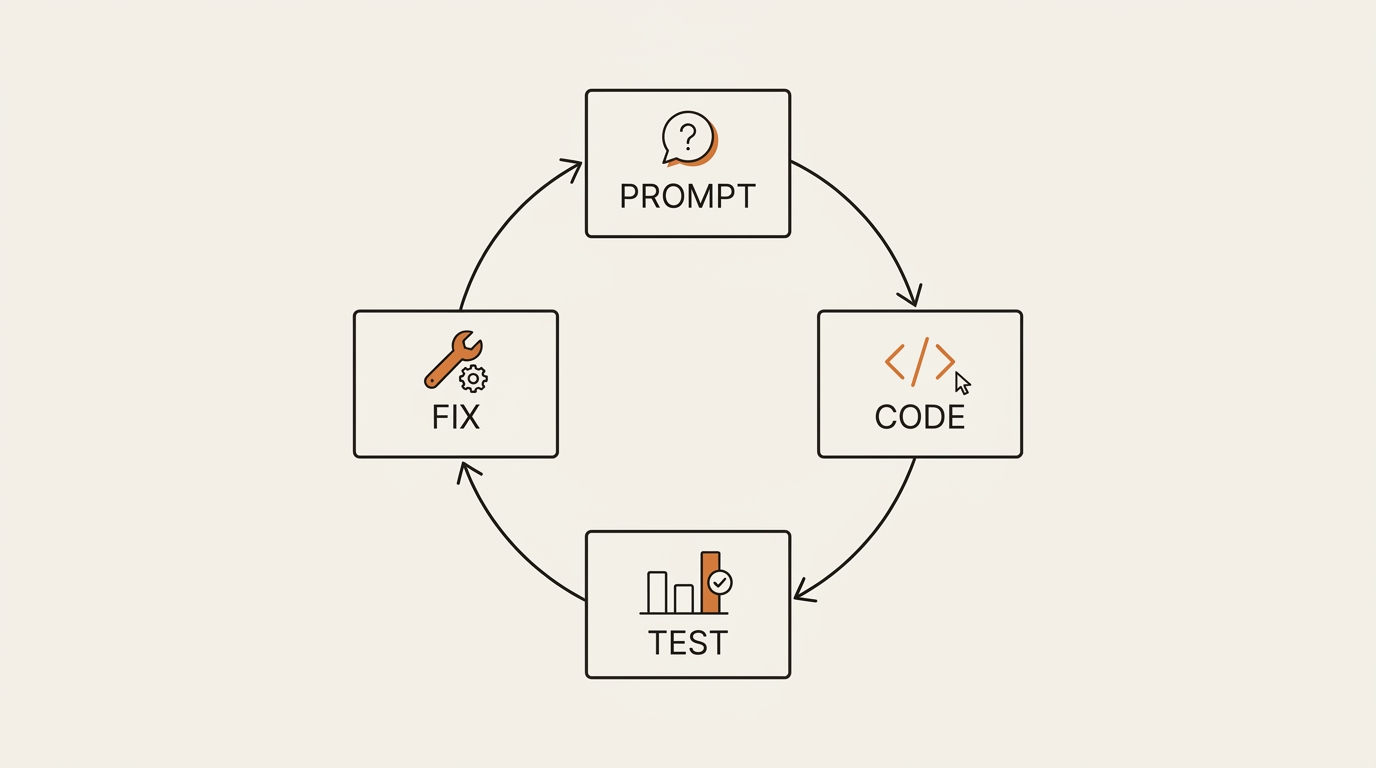
Day 3 was the turning point. Until then I thought my job was to write a perfect prompt. The actual skill turned out to be smaller and dumber: when something breaks, copy the red error text, paste it back, and say “this broke, fix it.” Claude Code reads its own mistake and tries again. That loop — prompt, run, paste the error, repeat — is the entire job for a non-developer here. Nobody told me it would be that unglamorous.
Day 4 was the other shift. I started a fresh session and the AI had forgotten everything from the night before. That’s when I learned what CLAUDE.md is for. I wrote four plain sentences in it: where my receipts live, how I name folders, what “sorted” means to me, and “never delete a file, only move it.” After that, every new session started already knowing my rules. It was the closest thing to teaching the AI my own habits.
What Broke — Three Failures I Won’t Hide
This is the section the tool funnels never write. Here are the three things that actually broke in my first week of vibe coding for non developers.
1. The terminal itself nearly ended the experiment on Day 1. The install instruction assumed I knew how to “add something to my PATH.” I did not know what a PATH was. I spent an hour pasting commands that returned errors I couldn’t read, getting genuinely annoyed, almost quitting. What unstuck me was the most obvious trick in hindsight: I copied the error into Claude itself and asked “I’m a non-developer, what does this mean and what do I type next?” The plain-English explanation got me through. The lesson — the AI is not just the thing building the script, it’s also the thing that explains the terror window.
2. The AI wrote confident code that quietly did the wrong thing. On Day 5, my script ran with no error. Success, I thought. Then I looked: it had sorted three files correctly and silently skipped a fourth that had an odd character in its name. No crash, no warning — it just didn’t do part of the job. This is the scary failure mode, because “it ran” is not the same as “it worked.” For someone who can’t read the code, the only defense is to check the output against reality every single time. I now open the folder and count.
3. I didn’t know what I didn’t know, so I couldn’t ask. Several nights I was stuck and couldn’t even phrase the question, because I didn’t know the word for the thing that was wrong. That’s the real beginner tax. The fix was Plan Mode — a Claude Code feature where the AI describes its plan in English before changing any files. Reading the plan first gave me something to react to, even when I couldn’t have written it. It turned a blank-page panic into a yes/no.
There’s a safety angle here I won’t gloss over. AI-generated code can carry flaws the author can’t see — a University of Cincinnati piece on how vibe coding rewrites the rules makes the academic version of the point. My receipt-sorter touches only my own files and can’t send anything anywhere, which is exactly why it was a safe first project. The moment vibe-coded code touches other people’s data or the open internet, the stakes change, and that’s the same line I drew in the email triage agent I refused to build.
What a Non-Developer Can Realistically Build in Week One
Let me set honest expectations, because “build anything” is the lie that gets beginners hurt. In one week, I built a personal script that sorts my own files. That is the realistic ceiling, and it is genuinely useful.
What lives in the realistic zone for week one:
- Small personal scripts that touch only your own files — renamers, sorters, format converters.
- Throwaway helpers for a one-time chore — clean up a messy spreadsheet, pull text out of 50 PDFs.
- Tiny automations with no users but you, and no money on the line.
What does not belong in week one: anything multiple people rely on, anything handling payments, anything that talks to the public internet without supervision. The same scoping logic from the no-code agent framework applies — start with a build small enough to embarrass you, where the cost of a mistake is that you fix two files by hand. My script missed 2 of 40 receipts and the cost was thirty seconds of manual cleanup. That’s the right size of failure for a first week.
Vibe Coding vs No-Code — Which Path Should You Pick?
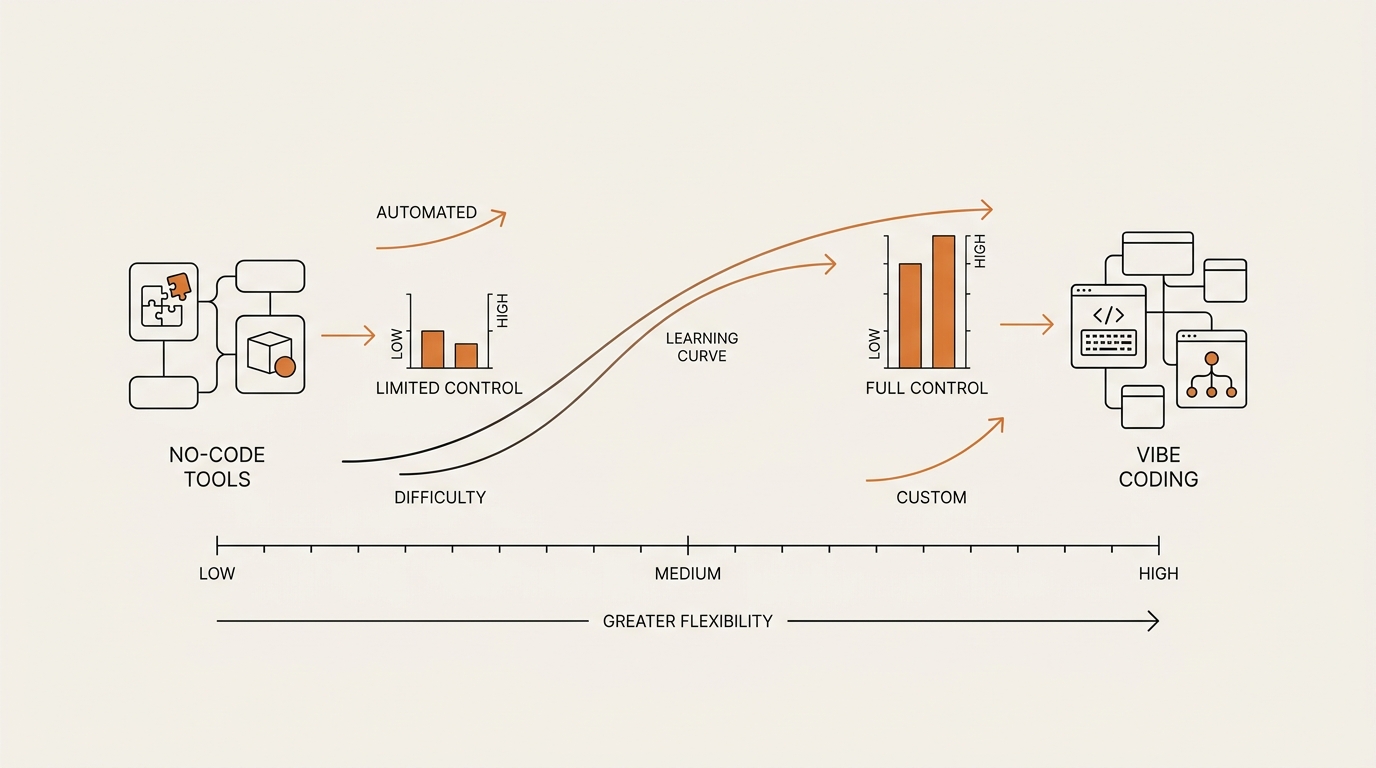
Build Log #1 was no-code. This one is vibe coding. People searching for this topic often really mean “which of these two should I start with?” Here’s the honest difference, from having done both.
| No-code (Build Log #1) | Vibe coding (this post) | |
|---|---|---|
| Where you work | Clicking in a browser app | Typing in a terminal |
| What you get | A workflow inside the tool | Real code files you own |
| Learning curve | Gentle | Steeper at first |
| When it breaks | The tool shows you visually | You paste an error back to the AI |
| Best for | Connecting existing apps | Custom one-off scripts |
| Lock-in | High — lives in the vendor | Lower — files on your machine |
Neither is “better.” No-code got me a working agent faster. Vibe coding got me something I owned and could change without a vendor’s permission. For a first-ever project, no-code is the gentler start. If you want the code to be yours, vibe coding for non developers is worth the rougher week — and the two skills stack rather than compete.
Can You Vibe Code If You Genuinely Can’t Read Code?
The honest answer after one week: yes, with one permanent condition. You can build working things without reading the code. You cannot escape checking whether the result is true. Vibe coding for non developers doesn’t require you to read syntax — it requires you to verify behavior. I never once understood the code line by line. I always checked the folder.
That’s not a loophole. That’s the job. The skill that replaces “reading code” is “testing reality” — run it on a small case you can verify by hand, count the output, and don’t trust “it ran” as proof it worked. Karpathy’s original framing assumed the person could still read the output when needed. As a non-developer, my substitute for reading is relentless checking. It’s slower. It also works.
So is vibe coding for non developers real or hype? It’s real, and it’s smaller than the hype. It will not make you a developer in a week. It will let you make a computer do one specific boring thing for you, in plain English, and that is a genuinely new ability for someone who has only ever paid for ChatGPT and clicked around Notion. The long game is stacking those small wins, not pretending the first one made you an engineer.
Frequently Asked Questions
Can you vibe code if you can’t read code? Yes, with a condition you can’t skip. You don’t have to read the code, but you do have to verify the result against reality — run it on a small case, check the output by hand, and never treat “it ran without an error” as proof it did the right thing. As a non-developer, checking is my replacement for reading.
Is vibe coding safe for non developers? It’s safe when the project only touches your own files and can’t send anything anywhere, like my receipt sorter. It gets risky the moment vibe-coded code handles other people’s data, payments, or the open internet, because AI-generated code can carry flaws you can’t see. Start with low-stakes personal scripts, and keep anything public or money-touching off the table until you can verify it.
Do you need to pay for Claude Code to start vibe coding? I started on a Claude Pro plan, which as of mid-2026 included Claude Code access, so I didn’t add a new subscription. Plans and inclusions change, so check Anthropic’s current terms before you assume. The honest takeaway: if you already pay for Claude Pro, you may already have what you need to try Claude Code for beginners.
What’s the difference between vibe coding and no-code tools? No-code keeps you clicking inside a vendor’s app and the workflow lives there. Vibe coding produces real code files on your own machine that you own and can change. No-code is gentler to start; vibe coding gives you ownership and lower lock-in. I did both — Build Log #1 was no-code, this one was vibe coding — and they stack rather than replace each other.
What can a non-developer realistically build with vibe coding in a week? A small personal script that touches only your own files — a renamer, a sorter, a one-time cleanup helper. That’s the realistic ceiling for week one, and it’s genuinely useful. What doesn’t belong in a first week: anything other people depend on, anything touching payments, or anything talking to the public internet unsupervised.
Is Claude Code or Cursor better for beginners? I’ve only done a full week on Claude Code, so I won’t rank a tool I haven’t lived in. Claude Code runs in the terminal, which made my first day genuinely hard, but it gave me real files I own. Cursor is a different shape of experience, and I’ll only compare them after I’ve actually built something in both — a fair comparison needs real time in each, not a feature list.
Closing — What Ships Next
That’s one honest week of vibe coding for non developers: a hard Day 1, a turning-point Day 3, and a small script that sorts my receipts and misses two of them. Not a transformation. A new, narrow ability — and the start of a muscle.
Build Log #3 picks up where this stops: the first thing I actually ship for someone other than me, and the extra checks that go on the moment code leaves my own folder. If you want the map open in a second tab, the framework for building without coding is the spine both paths hang off, and every build log lands in the AI Agent Lab under the same series.
Frameworks, not forecasts. Build the script that sorts your own receipts before you build anything anyone else depends on.
seonjae — Korean office worker documenting his transition into AI systems, agents, and vibe coding — without a CS background. Shipping in public.
Published 2026-06-01 · Updated 2026-06-01 · AI Agent Lab · Build Log #2 · flowseekerlab.io