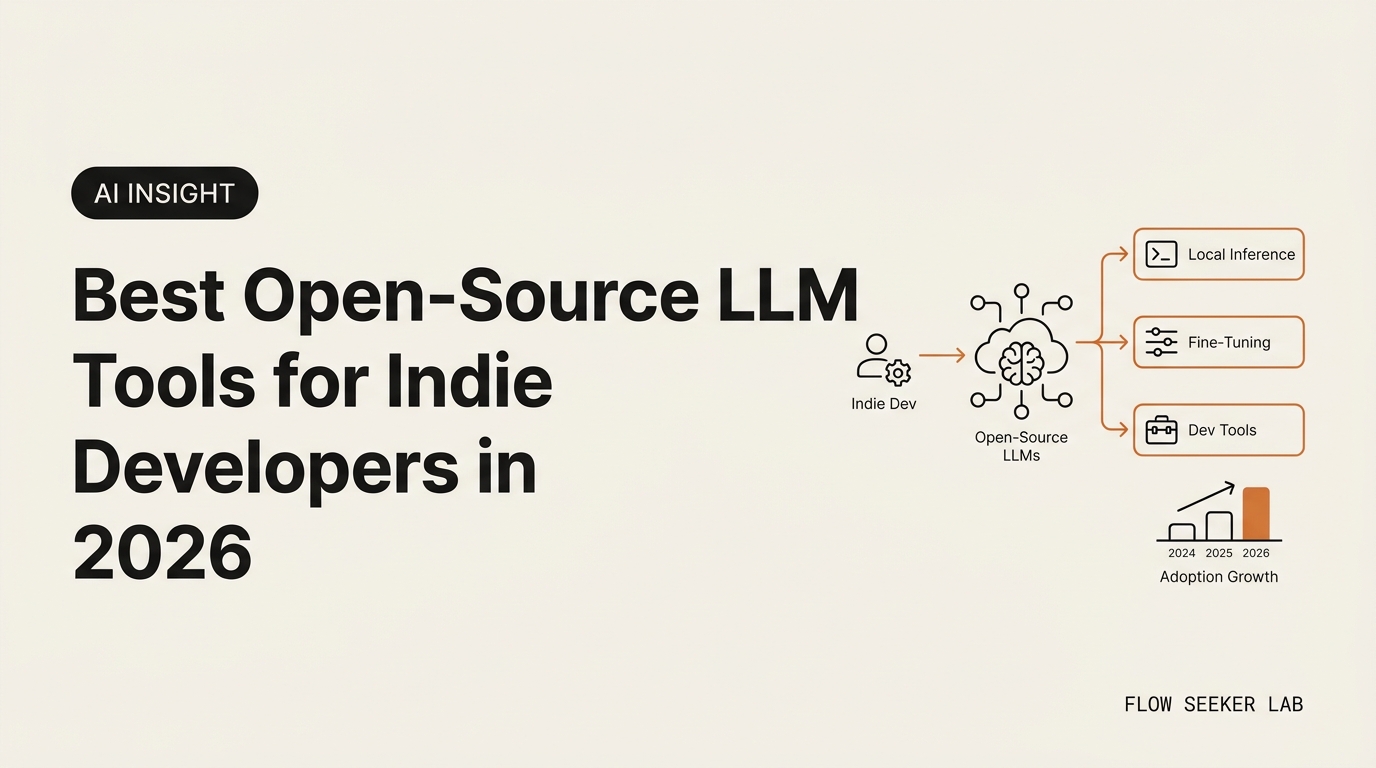
Best Open-Source LLM Tools for Indie Developers in 2026
Best Open-Source LLM Tools for Indie Developers in 2026: A Non-Dev Framework
My ChatGPT Plus bill was $20. My side-project token bill that month was $61. That’s when I started seriously evaluating best open-source LLM tools for indie developers in 2026 — not for the ideology, for the math. I’m a Korean office worker with no CS degree. I don’t want a benchmark table; I want a shortlist I can install on a Tuesday night and ship by Sunday.
Here’s the part nobody on the SERP says out loud: you don’t pick the smartest open-source model. You pick the one whose failure mode you can survive on your hardware. That sentence is the whole article. The rest is the framework I used to get there, the five models and three runners worth your evening, and what broke when I tested them on a 16 GB MacBook Air.
I’ll walk through a 5-axis decision matrix, the comparison table, the starter stack I’d actually pick today, and the silent failure modes that cost me a weekend.
Why an Indie Builder Even Cares About Open-Source LLM Tools
The honest answer is not “freedom.” It’s three things, in order.
First, the API tax stops scaling with you. ChatGPT Plus is fine for chatting. The moment you build an agent that loops — summarize, decide, call a tool, retry — the token bill is a different animal. My morning-briefing agent burned through $14 in tokens in one debugging session before I added a cost ceiling.
Second, your data leaves your laptop. For a side project this is usually fine. For anything touching client emails, internal docs, or a contract draft your boss sent you “just to look at,” it’s not. A local model lets you keep the messy first draft on your machine and only send the cleaned version out.
Third, the open-source LLM tools landscape finally crossed the “good enough” line in 2026. A year ago, the gap between a frontier API and a local 8B model felt like a chasm. Today, for the narrow tasks an indie actually ships — summarization, structured extraction, light coding, draft generation — the gap is small enough that the cost and privacy math wins.
This is not a “leave the cloud” sermon. It’s a framework for deciding when local makes sense and when paying $20 a month is still the smarter move.
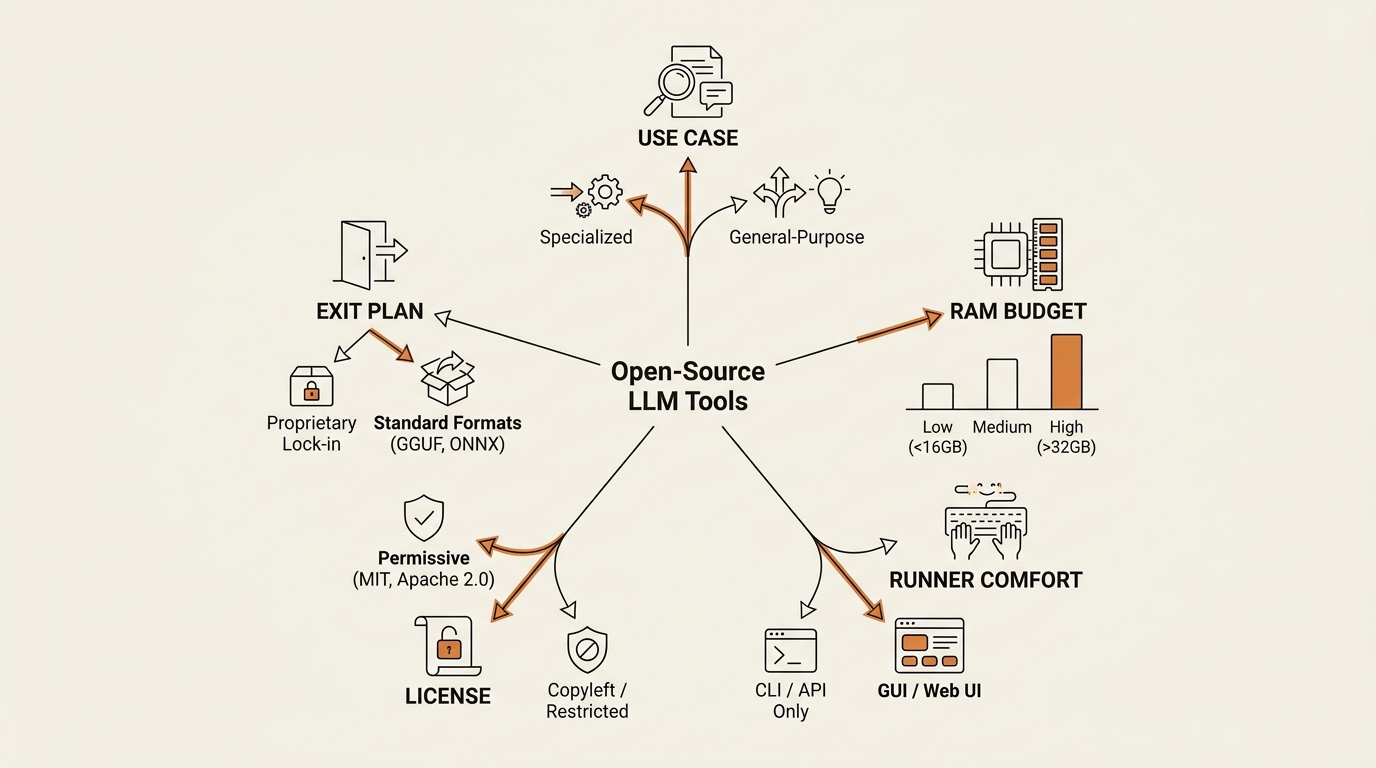
The 5-Axis Framework I Use to Pick an Open-Source LLM Tool
Every SERP article ranks models. That’s the wrong artifact. A ranking goes stale in six weeks; a decision framework holds. Here’s mine — five axes, in the order they actually constrain you.
Axis 1: Use case → Model class. Are you doing general chat and summarization, agentic coding, long-context document work, or structured extraction? Each of these wants a different model family. A coding-tuned model writing your blog drafts is wasted capacity. A long-context model on a one-paragraph task is a Ferrari in a parking lot.
Axis 2: RAM/VRAM budget → Quantization tier. This is the axis that kills most beginners silently. Your laptop’s available RAM, minus what your OS and browser already eat, is your real ceiling. A 26B-parameter model at Q4_K_M quantization runs in roughly 14 GB. The same model at Q8 needs ~28 GB. Pick the quant your hardware can hold, not the one that scores best on a benchmark.
Axis 3: Runner → Comfort level. The model is the engine. The runner is the dashboard. Ollama is a one-line install with a clean REST API. LM Studio is a GUI with a model browser. llama.cpp is the raw engine under both, used directly only if you out-grow the friendly options. Your comfort level here matters more than the runner’s max throughput.
Axis 4: License → Commercial intent. If you ever plan to charge a dollar for a product built on top, the license becomes a real question. Apache 2.0 and MIT are clean. The Llama community license has a clause that scares everyone but almost never applies. Gemma has its own terms. Picking the wrong license for your exit plan is the kind of mistake you don’t find out about for a year.
Axis 5: Exit plan → API compatibility. Models change every month. The one you pick today will not be the one you serve in six months. So pick a runner that exposes an OpenAI-compatible REST endpoint. That way swapping the model is a config change, not a rewrite.
Run a candidate through all five axes. If it survives, it’s on the shortlist. If it fails on axis 2 or 4, no benchmark score can save it.
The Five Open-Source LLM Models Worth an Indie Builder’s Evening
Five is the right number. Three is too narrow to fit different use cases. Ten is more than a non-dev can hold in their head while comparison-shopping. Here’s my honest shortlist.
| Model | License | Realistic local RAM (Q4_K_M) | Strength | When I’d pick it |
|---|---|---|---|---|
| Llama 4 (Meta) | Llama community | ~24 GB (mid-size variant) | General + long context | Default choice when hardware is generous |
| Qwen 3.6 | Apache 2.0 | ~14 GB (8B variant) | Coding + multilingual | Indie SaaS with paying users |
| DeepSeek V4 | MIT | ~40 GB+ (Pro variant) | Agentic coding | Power user with a real GPU |
| Mistral Medium 3.5 | Apache 2.0 | ~16 GB | General-purpose, EU data story | Privacy-sensitive client work |
| Gemma 4 (Google) | Gemma terms | ~14 GB (26B-A4B MoE) | Best practical local fit | 16 GB consumer laptops |
A few notes the table can’t carry. Llama 4 is the baseline everyone benchmarks against; its license has a clause for products with over 700 million monthly active users, which no indie will hit, but the legal-anxious panic about it anyway. Qwen 3.6 is my safest pick for any indie SaaS — Apache 2.0 means the license question simply disappears. DeepSeek V4 is the frontier-grade open model for agentic coding, but the Pro variant assumes you have a 24 GB+ GPU; on a laptop you’re looking at the Flash variant or hosted access. Mistral Medium 3.5 is the pragmatic mid-tier with a clean European data-residency story. Gemma 4 at the 26B-A4B MoE variant is the model I actually keep installed — it fits, it’s fast enough, and it doesn’t melt the fan.
I’m not listing Phi-4 or Kimi K2.6 Thinking as picks. They’re context. Phi-4 is the ultra-small option for embedded use; Kimi tops coding leaderboards but isn’t where an indie starts. Honorable mentions, not first installs.
For the official benchmark anchor, I cross-check against the Hugging Face Open LLM Leaderboard — useful as a sanity check, dangerous as a sole decision source. Treat the leaderboard as one input to the framework, not as the framework itself; open-source LLM tools shift faster than benchmark rankings can keep up.
The Three Runners: Ollama, LM Studio, llama.cpp
The model question gets all the SERP attention. The runner question is what determines whether you ship anything. These are the three open-source LLM tools that matter for indies, ordered by where you should start.
Ollama. One-line install. A model library you pull with ollama pull qwen3.6. An OpenAI-compatible REST endpoint at localhost:11434 so your other tools can talk to it without rewrites. This is the default recommendation for anyone who isn’t sure. The official Ollama documentation walks through install in about three minutes.
LM Studio. A GUI on top of llama.cpp. Best onboarding tool I’ve found for the “which quant do I actually download” phase. The Hugging Face browser is built in, the quantization recommender flags what fits your RAM, and the chat interface lets you stress-test a model before you commit it to a workflow. This is where I tell every non-developer friend to start.
llama.cpp. The engine under both of the above. Power-user tier. Recommended only when Ollama or LM Studio aren’t fast enough, or when you need to embed inference into a deployed app. For 95% of indies, you will never run llama.cpp directly, and that’s fine.
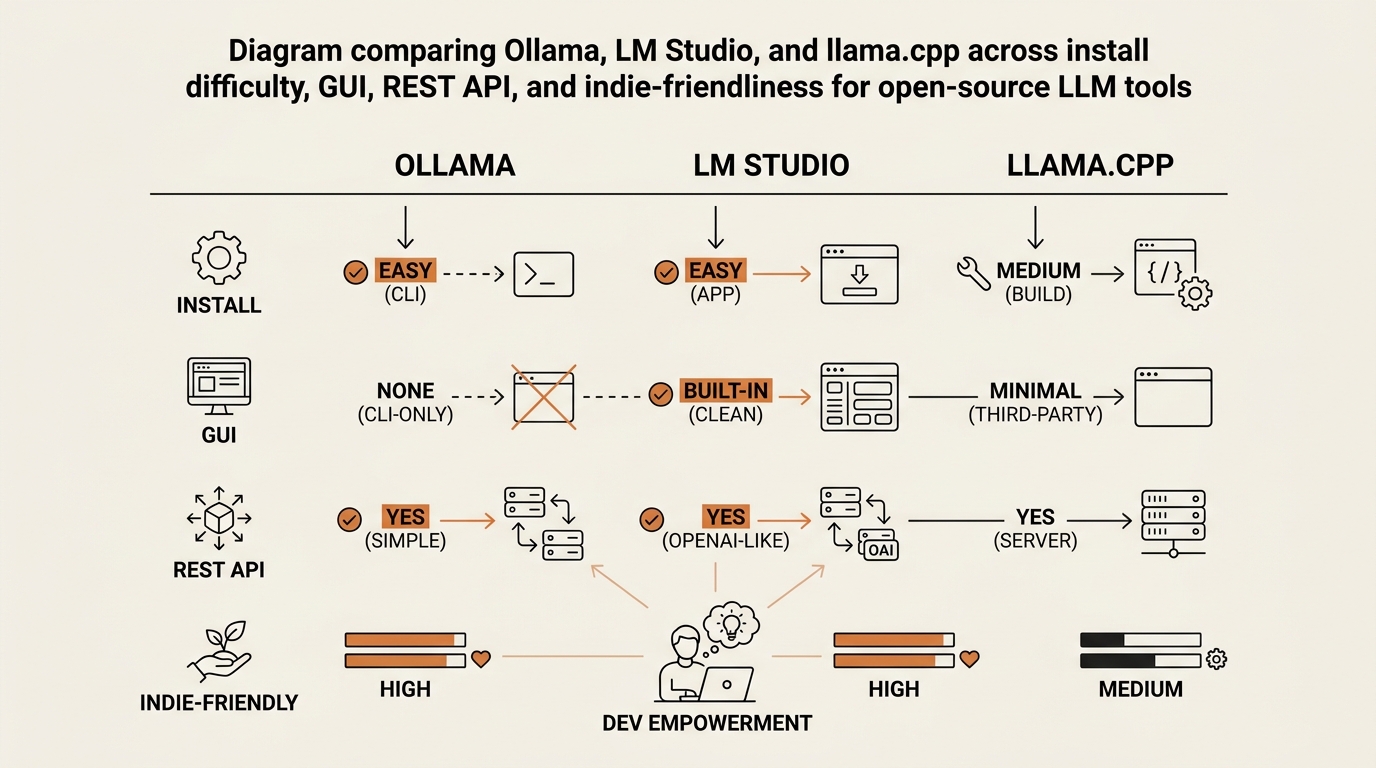
The combination that survived my testing: LM Studio to evaluate models, Ollama to serve the winner, llama.cpp only if you out-grow both. That’s not a ranking. That’s a workflow. The same way you might use Figma for ideation and Photoshop for the final export.
What I’d Actually Install on a Tuesday Night
Frameworks are useful, but at some point you need a concrete starter stack. Here is mine for a non-developer on a 16 GB MacBook in 2026:
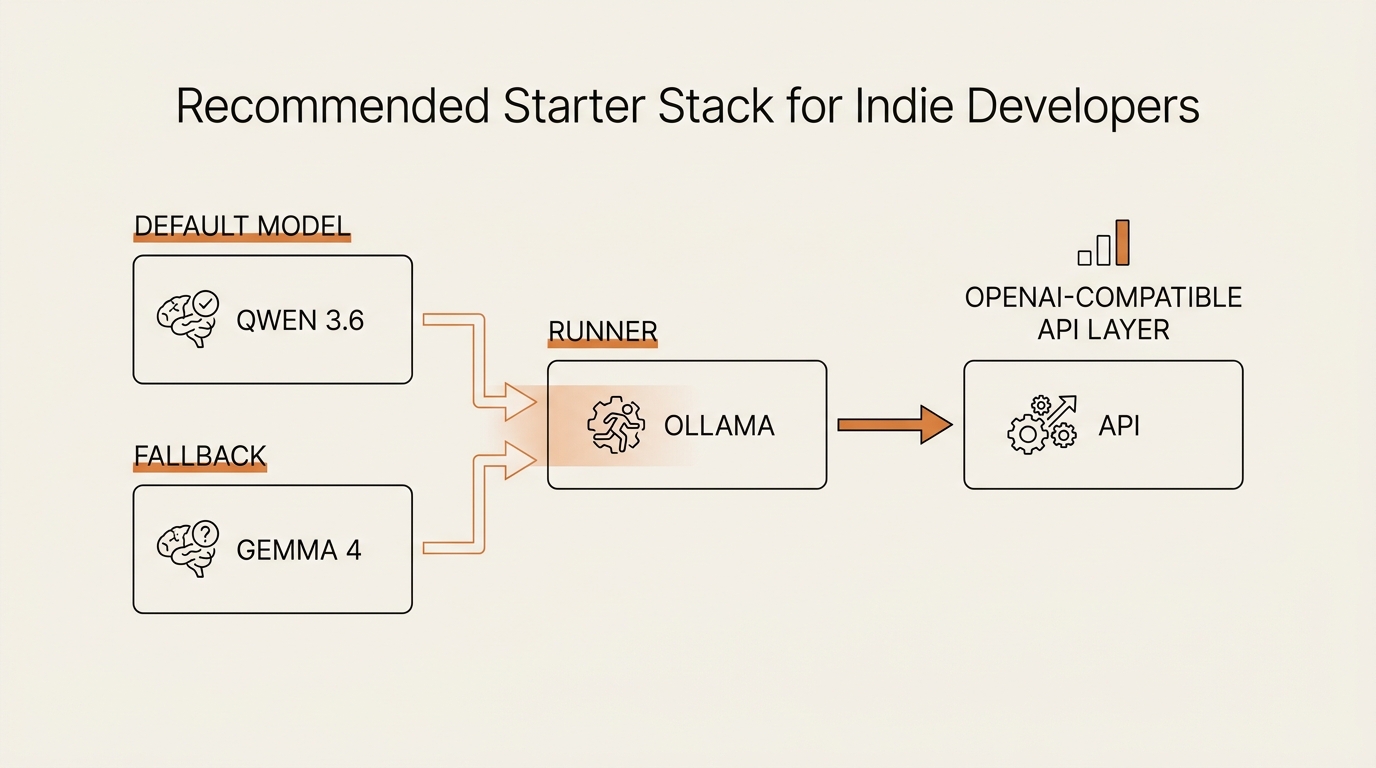
- Runner: Ollama. Install, accept the defaults, move on.
- Default model: Qwen 3.6 8B at Q4_K_M. Apache 2.0, general-purpose, ~6 GB on disk.
- Fallback model: Gemma 4 (26B-A4B). When you need more capability and don’t mind the fan running.
- Coding helper: leave coding tasks on the hosted API for now. Local coding models are usable but slower than just paying for Claude Code or Cursor for the actual coding seat. This is the vibe-coding workflow for non-developers I documented earlier — keep the IDE on the paid stack, run summarization and triage locally.
- Front-end: any OpenAI-compatible client. Point it at
http://localhost:11434and it works.
That stack solves the cost-and-privacy use case for an indie. It is not a frontier replacement. It is not what you’d ship in production for a million users. It is what lets you stop watching your token meter while you experiment.
If you want to wire this local model into an actual workflow — not just a chat box — I broke down the structure in build an AI agent without coding. The model is the engine; the agent is the car. You need both.
What Broke
This is the part the benchmark articles skip. Here’s what actually went wrong in my testing of these open-source LLM tools — five failure modes you will probably hit too.
Wrong quantization, silent gibberish. I downloaded a Gemma variant at Q2_K because the file was smaller. It loaded fine. It produced confident, grammatically perfect, semantically broken sentences. No error, no warning — just bad output. The fix: never go below Q4_K_M for general use. Q2 and Q3 quants exist for engineers benchmarking compression, not for you.
The model “fit” but thrashed RAM. A 26B mixture-of-experts model fit in my 16 GB on paper. In practice, with Chrome open and Slack running, the OS started swapping to disk, throughput dropped to 6 tokens per second, and the fan sounded like a hairdryer. The fix: free 4 GB of headroom before you load. Close the browser tabs. This is not optional.
License panic I didn’t need to have. I spent an evening reading the Llama community license worried about a clause that applies to products with over 700 million monthly active users. I have, roughly, zero monthly active users. The clause never applied. The fix: if you’re under 100k MAU, the license question on Llama is a non-issue — but check Meta’s official license page yourself, not Reddit.
Ollama worked locally, broke on a tunnel. I exposed my Ollama endpoint via ngrok so a deployed agent could hit it. The agent timed out. Turns out Ollama binds to localhost by default for safety. The fix: set OLLAMA_HOST=0.0.0.0 and put your own auth layer in front. Don’t expose a raw inference endpoint to the public internet.
I picked the wrong model for the task. I tried to use a coding-tuned model to summarize newsletters. It wrote code-shaped summaries with bullet points where there should have been prose. The model wasn’t broken; I was using it wrong. The fix: axis 1 of the framework above. Use case first, model class second.
Every one of these failures was silent. None of them produced a Python traceback. That’s what makes local LLM work feel different from regular software — the system tells you it’s working when it isn’t.
Where This Framework Falls Short
A few honest limitations before the FAQ. This framework assumes you already pay for a frontier API and are evaluating whether to displace some of that workload. If you’ve never used ChatGPT or Claude, start there first — pay $20, learn the shape of what these models can do, then come back to the local question.
The framework also assumes consumer hardware. If you have a dedicated GPU server, the calculus flips and you should be looking at the larger model variants the table only mentions in passing. And it assumes English or Korean as primary languages — for less-resourced languages, the open-source LLM tools landscape is rougher and you may have to wait another release cycle.
Finally, this is the framework as of June 2026. The models will change. The framework will not. That’s the whole point of building on principles instead of rankings.
How I Stay Current Without Losing Weekends
Open-weights models drop almost weekly now. Llama 4 lands, then DeepSeek V4, then Qwen 3.6, then 3.7 a month later. If you try to follow it all you’ll burn out and ship nothing. I wrote about how I track new AI models without burning out — short version: one weekly review, three sources, and the rule that I only re-evaluate my stack when a model beats my current default on a benchmark I actually care about.
For Apache 2.0 references and Mistral specifically, the Mistral documentation is the cleanest source on licensing and model variants. Bookmark it once, stop chasing tweets.
FAQ
What is a top open-source LLM to run locally in 2026?
There isn’t one. There’s a best one for your use case, hardware, and license needs. For a 16 GB laptop doing general tasks, I default to Qwen 3.6 8B (Apache 2.0) or Gemma 4 26B-A4B. For agentic coding on a real GPU, DeepSeek V4. The framework above tells you which one to pick.
Can I run open-source LLMs on a laptop with 16 GB RAM?
Yes, with constraints. Stick to 8B-class models at Q4_K_M quantization, or MoE models in the 14 GB-on-disk range like Gemma 4 26B-A4B. Close browser tabs before loading. Expect 30–80 tokens per second depending on the model. Don’t try to run a 70B model on 16 GB — it will load and then thrash.
Is Ollama or LM Studio better for beginners?
Start with LM Studio if you want a GUI to browse models and see what fits. Move to Ollama once you’ve picked your model and want a clean REST endpoint for other tools. They solve different stages of the same problem.
Which open-source LLM is best for coding?
DeepSeek V4 leads the open coding leaderboards in 2026, but it’s heavy. Qwen 3.6 is the most practical for laptop-grade coding help. Honestly though, for indie work the hosted Claude or Cursor stack is still the smoother choice — I keep coding tasks on the paid API and use local models for summarization and structured tasks.
Are open-source LLMs free for commercial use?
It depends on the license. Apache 2.0 (Qwen, Mistral) and MIT (DeepSeek) are commercially clean. Llama’s community license is commercial-friendly under 700M MAUs. Gemma has its own terms. Read the actual license for any model you ship on top of — not Reddit, the official page.
Are open-source LLMs as good as GPT-4 or Claude in 2026?
For narrow tasks — summarization, structured extraction, light drafting — yes, the gap is small enough that the cost and privacy math wins. For frontier reasoning, complex agents, and the longest context windows, the hosted frontier models still lead. Pick the right tool for the task, not the prestige one.
Where I Go Next
This whole post is the evaluation phase. Frameworks are forecasts in disguise if you never ship anything on top of them. So the next post in this series will be a Build Log: I’ll take this exact starter stack — Ollama plus Qwen 3.6 plus a thin agent wrapper — and ship a small side project on it. Then I’ll report which model I actually kept after a month of real use, not benchmark conditions.
A workflow isn’t about picking the smartest model. It’s about picking the failure mode you can survive.
seonjae — Korean office worker documenting his transition into AI systems, agents, and vibe coding — without a CS background. Shipping in public.
This post is part of the Framework Deep Dive series at FLOW SEEKER LAB.
One Comment