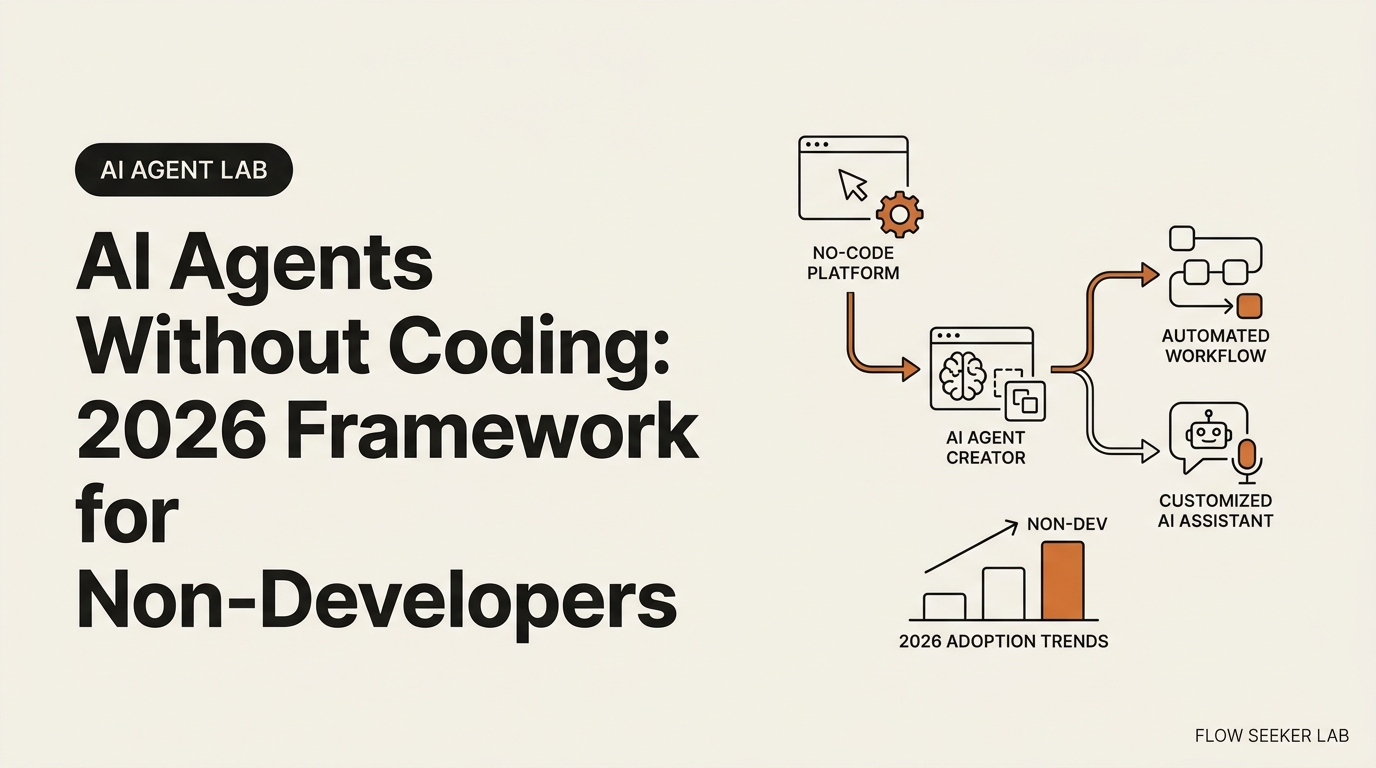
How to Build an AI Agent Without Coding: 2026 Framework
How to Build an AI Agent Without Coding (2026 Framework)
You don’t need a CS degree to build an AI agent in 2026. I’m a Korean office worker without one, and I’ve spent the last month doing this in public — shipping one no-code agent on a Saturday, then refusing to ship the second one until I’d written the safety framework first. This post is the framework I use for how to build an AI agent without coding — no syntax tutorial, no breathless tool reviews, just the ten steps that decide whether your first agent ships or dies in a folder.
By the end you’ll have a one-page mental model you can run against any builder, an honest record of what broke when I ran it on myself, and a clear path from your first agent to your tenth.
What “Building an AI Agent Without Coding” Actually Means in 2026
Two definitions matter before anything else.
An AI agent is a program that uses a large language model to reach a goal across multiple steps. It reads inputs, calls tools, and decides the next move without a human approving each one. That definition lines up with how Anthropic’s developer documentation describes agentic systems and with the broader Wikipedia entry on intelligent agents. Anthropic’s own essay on building effective agents is worth one slow read if you want the canonical version.
“Without coding” used to mean drag-and-drop builders only. In 2026 the phrase covers two paths that both work for non-coders:
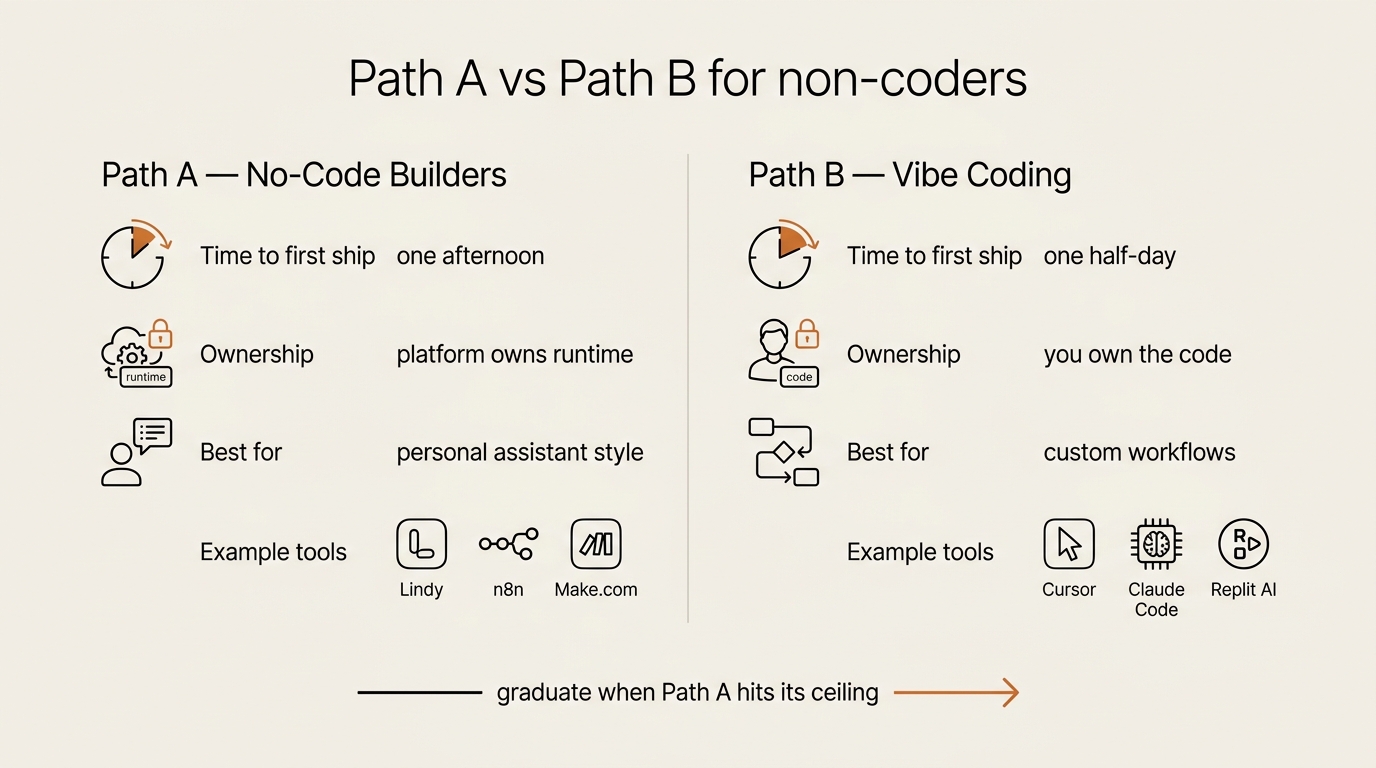
- Path A — No-code builders. Visual tools like Lindy, Relevance AI, n8n, and Make.com let you wire up an agent in a flowchart. You never see a function signature.
- Path B — Vibe coding. You describe what you want in English, and an AI like Cursor or Claude Code writes the code for you. You still ship code. You just don’t type the syntax.
I use both, depending on what the agent has to do and how much I want to own the result. The framework below works for either path.
The Ten-Step Framework: One Page That Survives the Platform
Before you open any builder, write the agent down on one page. Skipping this step is the most common reason a first agent dies in a folder, untested, two weeks after you start it.
Here is the framework I use for how to build an AI agent without coding from a blank page:
- Goal. One sentence that describes what the agent does. If it takes two sentences, the agent is too big.
- Inputs. Where the data comes from. An email inbox, a Google Sheet, an RSS feed, a webhook.
- Tools. What APIs or apps the agent is allowed to call. A search engine, a Slack channel, a Notion database.
- Decision rules. What the agent uses to choose its next action. Plain English is fine here.
- Output. Where the result lands. An email draft, a Slack message, a row in a spreadsheet.
- Trigger. When the agent runs. Manual, scheduled, or in response to an event.
- Guardrails. What the agent must not do. The list of “never send”, “never delete”, “always confirm”.
- Test loop. How you verify it worked. Read the last ten outputs once a week.
- Cost ceiling. How much you are willing to spend per run. Tokens add up faster than people expect.
- Kill switch. How you stop the agent if it misbehaves. A single toggle in the platform settings.
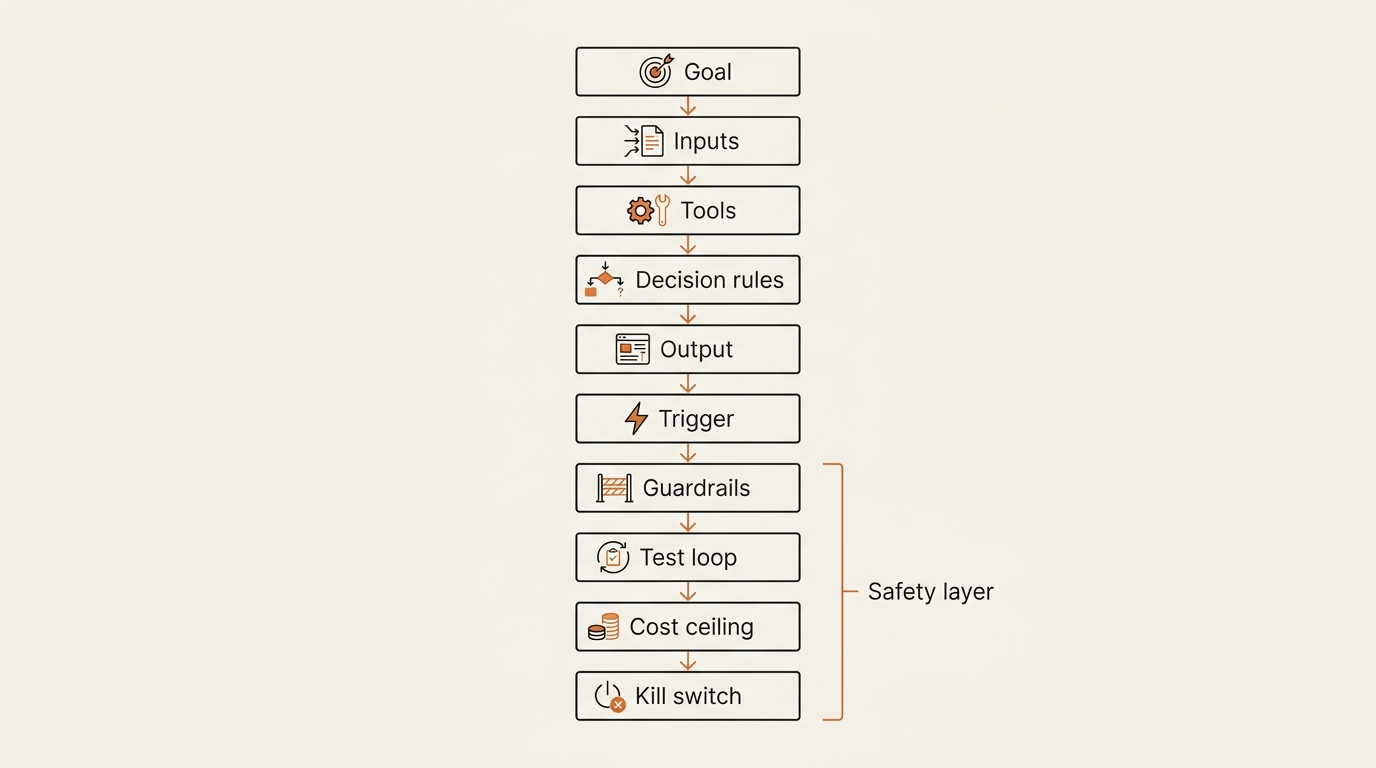
If you cannot answer all ten in a paragraph each, you are not ready to build yet. The framework is not a checklist for show. It is the part that separates a working agent from a graveyard of half-finished workflows — and the part that survives the platform underneath. Lindy could raise its prices tomorrow and the ten-step structure still tells me how to rebuild on n8n in an afternoon.
Path A — No-Code Builders for Pure Beginners
If you have never written a line of code and you want results this week, start with a no-code builder.
The lineup that holds up in 2026:
- Lindy — best for personal-assistant style agents. Email triage, meeting prep, calendar nudges.
- Relevance AI — best for business workflows with structured data and team usage.
- n8n — open-source, more flexible, slightly steeper learning curve.
- Make.com — strong integrations library, friendly UI, fair pricing at low volume.
- Zapier Agents — best for people already inside the Zapier ecosystem.
The honest tradeoff: you can build a working agent in an afternoon, but the platform owns the runtime. If Lindy raises prices or pivots, your agent moves with them or stops. That is the price of speed. For a first agent it is a fair trade.
Try this in twenty minutes. Open Lindy or n8n and build a “morning briefing” agent. Inputs: your calendar plus three RSS feeds. Output: a single email at seven a.m. that lists today’s meetings and the top three headlines from each feed. That is a complete agent. Nothing about it requires you to write code, and you will own enough of the result to debug it when it misbehaves.
I ran that exact build on a Saturday. The full play-by-play — every broken URL, every wrong timezone, every default permission scope I forgot to tighten — is in Build Log #1: my first no-code AI agent. Open it in a second tab if you want the framework with the breakage attached.
Path B — Vibe Coding for Curious Beginners
Vibe coding is what happens when you describe a program in English and an AI writes the code. You read the result, ask for changes, and ship it. The term went mainstream in 2025, and the workflow is documented well enough that a non-coder can pick it up in an afternoon.
The tools that matter for non-coders right now:
- Cursor — a code editor with an AI chat built in. You type intent, it writes files.
- Claude Code — a command-line tool from Anthropic that runs in your terminal. It reads your project, edits files, and runs commands on your behalf.
- Replit AI — a browser-based environment that also handles hosting.
- GitHub Copilot Workspace — an issue-to-pull-request workflow on top of GitHub.
The honest tradeoff: vibe coding gives you real ownership. The agent runs on your machine, your cloud, your account. The cost is patience. You will hit confusing errors, and you will need to read enough output to recognize when the AI is wrong.
Try this in thirty minutes. Open Claude Code and ask it to “build a script that fetches the top five Hacker News posts and saves them to a file named hn.json”. Watch what it does. Run the script. Ask it to add a step that filters out posts older than twenty-four hours. That is the loop. It feels strange the first three times and natural by the tenth.
What I Tried First: The Morning Briefing Build
The fastest way to learn how to build an AI agent without coding is to ship a forgettable one. I needed an agent small enough to embarrass me. That was the rule I gave readers above, and I had to honor it on myself.
A morning briefing fits. It runs once a day, it has a clear output, and if it fails I notice within minutes. No customers, no real money, no Slack channel watching for it to misfire. The cost of a broken first no-code AI agent is that I pour my own coffee and read my own calendar — the same thing I did before the agent existed.
I picked Lindy as the builder. A morning briefing is exactly the personal-assistant shape Path A is best at. I scoped the agent to three RSS feeds, one Google Calendar (read-only), and exactly two skills: Web fetch and Gmail send. The goal sentence took four rewrites before it survived without bolted-on extras. The build itself took a single Saturday sitting, breakage included.
The point of putting myself through that wasn’t the briefing — it was the loop. You don’t learn how to build an AI agent without coding by reading about it. You learn it by shipping the embarrassingly small first one, watching exactly which steps in the framework you skipped, and writing the breakage down.
What Broke — Five Honest Failures From My First Month
This is the part most guides on how to build an AI agent without coding skip, which is why people feel betrayed when their first agent misfires. These five all happened to me. Four are from the morning briefing. One is from the agent I deliberately did not ship.
1. A bad input URL looked plausible. One of my RSS feeds had moved at some point. The builder quietly ingested the redirected HTML page instead of the feed and turned a marketing page’s <title> tag into a “headline”. The output looked real enough that I almost shipped it. The fix was a rule I now keep on the same sticky note as the goal: every feed URL gets one test fetch in the browser before I wire it in.
2. A default permission scope was wider than I’d chosen. My first version of the agent had full Google Calendar access because that was Lindy’s default — not because I picked it. I only noticed when I read the permission summary out loud to myself. Reading the agent’s tool list out loud is now part of my checklist. It catches things skimming does not.
3. The timezone was wrong and the agent fired at the wrong hour. Lindy’s scheduler defaulted to UTC. The first scheduled run fired at four p.m. local time instead of seven a.m. I have now lost roughly four hours of my life to scheduled jobs that fired in UTC when I expected KST. I started writing the timezone into the goal sentence itself so it never gets left implicit again.
4. I almost added a fourth RSS feed at the last minute. The goal sentence said three. I caught myself reaching for a fourth at the very end of the build because the agent “felt too small”. Too small is correct. Too small is the win. A first agent that does one thing forty times is more useful than a first agent that does four things zero times.
5. I never built the email triage agent the way I’d planned to. The morning briefing only reads and reports. An email triage AI agent is asked to act on the place where my work and relationships live. The cost of a misfire is asymmetric and public. So instead of shipping I wrote the permission boundary first — the email triage AI agent I refused to build, and the read/label/draft line it would have to pass before I’d let it touch anything. Knowing when not to build is part of the framework too.
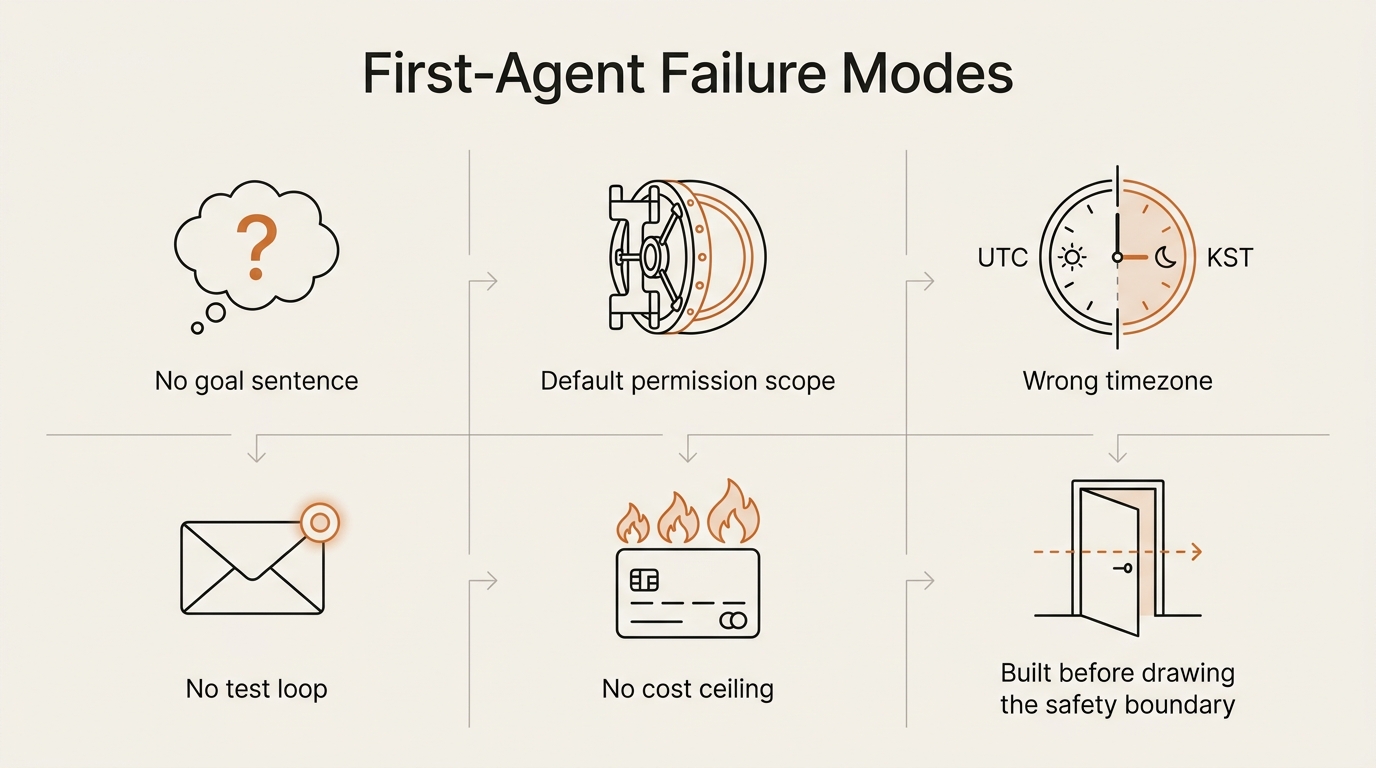
The pattern: none of these were bugs in the model. They were design decisions I left implicit and the platform filled in for me. The framework above is mostly a list of decisions you write down before the builder writes them for you.
What I Measured After One Month of Building
I want to be careful here, because vague percentages are how trust gets destroyed in any honest write-up of how to build an AI agent without coding. Here is what I can honestly count after a month.
- I shipped one agent (the morning briefing). It has run on every weekday since. Zero days missed since the timezone fix.
- I refused to ship one agent (email triage), and wrote up the framework instead.
- The briefing’s actual cost has settled around two cents per weekday run, roughly forty cents a month. I set a daily ceiling of ten cents on the platform before launch, and it has never hit that ceiling.
- My weekly test-loop review takes about ten minutes. Some weeks I find a small drift in the feed output. Most weeks I find nothing, which is also the point.
- The fourth RSS feed I almost added on launch day is still not added. Wanting it has stopped showing up after about the third week.
That is the entire honest scorecard. No 94% accuracy, no 39% time saved, no breathless claim about “10x productivity”. Real building is small numbers, kept on purpose. If you read someone selling you bigger numbers than that for a first agent, they are selling — not building.
What I Would Do Differently Next Time
Three changes I have already baked into the next build:
- Write the goal sentence and the timezone on the same sticky note before opening any builder. Implicit timezone is the bug I keep paying for. Putting it in the goal sentence promotes it from setting to spec.
- Make a test email address before wiring up Gmail at all. My first send went to my real inbox. It worked, but a wrong send to a real address is a privately ugly day, and I’d rather break a test address.
- Stay in assisted mode by default. Never auto-send, never auto-delete, never auto-spam. This is the rule I wrote up at length for the email triage build. It generalizes: any agent that touches a place other people can see should hand you a draft and stop. The pause is the entire safety story.
If you do those three before you do anything else, the framework above gets noticeably shorter — because the most common failures simply do not happen.
Common Mistakes Non-Coders Make on Their First Agent
Everyone who asks how to build an AI agent without coding eventually walks into the same five traps. I made all five of them, and I see them in every beginner thread I read.
Trying to build the perfect agent on day one. Your first agent should be small enough to embarrass you. Mine was a script that summarized a single newsletter, and then a briefing that fits in one email. The win is the loop, not the artifact.
Skipping the one-sentence goal. If you cannot finish the sentence “this agent does X for Y,” the agent has no shape, and the model will fill the shape with whatever it feels like that day.
Forgetting the cost ceiling. An agent that runs on a schedule can burn through credits faster than you can read about why. Set a daily token cap on the platform before you let it run unsupervised.
Treating the model as deterministic. Same prompt, different runs, different outputs. Build for the distribution, not for the best case. The prompt engineering section of Anthropic’s docs is worth one careful read.
No test loop. If you do not look at the last ten outputs once a week, you do not know what your agent is actually doing. You only know what it did the day you built it.
When to Graduate from No-Code to Vibe Coding
You will know.
The signals are concrete. You hit a limit in the no-code builder that requires a feature it does not have. You want version history that survives the platform. You start guessing at the cost of platform fees over a year, and the number gets uncomfortable. You read a vibe-coded snippet and roughly understand what it does without translating each line.
The bridge is not a class. The bridge is a habit. Spend twenty minutes a day reading vibe-coded code in your stack. After a month you will recognize patterns. After three months you will write your own prompts that ship working scripts on the first try. I wrote about why depth beats breadth, and why constant tool-switching resets that compounding, in why I stopped chasing new AI tools.
What to Build Next After Your First Agent
If you finished the twenty-minute and thirty-minute exercises above, you have the muscle to ship a second agent without help.
A short list of next builds, ordered by usefulness:
- An email triage AI agent that labels and drafts replies but never sends — I wrote up the safety framework for this one before building it, which is the order I now recommend for any agent that touches a shared surface.
- A weekly digest of your most-used Notion or Google Doc pages.
- A research agent that reads a topic feed and writes a one-paragraph summary each morning.
- An expense reader that pulls totals from a receipts folder.
Pick one. Set a one-hour timer. Ship the smallest version that runs end to end. The framework above is enough to keep the build honest, even when the tool you use changes. Every new build in this series lands in the AI Agent Lab category, including the ones that did not work.
Frequently Asked Questions
How long does it take to build a first AI agent without coding? With a no-code builder, plan twenty to ninety minutes for a working agent. With vibe coding, plan a half-day. My own morning briefing build took a full Saturday sitting once breakage was included. The bottleneck is rarely the building. It is the writing-down of the one-sentence goal.
What is the cheapest way to start? Most no-code builders have a free tier that runs ten to one hundred agent steps per month. For vibe coding, Claude Code and Cursor both have free or trial usage that covers a beginner project. Set a token cap before you scale.
Do I need to learn Python eventually? Not to ship agents in 2026. You will be more dangerous if you do, but the floor for useful agents now sits below the line of needing a real language. Read code before you write it.
How safe is it to let an AI agent act on my real accounts (Gmail, Slack, calendar)? It is safe for actions that are reversible and visible — reading, labelling, drafting. It is not safe to grant send, delete, or mark-as-spam to a first agent. Safety is not a setting you trust; it is a permission you withhold. I walk through the permission boundary in detail in the email triage framework.
What is the difference between an AI agent and a ChatGPT conversation? A conversation is one turn at a time, driven by you. An agent is multiple turns chained together, driven by a goal, often without you in the loop. The framework above is what makes the second thing possible without the first thing’s hand-holding.
Should my first agent run on a schedule or only when I trigger it manually? Manual for the first hour. Scheduled once you’ve watched the outputs for at least one week. A scheduled agent that drifts in the background is the failure mode that costs the most to recover from, because you stop looking at it.
Can I make money with no-code AI agents? Some people do. The realistic path is solving a specific pain in a specific business and charging per outcome, not per seat. The unrealistic path is selling a generic “AI agent” to a generic market. I don’t quote income numbers because I am not selling that story — I am building.
Is there one best framework for how to build an AI agent without coding? No. The framework above is mine, and it works because I shipped against it for a month. Yours will mutate as you ship. Anyone selling you the one true framework is selling, not building.
Do I need to pick Path A or Path B before I start? No — and you shouldn’t. Pick the path that fits the first agent’s blast radius. A morning briefing is fine on Path A. An agent that touches a shared inbox earns Path B’s ownership later. The whole point of learning how to build an AI agent without coding is that you can ship on either path with the same ten-step spine underneath.
Closing — Frameworks, Not Forecasts
The honest version of how to build an AI agent without coding fits on one page. The framework above is mine, refined by shipping a small thing on a Saturday and then writing down which of the ten steps I had skipped when the thing broke. If you remember nothing else from this post on how to build an AI agent without coding, remember that — the framework is the asset, the agent is replaceable.
This site is a notebook, not a manual. Every build lands here with the parts that did not work attached. The next post in the AI Agent Lab is Framework Deep Dive #2 on cost ceilings — why your first agent burns more credits than you expect, and how to bound the spend before it bounds you.
Build the framework. Skip the forecast. The next agent ships when you write the one-sentence goal.
seonjae — Korean office worker documenting his transition into AI systems, agents, and vibe coding — without a CS background. Shipping in public.
Published 2026-05-13 · Updated 2026-05-28 · AI Agent Lab · flowseekerlab.io