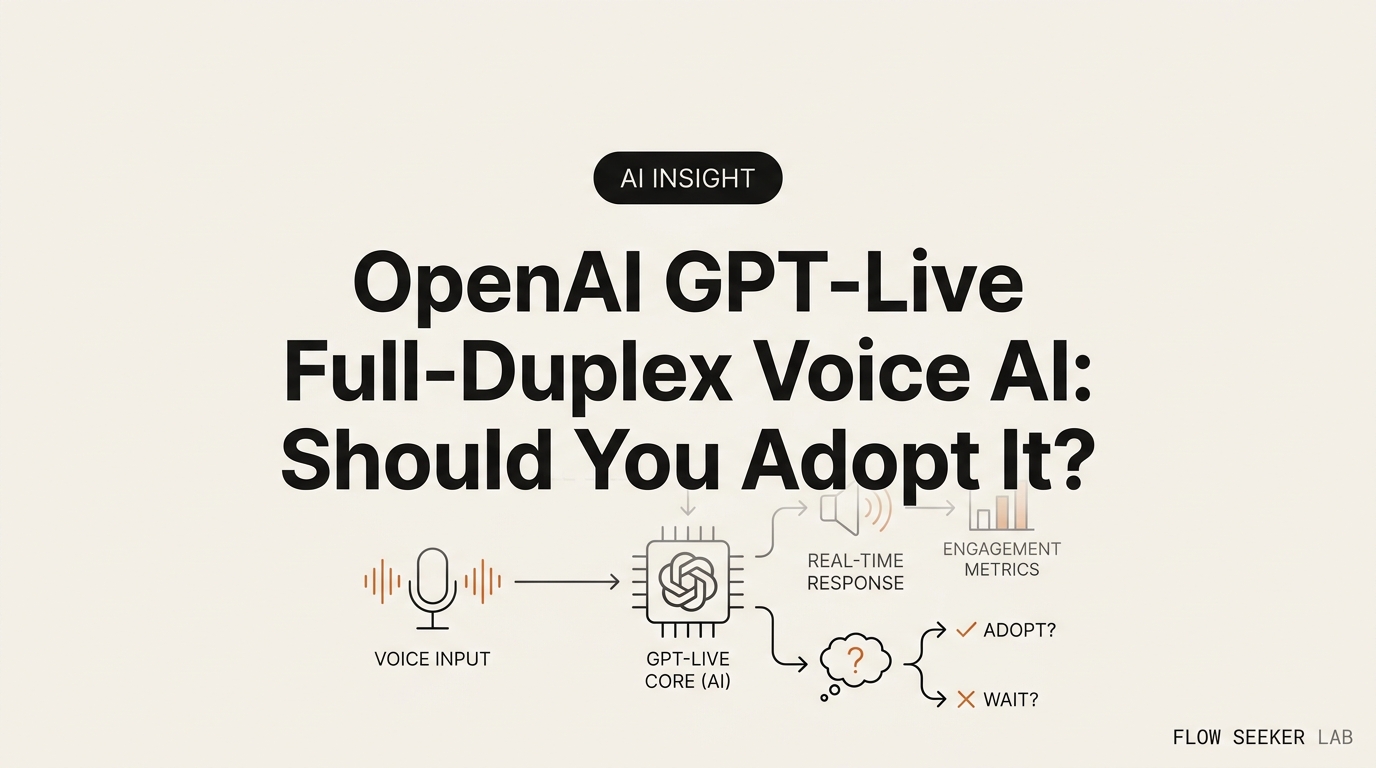
OpenAI GPT-Live Full-Duplex Voice AI: Should You Adopt It?
OpenAI GPT-Live Full-Duplex Voice AI: A Non-Developer’s Adopt-or-Wait Memo
I have ignored ChatGPT’s voice mode for a year. I pay for Plus, and I still typed everything. So when OpenAI shipped OpenAI GPT-Live full-duplex voice AI on July 8, I opened it expecting another demo I’d forget by Friday. This post is my decision memo on whether it earns a spot in real work — where it beats typing, where it fails, and the one condition that would flip my verdict.
Here’s the short version. I’m not adopting it as a daily driver. I’m using it in two narrow lanes, and I’ll walk you through why.
If you sit in an open-plan office like I do, that context matters more than any spec sheet. Let me lay out the decision the way I actually worked through it.
What GPT-Live actually is (so we don’t argue about the wrong thing)
Let me ground the term before I judge it, because half the takes online judge the wrong object.
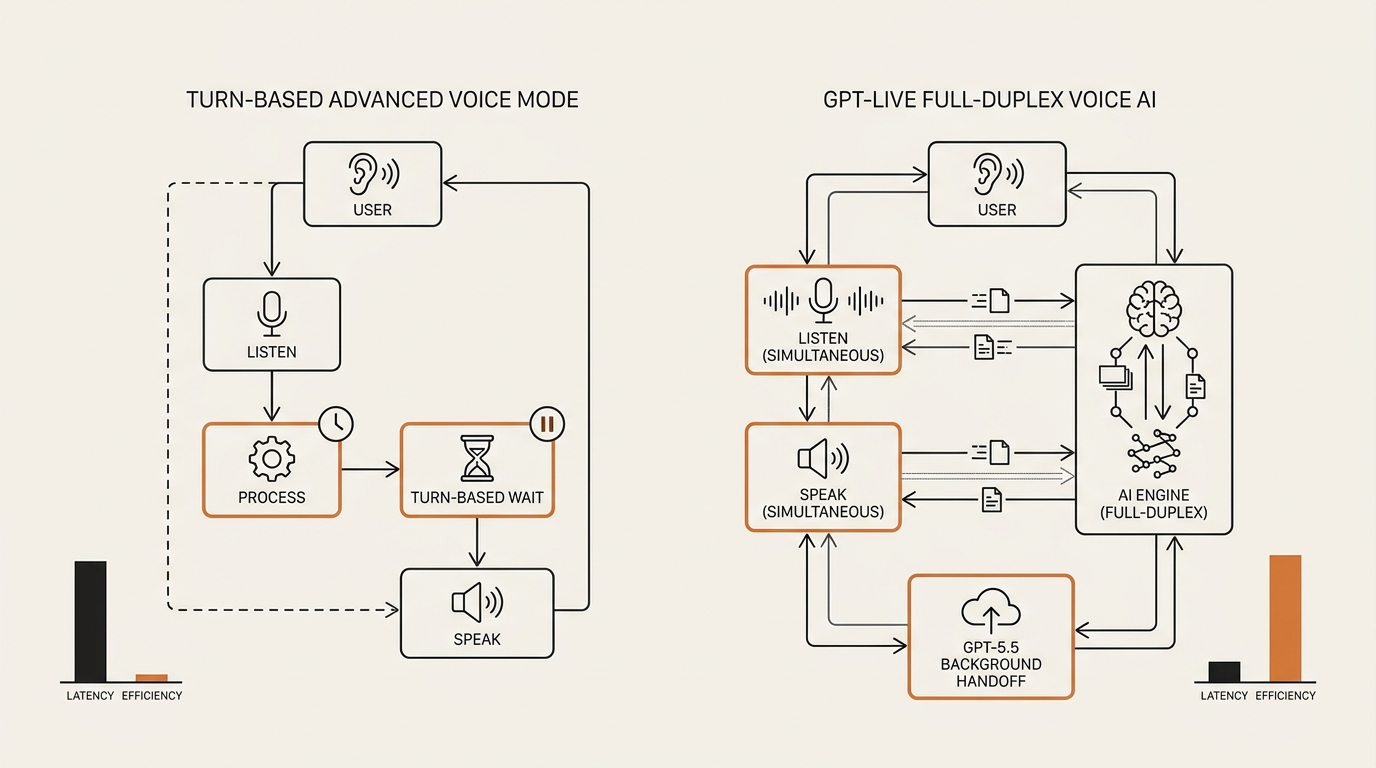
It is not a new standalone model you pick from a dropdown. It’s the voice layer of ChatGPT — the thing that now replaces Advanced Voice Mode as the default when you tap the voice button. When you ask it something that needs real reasoning, web search, or a multi-step task, the voice layer hands off to GPT-5.5 in the background and speaks the result back to you. The voice part and the thinking part are two different jobs stitched together.
Full-duplex voice, defined: A full-duplex voice AI listens and speaks at the same time, continuously, instead of waiting for you to finish before it responds. It can be interrupted mid-sentence (barge-in), can drop in a quiet “mhmm” while you think (backchanneling), and never has to detect the end of your turn with a silence timer. The term is borrowed from telecom, where full-duplex means both directions carry signal at once.
That definition is the whole product in one paragraph. Advanced Voice Mode was walkie-talkie: you talk, it waits for silence, it talks, you wait. The voice mode is a phone call: both of you can cut in whenever. OpenAI’s own GPT-Live announcement frames it as a system that decides many times per second whether to speak, listen, pause, or reach for a tool. If you want the neutral engineering meaning of the word, Wikipedia’s entry on duplex communication) is the plain-English grounding — I’m not inventing the metaphor.
One distinction I want to make once, on purpose, so you don’t get confused later. This is a consumer feature inside ChatGPT. It is not the same thing as OpenAI’s developer Realtime API and the gpt-realtime speech-to-speech models, which shipped earlier for people building their own voice apps. As of this writing, the feature has no public API — there’s a waitlist. So if you’re a non-developer like me, you get the voice layer by opening the ChatGPT app, not by wiring up code. That’s the only lane that matters for us here.
The tiers, without the marketing gloss
Before the verdict, you need to know what you’re actually getting on your plan, because it changes the calculus.
There are two variants. GPT-Live-1 is the default voice model on the Go, Plus, and Pro paid tiers. GPT-Live-1 mini is the default on the free tier. On paid tiers you can pick a reasoning level — reported as Instant, Medium, and High in the voice settings. Instant answers fast and shallow. Medium and High route to GPT-5.5’s slower thinking path for harder questions, which is exactly where the “natural conversation” feel starts to wobble. More on that friction below.
Here’s the comparison I’d have wanted before I opened the app.
| GPT-Live-1 (Plus/Pro/Go) | GPT-Live-1 mini (Free) | |
|---|---|---|
| Default for | Paid tiers | Free tier |
| Reasoning levels | Instant / Medium / High | Fixed, lighter |
| Background model | GPT-5.5 (Instant or Thinking) | GPT-5.5 Instant |
| Full-duplex barge-in | Yes | Yes |
| Best fit | Deeper Q&A by voice | Casual, quick voice tasks |
The full-duplex behavior — interrupting, backchanneling — is on both tiers. That surprised me. The paid gap is mostly about how deep the reasoning goes, not whether the conversation feels alive. So the “should I upgrade for voice” question mostly reduces to “do I ask voice questions hard enough to need GPT-5.5’s slow path.” For me, honestly, rarely. I ask hard questions by typing.
If you want the wider context on why OpenAI keeps pushing consumer features like this into ChatGPT, I broke that down in my piece on where ChatGPT sits in the 2026 assistant race. Voice is a moat play as much as a feature.
The decision: is voice worth using for real work now?
This is the actual question. Not “is the voice mode impressive” — it is. The question is whether talking to an AI beats typing to one for the work I do at a desk, in a Korean office, on a commuter train.
I laid out three options and scored each against my real constraints.
Option 1: Adopt it as a daily driver. Replace typing with voice for most ChatGPT tasks.
Option 2: Wait. Let it mature, watch the API land, revisit in a few months.
Option 3: Use it in narrow lanes only. Pick the two or three tasks where voice genuinely wins and ignore the rest.
To score these, I used the same filter I apply to any new capability at work — the one I laid out in my filter for using AI at work. Does it save real time, does it fit where I actually sit, and can I fall back cleanly when it fails? Voice passes the first test and fails the second, hard.
The friction nobody in the reviews mentions
The reviews all test the feature alone in a quiet room. I don’t work in a quiet room. I work in an open-plan office where the desks are close and the walls are thin.
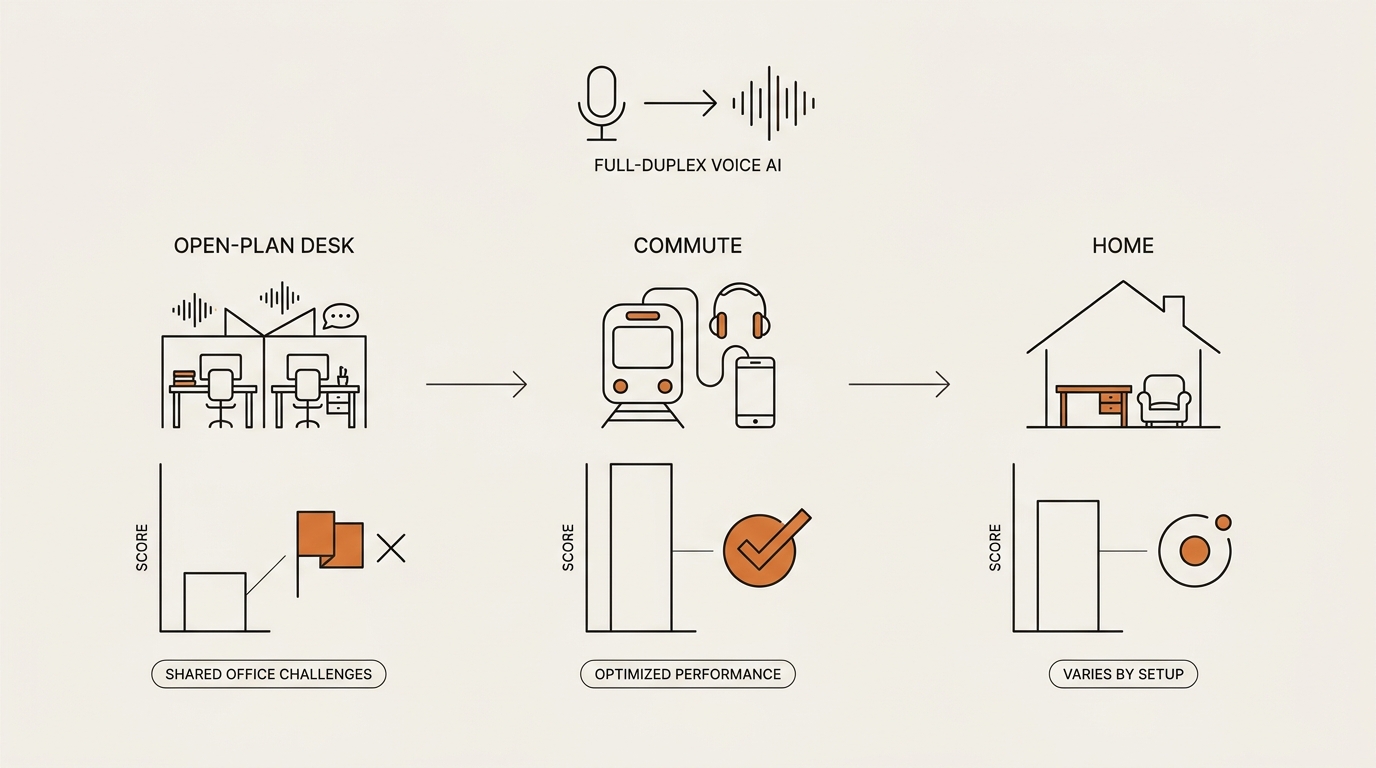
Talking out loud to an AI at my desk is socially awkward. That’s not a small footnote — it’s the whole ballgame for the “voice replaces typing” pitch. My colleague sits a meter away. Narrating a prompt about a slide deck, out loud, in a shared room, feels like taking a phone call nobody else can hear. In Korean office culture, where the open floor plan is standard and quiet focus is the norm, this friction is sharper than most Western reviews assume. The killer feature collides with the room.
So voice’s biggest win — hands-free, eyes-up, no keyboard — is exactly the thing I can’t use where I spend eight hours a day.
Where full-duplex helps and where it hurts
Full-duplex is not uniformly good. It depends on what you’re doing.
For brainstorming, interrupting is a gift. I can start a half-formed thought, it jumps in, I cut it off, redirect, and we bat an idea around like two people. The turn-taking lag that made old voice mode feel robotic is gone. This is the one place it genuinely changed my mind.
For dictation, interrupting is a bug. When I want to talk out a long message and have it just transcribe and tidy, I don’t want it jumping in with “mhmm” or trying to answer. I want it to shut up and listen. Full-duplex, tuned for conversation, keeps wanting to converse. There’s no clean “just take notes” mode that I’ve found in my first days with it.
So the same feature is a win and a loss depending on the task. That’s why a blanket “adopt it” verdict is wrong.
I tested this the boring way. I ran the same task both ways: brainstorm a blog outline by voice, then dictate a long Slack message by voice. The first felt like a real exchange. The second felt like arguing with a colleague who kept finishing my sentences. Same tool, opposite result, and no setting I found let me turn the conversation instinct off for the dictation run. What I’d change first isn’t the model — it’s a mode toggle.
Where I was wrong
I opened the feature sure it was a gimmick. I’d tried voice AI before and filed it under “cool demo, useless for work.” I expected to confirm my bias and move on.
Full-duplex changed my mind on one thing, and only one thing: thinking out loud. Not asking, not dictating — thinking. On a walk home, phone in pocket, I talked through a decision I’d been circling for days. It pushed back, I argued, it followed. It felt less like querying a database and more like having a patient colleague on the phone. I did not expect that. I expected friction; I got flow.
But here’s where my optimism broke. The moment I asked something genuinely hard — a question that needed GPT-5.5’s Thinking path — the handoff introduced a wait. The voice went quiet, the “conversation” stalled, and I sat there listening to nothing while the background model reasoned. The full-duplex magic evaporated the second the question got heavy. On easy back-and-forth it’s a person; on hard questions it’s a search box with a nicer voice. That gap is the whole story of my mixed verdict.
I was wrong that it was a pure gimmick. I was also wrong to expect the natural-conversation feel to hold under load. Both corrections landed in the same afternoon.
My verdict, and the one condition that flips it
I’m not adopting the voice layer as a daily driver. The open-office problem alone kills that, and the dictation gap and the hard-question wait seal it. Typing still wins for most of my desk work.
But I’m not waiting, either. Waiting implies there’s nothing here yet, and there is. So I landed on the narrow-lane option, with two lanes I’ll actually use:
- Commute and walk thinking-out-loud. Alone, hands free, low-stakes reasoning. This is the lane where full-duplex earns its keep.
- Solo brainstorming at home, when nobody’s around and I want a fast sparring partner for a rough idea.
Everything else — dictation, hard research, anything at my shared desk — stays on the keyboard.
Here’s the comparison that made the call for me.
| Use case | Voice or type? | Why |
|---|---|---|
| Commute idea-sparring | Voice | Hands free, full-duplex shines, low stakes |
| Solo home brainstorm | Voice | Fast interruptible back-and-forth |
| Shared-desk prompting | Type | Talking out loud is socially awkward |
| Long-form dictation | Type | Full-duplex keeps interrupting |
| Hard research question | Type | GPT-5.5 handoff breaks the flow anyway |
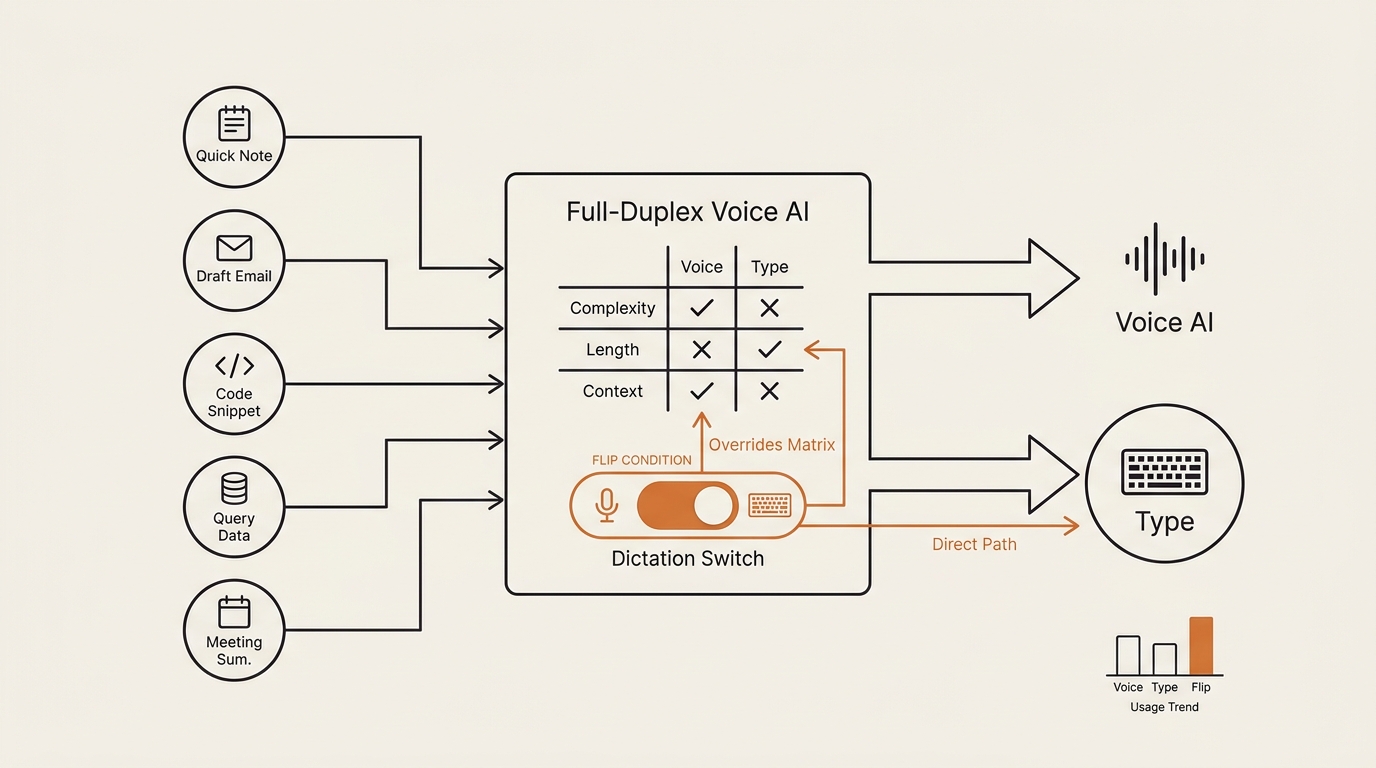
The one condition that flips my verdict to “adopt”: a clean, reliable dictation mode that turns full-duplex off on demand — where I can say “just transcribe” and it stops trying to converse. Give me that switch and voice covers a third case: drafting long messages at home without a keyboard. Without it, conversation-tuned voice keeps stepping on the one silent job I’d hand it.
The API landing publicly would also change things for builders, but that’s a different reader than us. For non-developers, the flip condition is the dictation switch, not the API.
What this means for people like us
If you already pay for ChatGPT Plus and you’ve been ignoring voice like I was, the feature is worth one honest test — but test it where you’d actually use it, not in a quiet room where everything feels magical.
Try it on your commute first. That’s the lane most likely to stick. Then try it at your desk and notice how fast the social friction shows up. That contrast tells you more than any review. This is the same “match the tool to where you sit” logic I use across learning to use AI at work — the capability is only as good as the context you can run it in.
Don’t upgrade your plan for voice alone. The full-duplex feel is on the free mini too. Pay for GPT-5.5’s deeper reasoning if you need it by typing, not because voice needs a subscription to feel alive.
FAQ
What is GPT-Live and how is it different from ChatGPT’s Advanced Voice Mode? It is the new default voice layer of ChatGPT, launched July 8, 2026, replacing Advanced Voice Mode. The core difference is full-duplex: it listens and talks at the same time and can be interrupted, instead of waiting for silence before each reply. It delegates deeper reasoning to GPT-5.5 in the background.
What does “full-duplex” mean for an AI voice assistant? Full-duplex means the AI can listen and speak simultaneously, like a phone call rather than a walkie-talkie. You can cut in mid-sentence, it can acknowledge you with a quick “mhmm,” and it never waits for a silence timer to decide your turn is over. The result feels closer to talking with a person.
Is the voice mode free, or do I need ChatGPT Plus? Both. Free users get GPT-Live-1 mini by default. Go, Plus, and Pro users get GPT-Live-1, which lets you pick reasoning levels (Instant, Medium, High). The full-duplex conversation feel is on both, so paying is really about deeper GPT-5.5 reasoning, not the live voice itself.
Can I interrupt the voice mode while it’s talking? Yes. Barge-in is the headline feature. Because it processes audio continuously instead of waiting for your turn to end, you can cut it off mid-sentence and it will stop and adjust. This is what makes brainstorming out loud feel natural, though it also makes clean dictation harder.
Does the voice layer use GPT-5.5, and what are Instant, Medium, and High? It handles the voice, then hands hard tasks to GPT-5.5 in the background. Instant uses GPT-5.5’s fast path for quick replies. Medium and High route to GPT-5.5 Thinking for deeper reasoning — better answers, but a noticeable pause that breaks the conversational flow on hard questions.
Is there a GPT-Live API for developers yet? Not publicly, as of this writing. It is a ChatGPT consumer feature with an API waitlist. Developers who want to build voice apps today use OpenAI’s separate Realtime API and the gpt-realtime speech-to-speech models, which are a different track from the consumer voice experience.
Is the voice mode private enough to talk to out loud at work? That’s less about privacy settings and more about the room. In a shared or open-plan office, talking to an AI out loud is socially awkward regardless of data policy. My honest take: keep voice for your commute or a private space, and keep typing at a shared desk.
The takeaway
A year of ignoring voice taught me to judge it by the room, not the demo. The voice layer doesn’t fail because the tech is weak — the full-duplex feel is real. It fails at my desk because the desk isn’t mine alone. Match the capability to where you actually sit, and voice stops being a gimmick and becomes a commute tool.
Next in this series, I’ll run a week-long test of the voice mode purely on my commute — one lane, every workday — and log what stuck and what I quietly stopped using.
seonjae — Korean office worker documenting his transition into AI systems, agents, and vibe coding — without a CS background. Shipping in public.