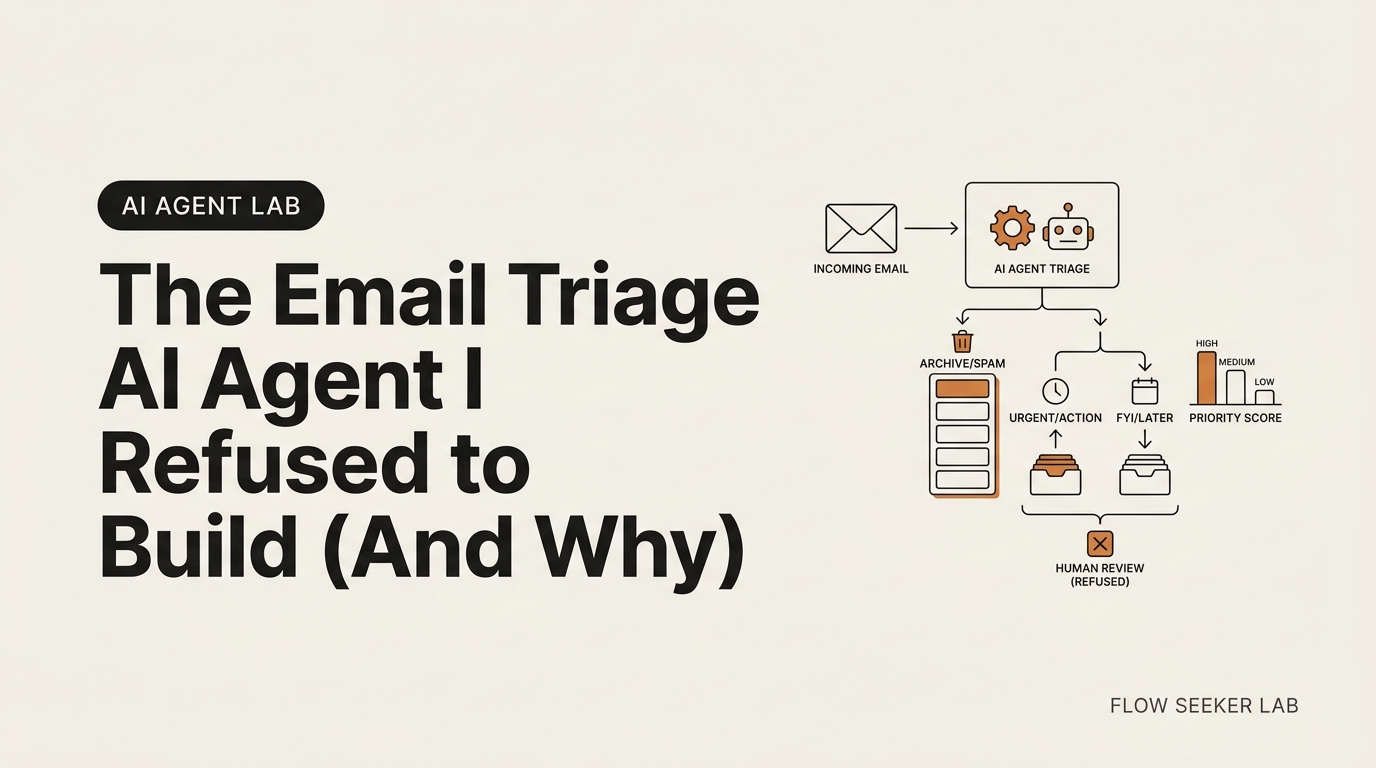
The Email Triage AI Agent I Refused to Build (And Why)
The Email Triage AI Agent I Refused to Build (And Why)
I built one agent. I deliberately haven’t built this one. An email triage AI agent is the obvious next thing to make after a morning briefing — same builder, same framework, an afternoon of work. I had the plan ready. Then I stopped, because the cost of a mistake in my inbox is not “I pour my own coffee.” It is a reply going to my manager that I never wrote. So instead of shipping, I wrote down the safety framework an inbox agent has to pass before I’ll let it touch anything. That is this post. By the end you’ll have the same permission boundary I use, a read/label/draft line you can copy, and an honest list of the failures I refuse to risk.
This is Framework Deep Dive #1. Build Log #1 was the agent I actually shipped. This one is the agent I’m holding at the door on purpose.
Why Email Is a Riskier Build Than a Morning Briefing
My first no-code AI agent was a morning briefing. It runs once a day and sends one email to me. If it breaks, I read my own calendar instead. That is the whole blast radius.
An inbox agent is a different animal. A morning briefing only reads and reports. An email triage AI agent is asked to act on the place where your work and your relationships live. The same loop — read inputs, decide, act — now points at messages from your boss, your clients, and the one person you cannot afford to reply to badly.
Here is the asymmetry that stopped me. A briefing failure is invisible to everyone but me. An inbox failure can be visible to the exact people I least want to see it. When the downside is one-directional and public, the long game says you slow down. Frameworks, not forecasts. The NIST AI Risk Management Framework talks about the same idea in policy language — risk is about magnitude of impact, not just probability — and a single-user inbox agent is still the place where that calculus changes.
So the question I get asked — is it safe to let an AI agent reply to my emails — has a short answer. Not until you have drawn the line between what it may touch and what it may never touch. That line is the rest of this post.
The Permission Boundary: Read, Label, Draft — Yes. Send, Delete, Spam — Never.
Most failures I worry about are not the model being dumb. They are the agent being allowed to do something it should never have been allowed to do. So the first thing I write for any email triage AI agent is not a prompt. It is a permission boundary.
Three actions are safe because they are reversible and visible. Three actions are forbidden because they are not.
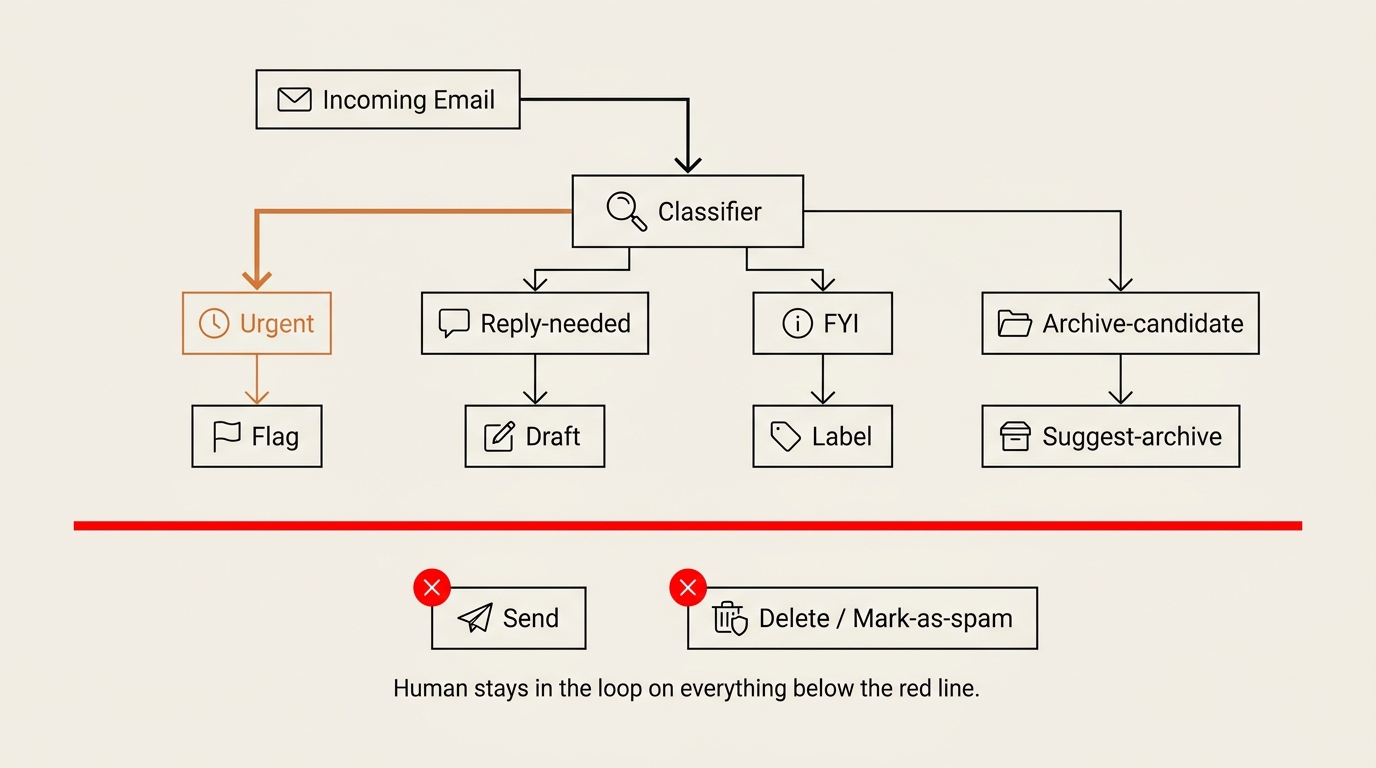
The safe set is read, label, and draft. Reading a message changes nothing. Adding a label is one click to undo. Writing a draft leaves the decision to send entirely with me. None of these three can do damage I cannot reverse in seconds.
The forbidden set is auto-send, delete, and mark-as-spam. Auto-send removes me from the one decision that matters. Delete and spam can bury a message I needed, and I might not notice for weeks. An agent that can quietly remove mail is an agent that can quietly cost you a client.
I write this boundary in plain English before I touch any builder, exactly the way the pillar framework tells you to scope tools first. You do not need code to enforce it. You need to refuse to grant the permission in the first place.
Assisted, Not Autonomous: The Agent Drafts, You Send
The single most important design choice for an email triage AI agent is the one most tool demos skip: assisted mode, not autonomous mode.
An autonomous email agent reads, decides, and sends on its own. An assisted email agent reads, decides, and stops — it hands you a draft and waits. The whole safety story lives in that pause. This is what people mean when they search for an ai email agent that drafts but doesn’t auto-send. They have already felt the fear and are looking for the off switch. The off switch is: never turn autonomous send on.
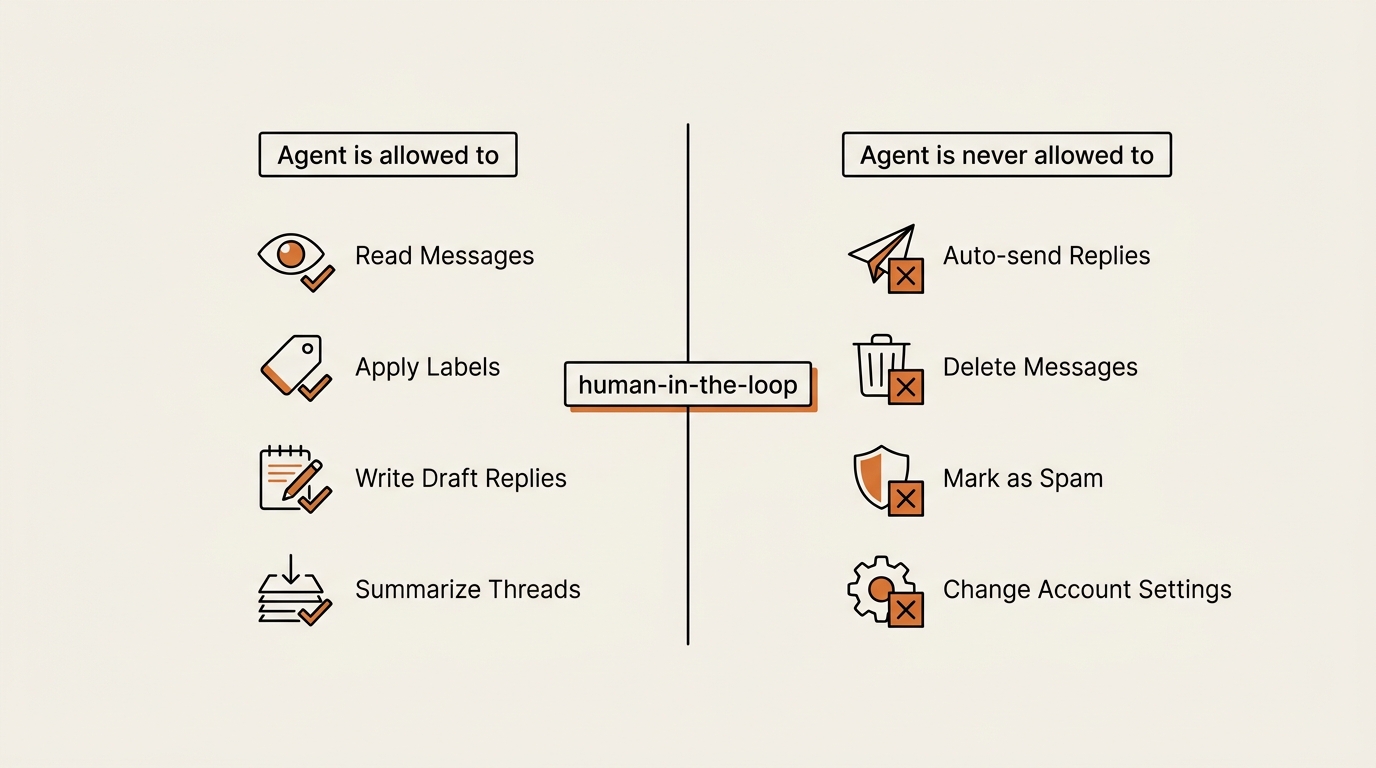
Drafting still saves real time. Most of the cost of email is not typing the words. It is the context switch — opening the thread, remembering who this is, deciding the tone. A draft sitting in the box does that scaffolding for you. You read it, fix the half that is wrong, and send. You stay the author.
There is one more reason I keep send off the table. A draft that is wrong is a private mistake. A sent message that is wrong is a public one. I will trade a little convenience to keep every mistake private. That trade is the entire point of no-code email triage done responsibly.
I will say the obvious thing the vendor pages will not. “98% accuracy” is a fine number until you are the 2%, and the 2% is the email that mattered. Assisted mode means the 2% never leaves the building.
Running the Ten-Step Framework on an Inbox Agent
The point of a framework is that you can run it on a build you have not made yet. So I ran the ten-step framework from the pillar post against this email triage AI agent on paper. Three steps decide whether it is safe to build at all: Goal, Guardrails, and Kill switch.
Goal — the one-sentence job. Mine: “Read new mail, sort each into urgent / reply-needed / FYI / archive-candidate, label it, and draft a reply for the reply-needed ones — never send, never delete.” The “never” is inside the goal sentence, not bolted on later. If the goal does not survive without the nevers, the agent is not safe to build.
Guardrails — the list of nevers. For this agent: never send, never delete, never mark spam, never touch account settings, never act on anything outside my own inbox. Each never is a permission I simply do not grant in the builder, not a polite request in the prompt.
Kill switch — one tap, decided before launch. A single per-agent toggle, bookmarked on my phone’s home screen. If a draft ever shows up addressed to the wrong person, I disable the whole agent in two taps and sort it out later. The pillar post is blunt about this: if you have to think about where the kill switch is, you have already missed the moment it mattered.
The other seven steps still apply — Inputs are Gmail and my real labels, Tools are scoped to the safe set, Output is drafts plus a daily summary, Trigger is a few times a day, the Test loop is reading the last actions each day, and the Cost ceiling caps the spend. But Goal, Guardrails, and Kill switch are the three that decide go or no-go. On this build, they are why I said no-go for now.
| Framework step | Morning briefing (built) | Email triage agent (held) |
|---|---|---|
| Goal | Send me one daily summary | Sort, label, draft — never send |
| Tools allowed | Read feeds, send to me only | Read, label, draft only |
| Tools forbidden | — | Send, delete, mark-as-spam |
| Mode | Autonomous (safe: read-only output) | Assisted only (human sends) |
| Blast radius if wrong | I read my own calendar | A wrong reply reaches a real person |
| Kill switch | One toggle | One toggle, needed sooner |
| Decision | Shipped | Not yet — pending calibration |
What Broke — Real Failures, and the Ones I Won’t Risk
Honesty section. This splits in two: what actually broke on the agent I did build, and the failure modes I am refusing to walk into on the one I didn’t.
(a) What actually broke on Build Log #1. These are real, from the morning briefing.
- A bad feed URL fed the agent garbage. One RSS source had moved, and the builder quietly ingested an HTML page instead of a feed, turning a marketing page’s title into a “headline.” It looked plausible. That is the scary part.
- A default permission scope was too wide. My first version had full calendar access because that was the builder’s default, not because I chose it. I only caught it by reading the permission summary out loud.
- The timezone was wrong and the job fired at the wrong hour. Four hours of my life, gone to UTC-versus-KST, the kind of small drift that hides until it bites.
Now map those onto an inbox. A bad input that looked plausible. A default permission wider than I intended. A silent timing error I did not notice for a while. On a read-only briefing, each one cost me minutes. On an agent that can send and delete, the same three classes of bug cost me a misfiled client, a deleted thread, or a reply to the wrong person. Same bugs. Different blast radius.
Two of those Build Log #1 breaks are the ones that stopped me cold for an email triage AI agent. The default permission scope — Lindy gave me full Calendar access I had not chosen — is exactly the kind of default a Gmail builder would give me too: a broad scope like gmail.modify when I only need gmail.readonly plus gmail.compose. And the timezone bug, harmless when it sent a briefing four hours late to me, becomes something else when the misfire is a scheduled draft going out — or worse, going out the door — at the wrong hour to someone I work with. Same bug class. Public consequence.
(b) The failures I refuse to risk. I have not hit these because I have not built the agent. They come from how inbox automation goes wrong in the field, not from my own logs.
- The mislabel that hides a real message. If “FYI” quietly swallows a time-sensitive email, I might not see it until the deadline is gone. Google’s own Gmail API documentation shows how freely an app can move and modify mail once it has the scope — which is exactly why I keep delete and archive on the human side of the line.
- The auto-sent reply to the wrong person. The one I will not gamble on. The fix is structural, not careful: send is never granted, so it cannot happen.
- The credit spike. An agent looping over a busy inbox can burn through credits fast. I cap spend before launch, the way Anthropic’s guidance on building agents frames tool use as something you scope and bound rather than hand over wholesale.
This is the difference between Build Log #1 and Framework Deep Dive #1. One is a record of what broke. The other is a record of what I drew a line in front of so it cannot break. Both come from the same place: the long game rewards the failures you never have to explain.
The Calibration Plan I’d Run Before Trusting It
Drawing the line is not the same as trusting the agent. If I do build this, it earns trust over a calibration window — running in assisted mode while I grade it, with send and delete still forbidden the whole time.
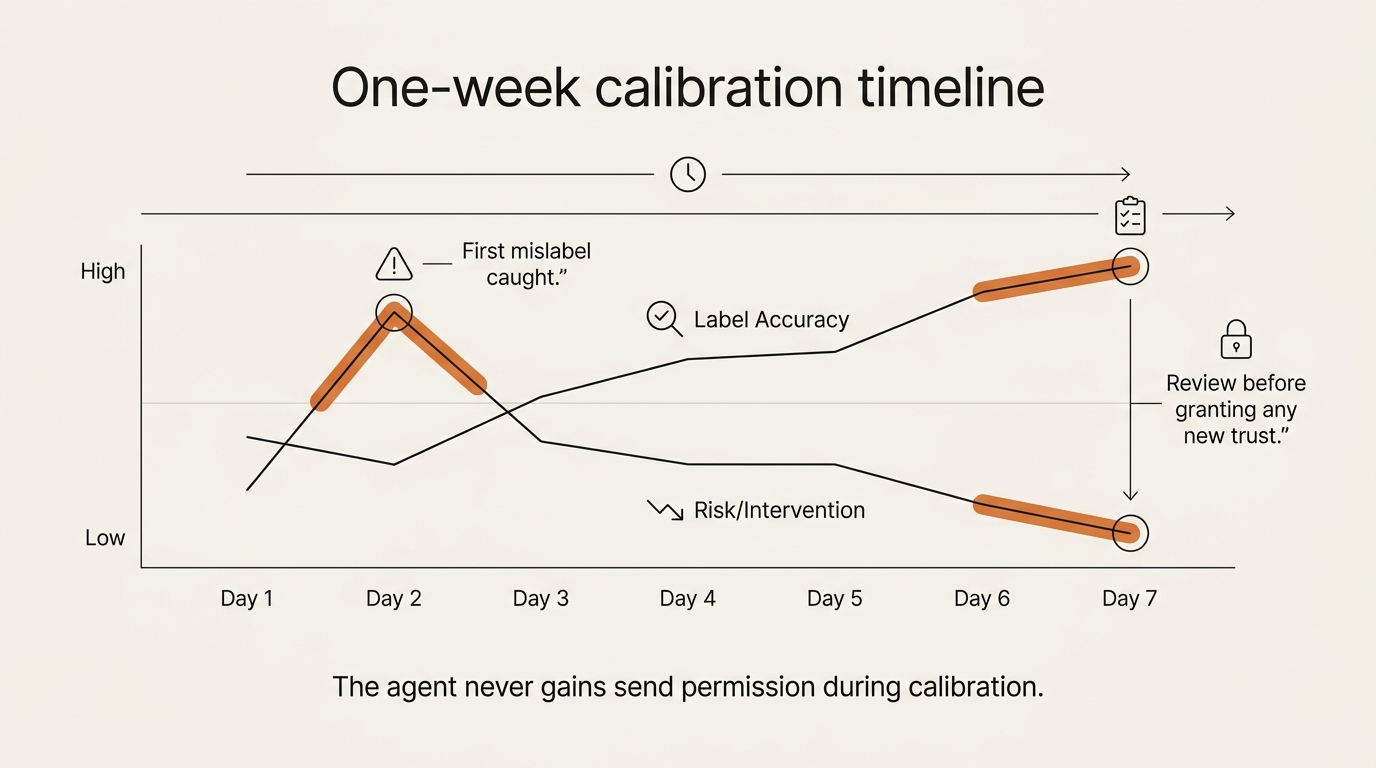
The plan is plain. Each day I read the last batch of the agent’s actions and grade two things only: did it label correctly, and did any draft say something I would not have said. I am not looking to be impressed. I am hunting the small drift before it becomes a habit — the same test loop I run on the briefing, just with higher stakes.
Trust is granted by removing a never, one at a time, and never all at once. The first never I might relax is letting it auto-apply labels without my review — the cheapest one to undo. Send stays forbidden far longer, maybe forever. Delete I expect to keep on the human side permanently. Calibration tells me which nevers have earned a downgrade, and the honest answer might be “none of them,” which is still a result worth a week of watching.
If you have lived through tool churn, you’ll recognize the instinct here. I wrote a whole post on why I stopped chasing new AI tools and went deep on a few instead. Calibrating one agent slowly is the same muscle: depth over speed, on purpose.
Frequently Asked Questions
What is an email triage AI agent, and how is it different from Gmail filters? A Gmail filter is a fixed rule: if the sender is X, apply label Y. An email triage AI agent reads the actual content and decides — urgent, reply-needed, FYI, or archive-candidate — and can draft a reply. Filters are dumb and totally safe. An agent is flexible and therefore needs the permission boundary in this post.
Is it safe to let an AI agent act on my Gmail? It is safe for read, label, and draft, because those are reversible and visible. It is not safe to hand it send, delete, or mark-as-spam, because those can do damage you may not notice for weeks. Safety is not a setting you trust; it is a permission you withhold.
Can I build an email triage agent without coding? Yes. The same no-code builders that handle a morning briefing can read mail, apply labels, and write drafts. The hard part is not the wiring — it is scoping the agent to the safe set and keeping it in assisted mode. No-code does not mean no judgment.
Should the agent auto-reply, or just draft? Just draft. An ai email agent that drafts but doesn’t auto-send keeps every mistake private and leaves you as the author. The time you save is in the context-switching, not the typing, so drafting captures most of the benefit with almost none of the risk.
How much does running an email triage agent cost per month? It depends on inbox volume and the model, and I won’t quote a number for a build I haven’t run — that would be a forecast, not a fact. What I will say: set a daily cost ceiling before launch, because an agent looping over a busy inbox can spike credits faster than a once-a-day briefing.
How long before I can trust it? Plan on a calibration window of roughly one to two weeks in assisted mode, grading its labels and drafts daily, with send and delete forbidden the entire time. Trust is earned by removing one never at a time — and “none of them yet” is a valid outcome.
What happens when the agent mislabels or archives an important email? This is the whole reason I keep delete and archive on the human side. With the boundary in this post, the worst case is a wrong label you can fix in one click, not a message gone from your inbox. Design so the bad case is annoying, not expensive.
What is the smallest Gmail OAuth scope an email triage AI agent actually needs? For a read/label/draft agent, the narrowest combination is gmail.readonly (to read), gmail.labels (to apply labels), and gmail.compose (to write drafts that stay as drafts). You do not need gmail.send, gmail.modify, or full mail.google.com. Google’s OAuth 2.0 scopes for Gmail list the exact strings; if your builder asks for anything broader than the three above, that is a flag, not a feature.
How do I revoke an email triage AI agent’s access if it misbehaves? Two switches, in order. First, the per-agent kill toggle in your no-code builder — that stops the loop immediately. Second, revoke the OAuth grant inside Google Account → Security → Third-party apps with account access, which severs the connection at the source even if the builder is unreachable. Bookmark both pages on your phone before launch. If you have to think about where the switches are, you have already missed the moment they mattered.
Closing — What Ships Next
This is the email triage AI agent I chose not to ship, and writing the framework first is the point. Build Log #1 showed what breaks when you build. Framework Deep Dive #1 shows what you draw a line in front of so it can’t.
Framework Deep Dive #2 takes the next piece apart: cost ceilings — why your first agent burns more credits than you expect, and how to bound the spend before it bounds you. If you want the spine open in a second tab, the framework for building an AI agent without coding is here, and every deep dive lands in the AI Agent Lab under the same series. While you’re here, the other build logs and deep dives are worth a look if you’re scoping your own first agent.
Frameworks, not forecasts. Draw the permission boundary before you grant the permission.
seonjae — Korean office worker documenting his transition into AI systems, agents, and vibe coding — without a CS background. Shipping in public.
Published 2026-05-20 · Updated 2026-05-28 · AI Agent Lab · Framework Deep Dive #1 · flowseekerlab.io